Report SpywarePrDesktop-hide window boss key 3.5.2.727

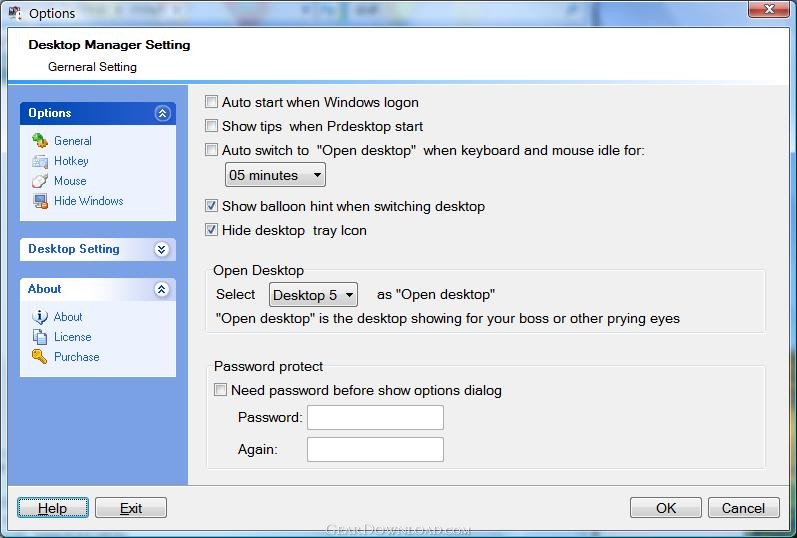 Click to enlarge screenshot
Software Description:
PrDesktop-hide window boss key - Desktop manager to hide window and mute sound with boss key
Prdesktop:better than a virtual desktop managers that allows you to hide windows quickly and protect your screen from prying eyes. Keeps applications running in the background and allows you to continue your work from the point of interruption. PRDesktop is an all-in-one boss key tool that will instantly cover your current activity using a single key or mouse shortcut,and Includes extra features that allow you to mute sound.
Features:
Instantly hide windows with clicking left and right mouse key
Mute the sound
Restore all applications exactly to the same state
PRDesktop will switch display resolution to the one that you usually use (Useful when playing games or watching a movie)
PRDesktop will work invisibly in the background for additional privacy
PRDesktop is extremely fast with low system resources consumption
Hide task bar
PRDesktop will keep the applications running in order to let them perform the necessary tasks while they are hidden
compatible with Vista operating system
What's New: 1.Switch back to previous desktop by pressing boss key("Win+C" or click left and right mouse key at the same time) on "Open desktop" .
Prdesktop:better than a virtual desktop managers that allows you to hide windows quickly and protect your screen from prying eyes. Keeps applications running in the background and allows you to continue your work from the point of interruption. PRDesktop is an all-in-one boss key tool that will instantly cover your current activity using a single key or mouse shortcut,and Includes extra features that allow you to mute sound.
Features:
Instantly hide windows with clicking left and right mouse key
Mute the sound
Restore all applications exactly to the same state
PRDesktop will switch display resolution to the one that you usually use (Useful when playing games or watching a movie)
PRDesktop will work invisibly in the background for additional privacy
PRDesktop is extremely fast with low system resources consumption
Hide task bar
PRDesktop will keep the applications running in order to let them perform the necessary tasks while they are hidden
compatible with Vista operating system
What's New: 1.Switch back to previous desktop by pressing boss key("Win+C" or click left and right mouse key at the same time) on "Open desktop" .
100% Clean:
 PrDesktop-hide window boss key 3.5.2.727 is 100% clean
This download (prdesktop.exe) was tested thoroughly and was found 100% clean. Click "Report Spyware" link on the top if you found this software contains any form of malware, including but not limited to: spyware, viruses, trojans and backdoors.
Related Software:
- Active Tray 2.2.1 - Everything the System Tray should have been, but never was - until NOW.
- Actual Window Rollup 7.5.1 - Say goodbye to minimized windows and welcome the more practical Roll Up feature!
- Actual Window Manager 7.5.1 - Forget the windows chaos on your PC desktop and concentrate on work.
- Universal Desktop Ruler 3.2 - Measure not only a straight line distance but any curved distance on the Screen
- Rohos Logon Key 2.7 - It allows to access to Windows computer in a secure way using USB flash drive.
- Screen Privacy 1.2 - Hide / restore windows by single key stroke in order to protect your privacy
- ShutDownOne 3.021 - Auto Restart or ShutDown, AutoLogin, Schedule, Password Protect
- Super X Desktop 3.4.1208 - Get 100 reliable virtual desktop,custom caption and wallpaper,switch them
- AppLaunch 1.2.0 - Application launcher utility, allows organized groups of shortcuts with hot-keys
- AltDesk 1.9.1 - Virtual Desktop Manager for Windows 9x/XP/Vista, skins supported
top 10 most downloaded


recommended software
-
- Weeny Free Alarm Clock
- Weeny Free Alarm Clock is a free alarm clock software for Windows to set as many alarms as you want. You can set one-time alarms or repeating alarms w...
-
- Fresh Desktop
- Fresh Desktop is a useful utility that lets you manage vast collections of wallpapers for your desktop with ease. Fresh Desktop changes your wallpap...