Report SpywareActual Window Manager 7.5.1

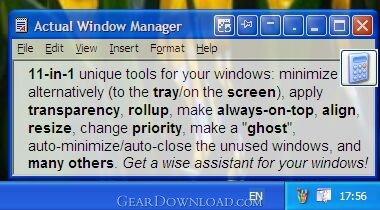 Click to enlarge screenshot
Software Description:
Actual Window Manager - Forget the windows chaos on your PC desktop and concentrate on work.
Actual Window Manager is a desktop productivity suite of over 50 tools, letting users change their interaction with windows in many new exciting ways: minimize windows to tray or screen, apply transparency, roll up, pin on top, auto-align windows, resize, etc. Any of these operations (and many others) can be done in a click on the title buttons, which are added to the standard Minimize/Maximize/Close buttons after the installation. In addition to buttons, users can set up specific settings to be applied to predefined windows automatically (for example, 50% transparency for Winamp).
Installation and getting started is remarkably easy. Once installed, Actual Window Manager adds its own buttons to the title bar of each window. By default the program has profiles with the settings for the most popular Windows applications, but users can change these profiles to their preferences or make a profile of their own, which is a breeze to do. To make such changes, one needs to bring up the Configuration window and modify or set up a rule for a particular program, which can be done in a simple, point-and-click manner.
Actual Window Manager is particularly useful when you are simultaneously working with several applications. Switching from one window to another distracts attention, reducing the productivity of work. Moreover, the taskbar becomes packed with minimized windows. But it is not the case when you have Actual Window Manager on your computer. You can set it up to minimize windows to tray or on the desktop, roll them up, set up the appropriate level of semi-transparency. If you need to multitask in several applications at once, you can pin all necessary windows on top without the need to bring each one up several times.
And the last but not least: Actual Window Manager is the only window manager that provides the fully featured support for command prompt windows and native 64-bit applications running on any x64 edition of Windows.
What's New: 1) Desktop icons order restoration improved. 2) Win8: Speed of Alt-Tab task switching improved. 3) Win x64: Memory leak fixed. 4) Win7: Showing the task states in Actual Taskbar buttons improved. 5) Win8: Alt-Tab Task Switcher compatible with the Scroll Inactive Windows feature.
Limitations: 60 Days Trial
Actual Window Manager is a desktop productivity suite of over 50 tools, letting users change their interaction with windows in many new exciting ways: minimize windows to tray or screen, apply transparency, roll up, pin on top, auto-align windows, resize, etc. Any of these operations (and many others) can be done in a click on the title buttons, which are added to the standard Minimize/Maximize/Close buttons after the installation. In addition to buttons, users can set up specific settings to be applied to predefined windows automatically (for example, 50% transparency for Winamp).
Installation and getting started is remarkably easy. Once installed, Actual Window Manager adds its own buttons to the title bar of each window. By default the program has profiles with the settings for the most popular Windows applications, but users can change these profiles to their preferences or make a profile of their own, which is a breeze to do. To make such changes, one needs to bring up the Configuration window and modify or set up a rule for a particular program, which can be done in a simple, point-and-click manner.
Actual Window Manager is particularly useful when you are simultaneously working with several applications. Switching from one window to another distracts attention, reducing the productivity of work. Moreover, the taskbar becomes packed with minimized windows. But it is not the case when you have Actual Window Manager on your computer. You can set it up to minimize windows to tray or on the desktop, roll them up, set up the appropriate level of semi-transparency. If you need to multitask in several applications at once, you can pin all necessary windows on top without the need to bring each one up several times.
And the last but not least: Actual Window Manager is the only window manager that provides the fully featured support for command prompt windows and native 64-bit applications running on any x64 edition of Windows.
What's New: 1) Desktop icons order restoration improved. 2) Win8: Speed of Alt-Tab task switching improved. 3) Win x64: Memory leak fixed. 4) Win7: Showing the task states in Actual Taskbar buttons improved. 5) Win8: Alt-Tab Task Switcher compatible with the Scroll Inactive Windows feature.
Limitations: 60 Days Trial
100% Clean:
 Actual Window Manager 7.5.1 is 100% clean
This download (aimsetup.exe) was tested thoroughly and was found 100% clean. Click "Report Spyware" link on the top if you found this software contains any form of malware, including but not limited to: spyware, viruses, trojans and backdoors.
Related Software:
- Actual Window Rollup 7.5.1 - Say goodbye to minimized windows and welcome the more practical Roll Up feature!
- Active Tray 2.2.1 - Everything the System Tray should have been, but never was - until NOW.
- Universal Desktop Ruler 3.2 - Measure not only a straight line distance but any curved distance on the Screen
- Rohos Logon Key 2.7 - It allows to access to Windows computer in a secure way using USB flash drive.
- Screen Privacy 1.2 - Hide / restore windows by single key stroke in order to protect your privacy
- ShutDownOne 3.021 - Auto Restart or ShutDown, AutoLogin, Schedule, Password Protect
- Super X Desktop 3.4.1208 - Get 100 reliable virtual desktop,custom caption and wallpaper,switch them
- AppLaunch 1.2.0 - Application launcher utility, allows organized groups of shortcuts with hot-keys
- AltDesk 1.9.1 - Virtual Desktop Manager for Windows 9x/XP/Vista, skins supported
- Skreens 1.0.0 - Skreens is a virtual desktop enviroment to manage opened applications.
top 10 most downloaded


recommended software
-
- Weeny Free Alarm Clock
- Weeny Free Alarm Clock is a free alarm clock software for Windows to set as many alarms as you want. You can set one-time alarms or repeating alarms w...
-
- Fresh Desktop
- Fresh Desktop is a useful utility that lets you manage vast collections of wallpapers for your desktop with ease. Fresh Desktop changes your wallpap...