Index >> Desktop >> Widgets & Gadgets >> Core Temp Gadget
Report SpywareCore Temp Gadget 2.7

 Click to enlarge screenshot
Software Description:
The original Core Temp Gadget, brought to you by Core Temp's developer.
The original Core Temp Gadget, brought to you by Core Temp's developer, Arthur Liberman.
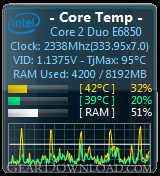
Monitor your processor temperature, load, frequency and VID settings with a visual representation via a graph at the bottom of the gadget.
Settings:
- Adjust the zoom to change the size of the gadget.
- Show or hide the graphs and text fields.
- Graphs can display core load or core temperatures.
- Select colors for the cores. Colors can be selected automatically or manually, a different color per core or a single color for all the cores.
By clicking on the resize button (dock/undock in Vista) you can quickly show or hide the graphs.
Uninstalling the gadget:
1. Close all instances of the Gadget.
2. In Vista - Restart Windows or Kill the "sidebar.exe" process by using the Task Manager.
In Windows 7 - Right click Desktop, View, uncheck "Show Desktop Gadgets".
3. Start Sidebar again from the Desktop context menu (right click Desktop).
4. Uninstall the Core Temp Gadget.
The original Core Temp Gadget, brought to you by Core Temp's developer, Arthur Liberman.
Monitor your processor temperature, load, frequency and VID settings with a visual representation via a graph at the bottom of the gadget.
Settings:
- Adjust the zoom to change the size of the gadget.
- Show or hide the graphs and text fields.
- Graphs can display core load or core temperatures.
- Select colors for the cores. Colors can be selected automatically or manually, a different color per core or a single color for all the cores.
By clicking on the resize button (dock/undock in Vista) you can quickly show or hide the graphs.
Uninstalling the gadget:
1. Close all instances of the Gadget.
2. In Vista - Restart Windows or Kill the "sidebar.exe" process by using the Task Manager.
In Windows 7 - Right click Desktop, View, uncheck "Show Desktop Gadgets".
3. Start Sidebar again from the Desktop context menu (right click Desktop).
4. Uninstall the Core Temp Gadget.
User Reviews:
- reading reviews first before downloading. Not enough characters..... apparently theres no option to read reviews... well not downloading thank you
reading reviews - February 22, 2013 - 1/5 stars
100% Clean:
 Core Temp Gadget 2.7 is 100% clean
This download (CoreTempGadget.zip) was tested thoroughly and was found 100% clean. Click "Report Spyware" link on the top if you found this software contains any form of malware, including but not limited to: spyware, viruses, trojans and backdoors.
Related Software:
- Instrumentation Widgets for PDA 1.2 - .Net Compact Framework gauges for Graphical User Interface creation.
- ButtonGadget2 2.0 - Create Professional Custom Buttons - Now includes Plugins and Icons!
- NetGadgets 3.1 - Complete set of 23 easy to use diagnostic tools for Internet and Network trouble
- Photo Gadget Pro 2.5 - Right-click image editing: resize, rotate, crop, mark, frame, convert and upload
- Speed Test Gadget 1.0.20 - Speed Test is a meter that monitors your system CPU and RAM
- Fire Heart Desktop Gadget 2.20.134 - Nothing says 'I Love You!' more than a burning heart!
- Halftone Search 1.5.0 - A program to extend the Google Desktop and Windows Search functionality
- Ultimate Copy Paste 1.0 - Multi Clipboard tool with visual clipboards and save functionality.
- Desktop Sidebar 1.05 Build 116 - provides you with information by grabbing data from your PC and the internet.
- Language Translator for Windows Sidebar 1.0.0.3 - 43 languages auto translator. And easy to use.
top 10 most downloaded


recommended software
-
- Weeny Free Alarm Clock
- Weeny Free Alarm Clock is a free alarm clock software for Windows to set as many alarms as you want. You can set one-time alarms or repeating alarms w...
-
- Fresh Desktop
- Fresh Desktop is a useful utility that lets you manage vast collections of wallpapers for your desktop with ease. Fresh Desktop changes your wallpap...