Report SpywareDESKonTOP 2.40.151

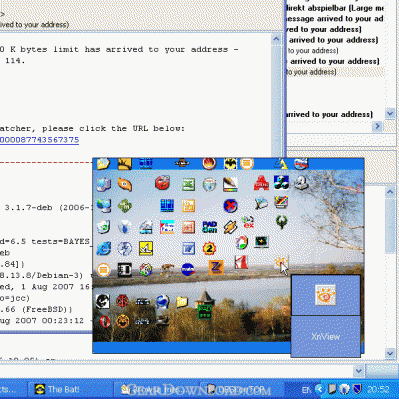 Click to enlarge screenshot
Software Description:
DESKonTOP - Solve window clutter, speed-launch desktop shortcuts and access your desktop
Solve window clutter, speed-launch desktop shortcuts and access your computer desktop easily with just two mouse clicks. How many application windows do you have open during your typical computer work? If your answer is "many"-DESKonTOP is right for you! Windows offers a convenient way to access applications and documents you use often by placing shortcuts to your computer desktop. These shortcuts are fast to click, but what if you have a window that covers your desktop? Minimizing an active window or moving it away to access the desktop may seem a good solution for a while, but what if you work with more than just one or two applications? Those shortcut icons are covered well enough to make you spend a while to minimize or move every window that blocks access. Opening that same shortcut from the Windows Start menu is even slower. Show Desktop button may seem a solution until you realize that it is impossible to restore your working set after you've launched the shortcut with a single click, and that you have to restore the windows one by one. DESKonTOP finally solves the puzzle. To launch a shortcut from your desktop simply click DESKonTOP icon near the system clock, and you'll see a small copy of your desktop with all shortcuts and icons. You can easily launch a shortcut from there, and that's it! No need to minimize or move windows around. No need for Start menu exploration. No playing hide-and-seek with your windows. All it takes is one click on DESKonTOP icon, and one more click to launch a shortcut! Once the mouse cursor is over an icon, DESKonTOP will enlarge it to show you the full-size version of the icon and its text label, allowing you to clearly see and click the shortcut without training your sniper skills. Still find it difficult to use the small icons on the reduced copy of your desktop? No problem! DESKonTOP is readily customizable, allowing you to fine-tune the appearance of the mini-desktop the way you like, from bigger icons to menu-driven system.
What's New: Added hotkey support.
Solve window clutter, speed-launch desktop shortcuts and access your computer desktop easily with just two mouse clicks. How many application windows do you have open during your typical computer work? If your answer is "many"-DESKonTOP is right for you! Windows offers a convenient way to access applications and documents you use often by placing shortcuts to your computer desktop. These shortcuts are fast to click, but what if you have a window that covers your desktop? Minimizing an active window or moving it away to access the desktop may seem a good solution for a while, but what if you work with more than just one or two applications? Those shortcut icons are covered well enough to make you spend a while to minimize or move every window that blocks access. Opening that same shortcut from the Windows Start menu is even slower. Show Desktop button may seem a solution until you realize that it is impossible to restore your working set after you've launched the shortcut with a single click, and that you have to restore the windows one by one. DESKonTOP finally solves the puzzle. To launch a shortcut from your desktop simply click DESKonTOP icon near the system clock, and you'll see a small copy of your desktop with all shortcuts and icons. You can easily launch a shortcut from there, and that's it! No need to minimize or move windows around. No need for Start menu exploration. No playing hide-and-seek with your windows. All it takes is one click on DESKonTOP icon, and one more click to launch a shortcut! Once the mouse cursor is over an icon, DESKonTOP will enlarge it to show you the full-size version of the icon and its text label, allowing you to clearly see and click the shortcut without training your sniper skills. Still find it difficult to use the small icons on the reduced copy of your desktop? No problem! DESKonTOP is readily customizable, allowing you to fine-tune the appearance of the mini-desktop the way you like, from bigger icons to menu-driven system.
What's New: Added hotkey support.
100% Clean:
 DESKonTOP 2.40.151 is 100% clean
This download (deskontop.exe) was tested thoroughly and was found 100% clean. Click "Report Spyware" link on the top if you found this software contains any form of malware, including but not limited to: spyware, viruses, trojans and backdoors.
Related Software:
- Active Tray 2.2.1 - Everything the System Tray should have been, but never was - until NOW.
- Actual Window Rollup 7.5.1 - Say goodbye to minimized windows and welcome the more practical Roll Up feature!
- Actual Window Manager 7.5.1 - Forget the windows chaos on your PC desktop and concentrate on work.
- Universal Desktop Ruler 3.2 - Measure not only a straight line distance but any curved distance on the Screen
- Rohos Logon Key 2.7 - It allows to access to Windows computer in a secure way using USB flash drive.
- Screen Privacy 1.2 - Hide / restore windows by single key stroke in order to protect your privacy
- ShutDownOne 3.021 - Auto Restart or ShutDown, AutoLogin, Schedule, Password Protect
- Super X Desktop 3.4.1208 - Get 100 reliable virtual desktop,custom caption and wallpaper,switch them
- AppLaunch 1.2.0 - Application launcher utility, allows organized groups of shortcuts with hot-keys
- AltDesk 1.9.1 - Virtual Desktop Manager for Windows 9x/XP/Vista, skins supported
top 10 most downloaded


recommended software
-
- Weeny Free Alarm Clock
- Weeny Free Alarm Clock is a free alarm clock software for Windows to set as many alarms as you want. You can set one-time alarms or repeating alarms w...
-
- Fresh Desktop
- Fresh Desktop is a useful utility that lets you manage vast collections of wallpapers for your desktop with ease. Fresh Desktop changes your wallpap...