Index >> Web Development >> Other >> Quick Web Photo Resizer
Report SpywareQuick Web Photo Resizer 2.4.2.0

 Click to enlarge screenshot
Software Description:
Quick Web Photo Resizer - Resize your photos by dragging to this program's window. Watermark images.
Modern digital cameras produce images with up to 6 times higher resolution than their ancestors. While the resolution is very important to photo-printers, such resolution can be a severe drawback for on-screen and Internet viewing.
This is why, before uploading your images to the Web or sending them via e-mail, you use your imaging software to reduce their size. There are two main disadvantages of this method. First, you need to do the same repetitive actions every time. Normally, you have to navigate to the folder containing images from your camera, then you need to select the images, set up resizing options, select a target folder, etc. The second disadvantage is that when resizing your images you never know exactly what file size they will have after resizing. Photos with a lot of small details will be significantly bigger in size than simple images after resizing with the same level of JPEG Quality/Compression.
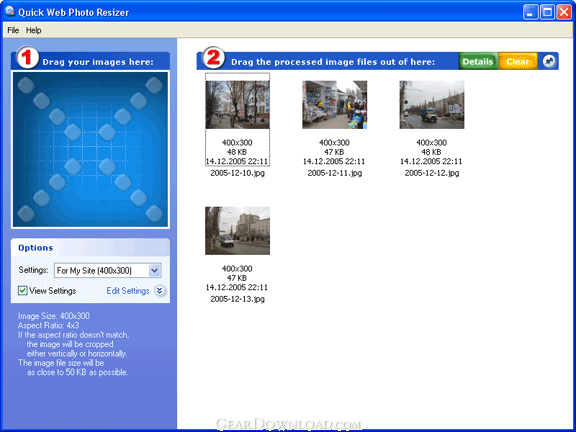
Quick Web Photo Resizer from DzSoft solves both problems. From now on, you don't need to bother with browsing through folders with your image viewer. This program offers an easy, yet very powerful, technique of resizing your photos. You simply select a conversion scheme and drag the photos to the program’s window. Your photos get automatically converted and you can drag them out, upload to the Web or send via e-mail. A "Conversion scheme" is a set of user-defined resizing options. You can define several sets for different purposes. The most exciting feature of the resizing options is that you can select the desired resulting image file size. The program will automatically choose a JPEG Quality/Compression level for each image to best fit the file size and dimensions that you've selected. In addition, the program can automatically watermark your images or place your logo on them.
Modern digital cameras produce images with up to 6 times higher resolution than their ancestors. While the resolution is very important to photo-printers, such resolution can be a severe drawback for on-screen and Internet viewing.
This is why, before uploading your images to the Web or sending them via e-mail, you use your imaging software to reduce their size. There are two main disadvantages of this method. First, you need to do the same repetitive actions every time. Normally, you have to navigate to the folder containing images from your camera, then you need to select the images, set up resizing options, select a target folder, etc. The second disadvantage is that when resizing your images you never know exactly what file size they will have after resizing. Photos with a lot of small details will be significantly bigger in size than simple images after resizing with the same level of JPEG Quality/Compression.
Quick Web Photo Resizer from DzSoft solves both problems. From now on, you don't need to bother with browsing through folders with your image viewer. This program offers an easy, yet very powerful, technique of resizing your photos. You simply select a conversion scheme and drag the photos to the program’s window. Your photos get automatically converted and you can drag them out, upload to the Web or send via e-mail. A "Conversion scheme" is a set of user-defined resizing options. You can define several sets for different purposes. The most exciting feature of the resizing options is that you can select the desired resulting image file size. The program will automatically choose a JPEG Quality/Compression level for each image to best fit the file size and dimensions that you've selected. In addition, the program can automatically watermark your images or place your logo on them.
100% Clean:
 Quick Web Photo Resizer 2.4.2.0 is 100% clean
This download (webpht24.exe) was tested thoroughly and was found 100% clean. Click "Report Spyware" link on the top if you found this software contains any form of malware, including but not limited to: spyware, viruses, trojans and backdoors.
Related Software:
- Quick Photo Resizer 2.6.2.2 - Resize your photos by dragging to this program's window. Watermark images.
- Serlient 2.2 - Client-side running & distribution of HTML/PHP-based websites without web server
- WEBSmith 3 - Allows non-programmers to produce dynamic websites via drag and drop components
- CoffeeCup Direct FTP 6.9.2014 - This drag-and-drop FTP program is the easiest way to maintain your Website.
- Easy Web Buttons 3.2 - Point and click your way to great looking glass or plastic 3D web buttons.
- Just Banners 4.01 - Create animated banners with text, graphics and skinned Window controls!
- Just Buttons 4.1 - Create animated/glass/plastic buttons or banners for your web site with ease!
- Just Tabs 3.2 - Generate stylish tabbed interfaces for your website. Make it easy to navigate!
- WebLines 1.00 - An RSS Newsfeed parser for displaying any RSS feed on your website. PHP based
- Magic Blog 1.00 - A revolutionary blog or message board that is much easier to use than others.
top 10 most downloaded


recommended software
-
- Store Manager for Zen Cart
- Store Manager for Zen Cart is a desktop application for quick and efficient Zen Cart store management. You can add, delete and update your products, c...

-
- Sothink SWF Easy
- An easy-to-use Flash banner tool is the best way for you to add Flash animation to your website. SWF Easy is the banner maker which enables you to get...