Index >> System Utilities >> Other >> DU Startup Repair for Windows
Report SpywareDU Startup Repair for Windows 1.0.0.20

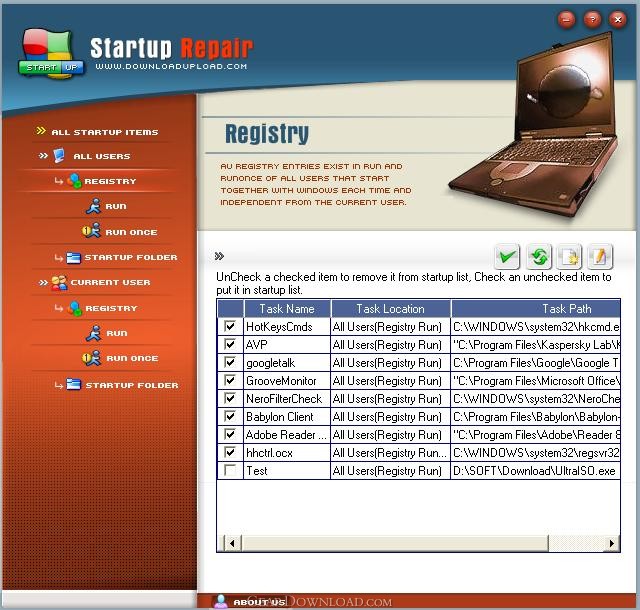 Click to enlarge screenshot
Software Description:
DU Startup Repair for Windows - The Startup Repair for Windows is the best utility to modify startup settings.
The Startup Repair for Windows is the best utility for modifying startup settings in the Microsoft Windows operating systems.
Startup Repair for Windows is much more than a Windows startup configuration tool! When Windows starts, it checks for registry entries that allow the system to execute processes together with it automatically, it also allows you to add entries that you want to be started automatically with the system, and most importantly allows you to identify which startup processes are harmful programs like spyware, virus, dialers, ..etc, and gives you the ability to remove them from your system startup and make your system healthier.
Startup Repair for Windows helps you monitoring the startup behavior of your Windows system.
Our product has a huge database, containing data on lots of startup programs, that will give you more information on most of your startup items. It can also detect harmful programs, such as spywares, viruses, worms, hijacks, ...etc, in your startup system, so you can easily identify them and safely remove them.
You can reverse any kind of changes by using the Profiles method, or by using the Rollback method - as long as you didn't close Startup Repair for Windows.
You can choose to add a new startup entry. You can access our program settings by just clicking the Settings Bar and then you can change any of the program settings available Controll messageboxes, Add to Windows startup, ... and more.
The program provides an Easy-to-use interface, Allows you to Remove harmful programs like spyware, virus, dialers,...etc, and make your system healthier, Add new startup entries, Very low system resources required, and Lets you to make profiles, to be loaded whenever needed.
You can run the live update to check if you have the latest startup database, in order to be able to identify all new startup entries that you might install, and also to check if Startup Repair for Windows has a newer version available online.
The Startup Repair for Windows is the best utility for modifying startup settings in the Microsoft Windows operating systems.
Startup Repair for Windows is much more than a Windows startup configuration tool! When Windows starts, it checks for registry entries that allow the system to execute processes together with it automatically, it also allows you to add entries that you want to be started automatically with the system, and most importantly allows you to identify which startup processes are harmful programs like spyware, virus, dialers, ..etc, and gives you the ability to remove them from your system startup and make your system healthier.
Startup Repair for Windows helps you monitoring the startup behavior of your Windows system.
Our product has a huge database, containing data on lots of startup programs, that will give you more information on most of your startup items. It can also detect harmful programs, such as spywares, viruses, worms, hijacks, ...etc, in your startup system, so you can easily identify them and safely remove them.
You can reverse any kind of changes by using the Profiles method, or by using the Rollback method - as long as you didn't close Startup Repair for Windows.
You can choose to add a new startup entry. You can access our program settings by just clicking the Settings Bar and then you can change any of the program settings available Controll messageboxes, Add to Windows startup, ... and more.
The program provides an Easy-to-use interface, Allows you to Remove harmful programs like spyware, virus, dialers,...etc, and make your system healthier, Add new startup entries, Very low system resources required, and Lets you to make profiles, to be loaded whenever needed.
You can run the live update to check if you have the latest startup database, in order to be able to identify all new startup entries that you might install, and also to check if Startup Repair for Windows has a newer version available online.
Feature List:
- Most importantly allows you to identify which startup processes are harmful programs like spyware, virus, dialers, ..etc, and gives you the ability to remove them from your system startup and make your system healthier
- It allows you to add entries that you want to be started automatically with the system
- Our product has a huge database, containing data on lots of startup programs, that will give you more information on most of your startup items. It can also detect harmful programs, such as spywares, viruses, worms, hijacks, ...etc, in your startup system, so you can easily identify them and safely remove them
- You can reverse any kind of changes
- Easy-to-use interface
- Very low system resources required
- Lets you to make profiles, to be loaded at any time you need
100% Clean:
 DU Startup Repair for Windows 1.0.0.20 is 100% clean
This download (dusr10020.exe) was tested thoroughly and was found 100% clean. Click "Report Spyware" link on the top if you found this software contains any form of malware, including but not limited to: spyware, viruses, trojans and backdoors.
Related Software:
- DU DVD Player 1.0.0.21 - The most efficient and powerful tools ever used to play DVD movies.
- DU Data Shredder 1.0.0.20 - Destroys files,free space and Recycle Bin contents instead of only deleting them
- Advanced-Password-Manager 3.0 - Advance Password Manager is a safe & user friendly password management utility.
- FastSum Standard Edition 1.6 - Check the integrity and track changes within your important files
- Acronis True Image Corporate Workstation 8.0 - Data and system backup and restore solution for corporate workstations
- Ashampoo PowerUp 3 3.23 - More protection, more control, faster and easier than ever
- Odbc 4 All 2.3 - Easy connection to ODBC data sources for any application, DOS and scripts too !
- Antechinus eBook Wizard 3.2 - Use eBook Wizard to compile your highly-compressed eBooks easily and in no time.
- O&O DriveLED 2.0 - O&O DriveLED permanently monitors the status of the hard disks in the background
- Unusual Works Utility Pack 1.0 - CD Ejector and Note Manager programs.
top 10 most downloaded


recommended software
-
- AppleXsoft Photo Recovery for Mac
- AppleXsoft Photo Recovery is the comprehensive digital media data rescue software designed for Mac users, it featuring innovative photo recovery algor...

-
- Cacheman
- Memory is one of the most important pieces of computer hardware as it is in constant use no matter what a PC is used for. There is a tremendous number...
