Index >> System Utilities >> Other >> DU Data Shredder
Report SpywareDU Data Shredder 1.0.0.20

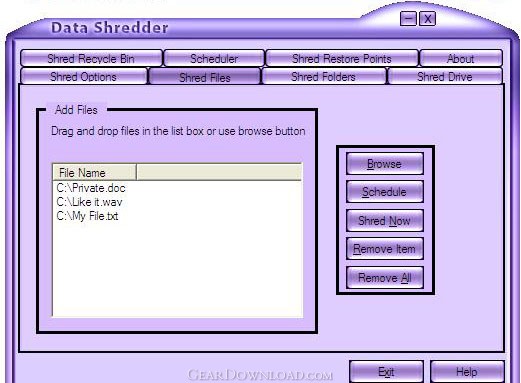 Click to enlarge screenshot
Software Description:
DU Data Shredder - Destroys files,free space and Recycle Bin contents instead of only deleting them
Data Shredder literally destroys files, free space and your Recycle Bin contents instead of only deleting them. That means your data contents once overwritten and destroyed It can't be recovered.
The user therefore should be sure of the files, folders .etc. he/she wants to shred.There are many safeguards built into the Data Shredder program to warn the user.Windows allocates clusters for new files (and extending existing files) from one end of the disk and moving towards the other end. Accordingly, the user for example if deleting files near the end of the disk, it might be very long before those clusters get used again.Therefore, shredding a disk's free space ensures that any deleted data stored in unallocated clusters will be completely shredded, and all the bits and pieces of left over data from deleted files will be destroyed.Generally speaking Windows stores files using two steps:A directory entry and A series of one or more clusters on a disk.When the user deletes a file using windows the file's data doesn't actually get deleted from disk. Windows simply marks the file's clusters as available for reuse, then marks that file's directory entry as deleted (from the directories available) by replacing the first character of the file's name with a special character. Now if those clusters don't get reused for another file, they are vulnerable and can be retrieved by those who know where and how to look for it.Adding one byte to the directory that was deleted will allow the retrieve of the entire file that has been deleted. This is used in most of the "Unerase" utilities functions. Data Shredder makes it virtually impossible to retrieve data from a file because it literally overwrites the file's data clusters before deleting the file. A "quick" shred overwrites the file once, filling its data clusters with zeroes. A "Thorough" shred overwrites the file maximum 10 times, using varying bit patterns each time.
Data Shredder literally destroys files, free space and your Recycle Bin contents instead of only deleting them. That means your data contents once overwritten and destroyed It can't be recovered.
The user therefore should be sure of the files, folders .etc. he/she wants to shred.There are many safeguards built into the Data Shredder program to warn the user.Windows allocates clusters for new files (and extending existing files) from one end of the disk and moving towards the other end. Accordingly, the user for example if deleting files near the end of the disk, it might be very long before those clusters get used again.Therefore, shredding a disk's free space ensures that any deleted data stored in unallocated clusters will be completely shredded, and all the bits and pieces of left over data from deleted files will be destroyed.Generally speaking Windows stores files using two steps:A directory entry and A series of one or more clusters on a disk.When the user deletes a file using windows the file's data doesn't actually get deleted from disk. Windows simply marks the file's clusters as available for reuse, then marks that file's directory entry as deleted (from the directories available) by replacing the first character of the file's name with a special character. Now if those clusters don't get reused for another file, they are vulnerable and can be retrieved by those who know where and how to look for it.Adding one byte to the directory that was deleted will allow the retrieve of the entire file that has been deleted. This is used in most of the "Unerase" utilities functions. Data Shredder makes it virtually impossible to retrieve data from a file because it literally overwrites the file's data clusters before deleting the file. A "quick" shred overwrites the file once, filling its data clusters with zeroes. A "Thorough" shred overwrites the file maximum 10 times, using varying bit patterns each time.
Feature List:
- Drag and drop use friendly interface
- Uses windows context menu for quick seen
- Scheduler tools enables users to set up timed deletions of certain
- folder contents or Recycle Bin for those who prefer a more automated process
100% Clean:
 DU Data Shredder 1.0.0.20 is 100% clean
This download (duds10020.exe) was tested thoroughly and was found 100% clean. Click "Report Spyware" link on the top if you found this software contains any form of malware, including but not limited to: spyware, viruses, trojans and backdoors.
Related Software:
- DU DVD Player 1.0.0.21 - The most efficient and powerful tools ever used to play DVD movies.
- DU Startup Repair for Windows 1.0.0.20 - The Startup Repair for Windows is the best utility to modify startup settings.
- Advanced-Password-Manager 3.0 - Advance Password Manager is a safe & user friendly password management utility.
- FastSum Standard Edition 1.6 - Check the integrity and track changes within your important files
- Acronis True Image Corporate Workstation 8.0 - Data and system backup and restore solution for corporate workstations
- Ashampoo PowerUp 3 3.23 - More protection, more control, faster and easier than ever
- Odbc 4 All 2.3 - Easy connection to ODBC data sources for any application, DOS and scripts too !
- Antechinus eBook Wizard 3.2 - Use eBook Wizard to compile your highly-compressed eBooks easily and in no time.
- O&O DriveLED 2.0 - O&O DriveLED permanently monitors the status of the hard disks in the background
- Unusual Works Utility Pack 1.0 - CD Ejector and Note Manager programs.
top 10 most downloaded


recommended software
-
- AppleXsoft Photo Recovery for Mac
- AppleXsoft Photo Recovery is the comprehensive digital media data rescue software designed for Mac users, it featuring innovative photo recovery algor...

-
- Cacheman
- Memory is one of the most important pieces of computer hardware as it is in constant use no matter what a PC is used for. There is a tremendous number...
