Index >> System Utilities >> Printer >> IPDS Print Server
Report SpywareIPDS Print Server 1.12

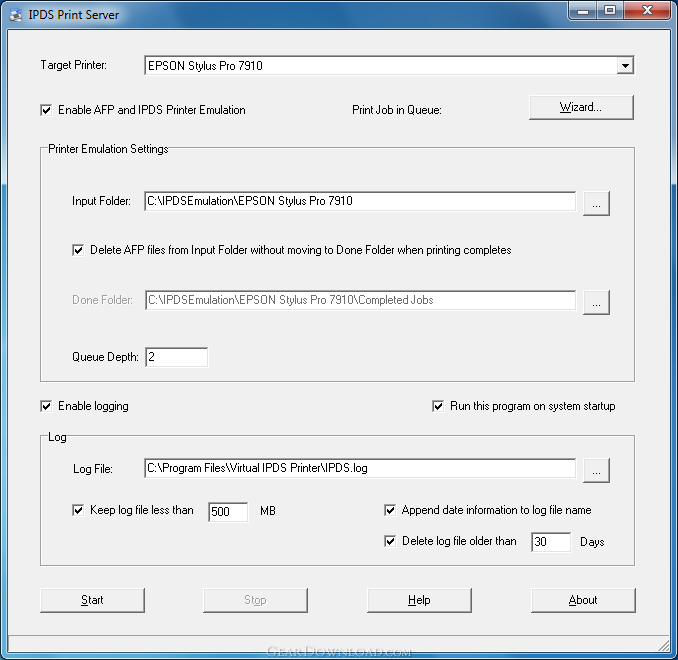 Click to enlarge screenshot
Software Description:
IPDS Print Server - Emulate your existing Laserjet, Inkjet printers, or MFP into IPDS printers.
IT managers and system administrators have long struggled to make IBM AS400-based data and Mainframe spooled files available in Windows environments. With IPDS Print Server software, AS400 host data and Mainframe spooled files can be sent to Windows-based printers or accessed on Windows-based systems.
IPDS Print Server allows PC users to emulate their existing Laserjet, Inkjet printers, or MFP devices into IPDS capable printers that fully supports the IPDS (Intelligent Printer Data Stream) protocol.
Using this software emulation solution for IPDS printing, users can print reports of IBM IPDS data streams produced from a wide range of systems such as AS400, i series, IBM power, and mainframe systems with a resolution up to 600 dpi, plus seamless emulation switching. Users also get tray and bin mapping and integrated-solution support features.
IPDS Print Server is a pure software emulation solution for IPDS printing, which translates IPDS directly into common printer languages eliminating the need for expensive investment on specialized hardware, extra software, and major reprogramming on the host side.
The IPDS Print Server software assigns a hot folder as a virtual tray to each of your non-IPDS printers, and it enables fast and flexible printing from mainframe, midrange and other non-Windows host systems - such as UNIX, AIX, AS400, IBM Power Series, System z, and Linux - to any Windows-based printers.
Easy to install and integrate, IPDS Print Server simplifies cross-platform printing and central management of print jobs. With the help of IPDS to PDF (Portable Document Format) converter plug-in, users can print AFP / IPDS to PDF files without difficulty, thereby conserving bandwidth, and promoting fast transmission of print documents for previewing, printing and archiving.
Organizations using IPDS Print Server will gain the benefits of increased efficiency, productivity and reduced cost.
For the complete list of features, visit our website.
What's New: Emulate maximum 255 printers as IPDS printing capable printer per server
Limitations: 15 Days Trial
IT managers and system administrators have long struggled to make IBM AS400-based data and Mainframe spooled files available in Windows environments. With IPDS Print Server software, AS400 host data and Mainframe spooled files can be sent to Windows-based printers or accessed on Windows-based systems.
IPDS Print Server allows PC users to emulate their existing Laserjet, Inkjet printers, or MFP devices into IPDS capable printers that fully supports the IPDS (Intelligent Printer Data Stream) protocol.
Using this software emulation solution for IPDS printing, users can print reports of IBM IPDS data streams produced from a wide range of systems such as AS400, i series, IBM power, and mainframe systems with a resolution up to 600 dpi, plus seamless emulation switching. Users also get tray and bin mapping and integrated-solution support features.
IPDS Print Server is a pure software emulation solution for IPDS printing, which translates IPDS directly into common printer languages eliminating the need for expensive investment on specialized hardware, extra software, and major reprogramming on the host side.
The IPDS Print Server software assigns a hot folder as a virtual tray to each of your non-IPDS printers, and it enables fast and flexible printing from mainframe, midrange and other non-Windows host systems - such as UNIX, AIX, AS400, IBM Power Series, System z, and Linux - to any Windows-based printers.
Easy to install and integrate, IPDS Print Server simplifies cross-platform printing and central management of print jobs. With the help of IPDS to PDF (Portable Document Format) converter plug-in, users can print AFP / IPDS to PDF files without difficulty, thereby conserving bandwidth, and promoting fast transmission of print documents for previewing, printing and archiving.
Organizations using IPDS Print Server will gain the benefits of increased efficiency, productivity and reduced cost.
For the complete list of features, visit our website.
What's New: Emulate maximum 255 printers as IPDS printing capable printer per server
Limitations: 15 Days Trial
Feature List:
- Spool IBM iSeries/zSeries IPDS data to your Windows environment replacing IPDS printers
- Bring the power of IBM AFP (Advanced Function Presentation) to your Windows environment
- Convert your IPDS, AFPDS (AFP data stream) and SCS into PDF for easy viewing, archiving and distribution
- Support IBM host printing from iSeries, zSeries systems with print data such as SCS, DCA, ICDS and IPDS/AFP
- Support emulation of common IBM IPDS and SCS printers
- Emulate IPDS printing for up to 255 non-IPDS printers on a host computer
- Associate one hot folder with each non-IPDS printer as a virtual tray
- Support for all IPDS data including overlays, colors, graphics, bar codes, page segments, font handling etc
- Supports all AFP/IPDS Towers
- Support for AFP/IPDS printing over the LAN using TCP/IP
- Support for black-and-white printing and full color printing
- Conversion of the IPDS data stream done by host resources and increases print speeds
- Enable IPDS host printing and standard network printing in an Ethernet environment
- Eliminate the expense of a dedicated host AFP/IPDS printer
- Supports Advanced Function Printing (AFP) using native IPDS protocol
- Support for barcode, images, electronic forms, overlays, resource management, error recovery
- Host controlled printing and page range printing
- Flexible page positioning is provided without modifying the applications
- Device tray mapping
- Printer Activities Logging
- Support for IPDS printing network
- No need for IPDS printer drivers for IPDS printing
- No changes to host applications or printers
- Auto Launch on System Startup
- Configuration Wizard for quicker and easier setup
- Configuration via software control panel
- Support for traditional coax or twinax printing
- Capture fonts to storage resulting in reduced network traffic over LAN, coax or twinax connections
- Support for multiple output destinations
- Archive IPDS print jobs and spooled files as AFP document, page segment, medium overlay, and overlay from any Windows application that supports printing (Print-To-File)
- Multiple Simultaneous Connections
- Support a complete set of paper sizes
- Define custom paper size
- Paper type includes White, Colored, Transparent
- Flexible page orientation such as Portrait, Landscape, Portrait 180, Landscape 270
100% Clean:
 IPDS Print Server 1.12 is 100% clean
This download (IPDSPrintServerSetup.exe) was tested thoroughly and was found 100% clean. Click "Report Spyware" link on the top if you found this software contains any form of malware, including but not limited to: spyware, viruses, trojans and backdoors.
Related Software:
- Virtual IPDS Printer 2.02 - Emulate any Windows printer as an IPDS capable printer to print barcode, report.
- AFP to PCL Converter 3.01 - Convert AFP to PCL and PCL-XL in batch at unlimited speed on Microsoft Windows.
- SpeedyPDF 1.3.0 - Create PDF files from virtually any Windows application that supports printing.
- Adolix PDF Converter 4.4 - PDF converter software. Create PDF in Vista. Convert PDF to image: tiff, jpeg.
- PDF to Word | Solid Converter 8.2 - Convert PDF Files into MS Word. Easy, Fast, Accurate
- Print Maestro 3.1 - Print file tree and directory content in 1 click with PrintMaestro.
- novaPDF Pro 8.6.942 - novaPDF Pro allows you to easily create PDF files from any printable document.
- O&K Print Watch 4.7.0.3223 - Print manager to control and audit printing costs in your organization.
- DateInTray 1.6 - Displays today's date in the system tray, includes popup calendar.
- Sprintbit File Manager 4.4 - Featured File Manager- Files Management - Editing and Viewing solution
top 10 most downloaded


recommended software
-
- AppleXsoft Photo Recovery for Mac
- AppleXsoft Photo Recovery is the comprehensive digital media data rescue software designed for Mac users, it featuring innovative photo recovery algor...

-
- Cacheman
- Memory is one of the most important pieces of computer hardware as it is in constant use no matter what a PC is used for. There is a tremendous number...
