Index >> System Utilities >> Automation Tools >> Febooti Automation Workshop
Report SpywareFebooti Automation Workshop 0.9.4

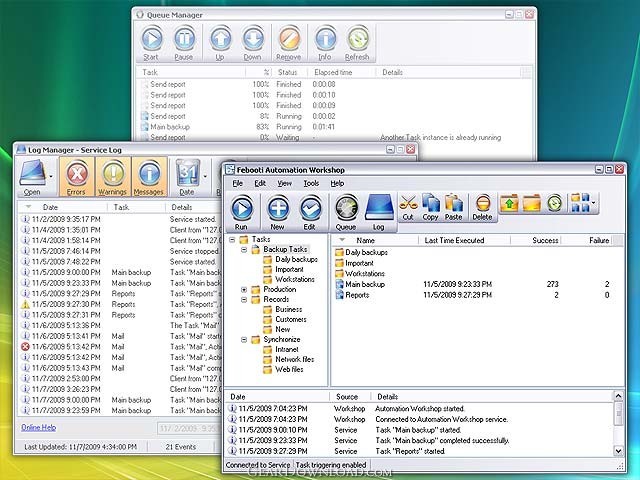 Click to enlarge screenshot
Software Description:
Febooti Automation Workshop - Automate recurring Tasks, eliminate human error, streamline business processes.
Automation Workshop allows scheduling and automating of business processes. Automation Workshop requires no scripting, programming or coding skills. Processes are automated by building Tasks that include Triggers and Actions as the key components. When system state match prespecified conditions, the Task is executed, or in other words, Actions are sequentially performed. Triggers and Actions are easy to setup and configure using intuitive interface. By combining system monitoring capacities with file, folder, email operations, you can create the automated solution of necessary complexity that perfectly integrates the existing environment and allows streamlining of workflow. Both time spent on repetitive routine tasks and possibility of human error are effectively diminished by creating bridges over the gaps between one process and another. Automation Workshop connects such processes and does the job without user intervention.
Automation Workshop features:
- File / Folder Watcher - a Trigger that can monitor nearly everything that happens with files or folders and launch appropriate Action to respond to the changes in the system.
- Task Scheduler - a Trigger that can execute scheduled processes on recurrent basis.
- Send email - industrial grade Action will take care of any email sending Task, from very simple to highly advanced.
- File / Folder actions - a set of file / folder Actions that can do nearly anything with files and folders, from automatic copying, moving, deleting to attribute change, content retrieval, and much more.
- Start application and Run Windows prompt command - Actions even further extends the automation by providing support for executing batch files, Windows command prompt commands and DOS / Windows programs.
- Automation Workshop is equipped with extensive monitoring, logging and reporting options; provides efficient deployment and management of automation flows; features comprehensive online help and qualified technical support.
Automation Workshop allows scheduling and automating of business processes. Automation Workshop requires no scripting, programming or coding skills. Processes are automated by building Tasks that include Triggers and Actions as the key components. When system state match prespecified conditions, the Task is executed, or in other words, Actions are sequentially performed. Triggers and Actions are easy to setup and configure using intuitive interface. By combining system monitoring capacities with file, folder, email operations, you can create the automated solution of necessary complexity that perfectly integrates the existing environment and allows streamlining of workflow. Both time spent on repetitive routine tasks and possibility of human error are effectively diminished by creating bridges over the gaps between one process and another. Automation Workshop connects such processes and does the job without user intervention.
Automation Workshop features:
- File / Folder Watcher - a Trigger that can monitor nearly everything that happens with files or folders and launch appropriate Action to respond to the changes in the system.
- Task Scheduler - a Trigger that can execute scheduled processes on recurrent basis.
- Send email - industrial grade Action will take care of any email sending Task, from very simple to highly advanced.
- File / Folder actions - a set of file / folder Actions that can do nearly anything with files and folders, from automatic copying, moving, deleting to attribute change, content retrieval, and much more.
- Start application and Run Windows prompt command - Actions even further extends the automation by providing support for executing batch files, Windows command prompt commands and DOS / Windows programs.
- Automation Workshop is equipped with extensive monitoring, logging and reporting options; provides efficient deployment and management of automation flows; features comprehensive online help and qualified technical support.
100% Clean:
 Febooti Automation Workshop 0.9.4 is 100% clean
This download (fauto094.exe) was tested thoroughly and was found 100% clean. Click "Report Spyware" link on the top if you found this software contains any form of malware, including but not limited to: spyware, viruses, trojans and backdoors.
Related Software:
- ByteWedge 2.7 - Acquire data from electronic devices through an RS232 interface
- Active Task Manager 1.70 - Start programs and display reminders using the flexible schedule or manually.
- Active Keys 2.41 - Make a controller capable of doing any action with single press of your keyboard
- WakeupOnStandBy 1.7.20.1 - Free software to wake up PC from sleep mode or hibernation at a predefined time.
- Auto-Keyboard 9.0 - Auto-Keyboard is a software that imitate keyboard keystroke and mouse action.
- Service Timer 2.0.0 - A smart assistant for administrator to control services or run program on time
- PC Auto Shutdown 5.6 - auto shutdown,power off, reboot, hibernate or suspend computers at schedule time
- Green Computing Shutdown Scheduler 1.1 - Save electricity by scheduling when your computer should shutdown or hibernate
- Icon Searcher 4.00 - This performs a fast scan of all local hard disks for icons.
- Keyboard Express 4.3.2.1 - Save time by creating macros to automate boring, repetitive computer tasks.
top 10 most downloaded


recommended software
-
- AppleXsoft Photo Recovery for Mac
- AppleXsoft Photo Recovery is the comprehensive digital media data rescue software designed for Mac users, it featuring innovative photo recovery algor...

-
- Cacheman
- Memory is one of the most important pieces of computer hardware as it is in constant use no matter what a PC is used for. There is a tremendous number...
