Index >> System Utilities >> Automation Tools >> Keyboard Express
Report SpywareKeyboard Express 4.3.2.1

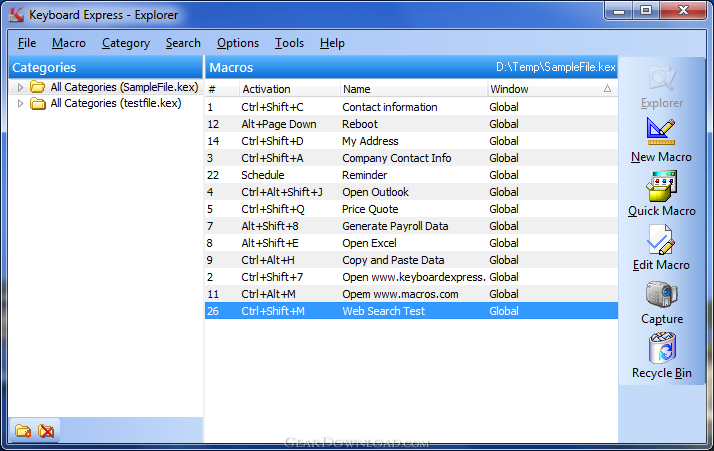 Click to enlarge screenshot
Software Description:
Keyboard Express - Save time by creating macros to automate boring, repetitive computer tasks.
Keyboard Express is a robust Windows keyboard macro utility that saves time and reduces errors by automating repetitive computer tasks.
Record keystrokes or build a sequence of steps for the computer to play back. Then, with the push of a key or two, run the macro sequence at a much faster speed than can be produced manually. Save time and significantly reduce errors whenever the macro is run. Create a number of macros and watch your productivity skyrocket.
Keyboard Express has over 800 hot keys available for initiating macros. Use the shortkey activation method by typing a letter sequence of 2 - 32 characters to activate the macro. Utilize the scheduling options to run a macro at practically any time or interval required. Schedule macros to do work for you while out running an errand or even while sleeping.
Use macros to insert text or international characters. Write answers to frequently asked questions and save them as macros. Instead of retyping responses to each repetitive email question, just press a hotkey. Create boilerplate text for price quotes, job orders, etc.
Copy and paste data from one application to another. Run macros in a repeat loop to plow through mind numbing tasks. Launch programs, create reminders, open web pages, and much more.
The Quick Macros feature provides an easy way to automate standard Windows functionality. Create macros in seconds to shut down or reboot the computer, open Control Panel applets or other Windows folders, such as the Startup, Printer or My Computer folders. Perform web searches, minimize or restore all open windows and much more.
Give it a try and see for yourself how much time Keyboard Express will save.
What's New: Minor upgrade to fix a few bugs in the recently released major update.
Limitations: 30 Days Trial
Keyboard Express is a robust Windows keyboard macro utility that saves time and reduces errors by automating repetitive computer tasks.
Record keystrokes or build a sequence of steps for the computer to play back. Then, with the push of a key or two, run the macro sequence at a much faster speed than can be produced manually. Save time and significantly reduce errors whenever the macro is run. Create a number of macros and watch your productivity skyrocket.
Keyboard Express has over 800 hot keys available for initiating macros. Use the shortkey activation method by typing a letter sequence of 2 - 32 characters to activate the macro. Utilize the scheduling options to run a macro at practically any time or interval required. Schedule macros to do work for you while out running an errand or even while sleeping.
Use macros to insert text or international characters. Write answers to frequently asked questions and save them as macros. Instead of retyping responses to each repetitive email question, just press a hotkey. Create boilerplate text for price quotes, job orders, etc.
Copy and paste data from one application to another. Run macros in a repeat loop to plow through mind numbing tasks. Launch programs, create reminders, open web pages, and much more.
The Quick Macros feature provides an easy way to automate standard Windows functionality. Create macros in seconds to shut down or reboot the computer, open Control Panel applets or other Windows folders, such as the Startup, Printer or My Computer folders. Perform web searches, minimize or restore all open windows and much more.
Give it a try and see for yourself how much time Keyboard Express will save.
What's New: Minor upgrade to fix a few bugs in the recently released major update.
Limitations: 30 Days Trial
Feature List:
- Define up to 500 macros per macro file with 5000 keystrokes per macro
- Choose from over 700 hotkey combinations
- Create multiple macro files
- Assign hotkeys to specific windows or make them global
- Simply key in text or auto-capture common keystrokes
- Quickly add, modify, delete, copy and move hotkeys
- Import/Export single macro or a group of macros
- Print list of hotkeys for future reference
- Command line options such as Browse Mode (to prevent users from changing the macros) and loading in specific macro files
- Networking option with file locking capability
100% Clean:
 Keyboard Express 4.3.2.1 is 100% clean
This download (keyexp4.exe) was tested thoroughly and was found 100% clean. Click "Report Spyware" link on the top if you found this software contains any form of malware, including but not limited to: spyware, viruses, trojans and backdoors.
Related Software:
- Macro Express 3.9a - Save time by creating macros to automate boring, repetitive computer tasks.
- ShortKeys 3.3.2.1 - Text expander tool to insert frequently used text snippets into other programs.
- ShortKeys Lite 2.3b - Type a few characters and ShortKeys Lite will replace them. Free.
- ByteWedge 2.7 - Acquire data from electronic devices through an RS232 interface
- Active Task Manager 1.70 - Start programs and display reminders using the flexible schedule or manually.
- Active Keys 2.41 - Make a controller capable of doing any action with single press of your keyboard
- WakeupOnStandBy 1.7.20.1 - Free software to wake up PC from sleep mode or hibernation at a predefined time.
- Auto-Keyboard 9.0 - Auto-Keyboard is a software that imitate keyboard keystroke and mouse action.
- Service Timer 2.0.0 - A smart assistant for administrator to control services or run program on time
- PC Auto Shutdown 5.6 - auto shutdown,power off, reboot, hibernate or suspend computers at schedule time
top 10 most downloaded


recommended software
-
- AppleXsoft Photo Recovery for Mac
- AppleXsoft Photo Recovery is the comprehensive digital media data rescue software designed for Mac users, it featuring innovative photo recovery algor...

-
- Cacheman
- Memory is one of the most important pieces of computer hardware as it is in constant use no matter what a PC is used for. There is a tremendous number...
