Index >> System Utilities >> Backup & Restore >> EzBackup
Report SpywareEzBackup 4

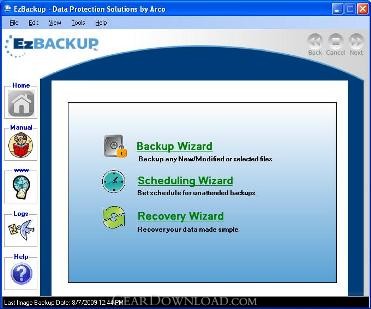 Click to enlarge screenshot
Software Description:
EzBackup - Make any drive a backup drive. Restore one file or an entire boot disk 1, 2, 3.
With EzBACKUP, backing up to another drive is easy as 1, 2, 3. First, EzBackup will transfer an exact image copy of your hard drive--partitions, preferences, everything--to your backup drive. Use EzBackup with any internal or external storage drive. Next, just point and click to tell EzBackup which files you want backed up on a regular basis and when and how often you want backups to take place. Then, forget about it!
Whether you inadvertently delete one or two files, corrupt your operating system or lose your entire drive due to a disk crash, you'll have everything you need to quickly replace or restore what's been lost. No hassle. No costly or annoying downtime. If you're in the middle of a project with no time to spare, you may be able to simply switch to your backup drive and keep on working.
Unlike tape or other backup programs-- there is never any question whether your backup files really exist. EzBackup uses no hidden compression/decompression, no unreadable backup files. Verify your backup files anytime. Simply open Windows Explorer and look at them.
EzBackup works automatically in the background. It won't disturb you while you work or forget to backup when you're away. Schedule up to 8 automatic backups a day. Backup manually anytime. Select individual files and folders or entire file types--such as all music, photo or email files. Tell EzBackup to overwrite existing backup files with each new backup or to maintain multiple backups with dated restore points so you can revert to an earlier version of a file if necessary.
Set EzBackup to notify you by email when a backup occurs. Backup and restore at 1 minute per GB of data. Use EzBackup's built-in drive migration and partitioning tools to quickly and easily transfer your entire drive contents to a new or larger drive. EzBackup will clone your existing drive on the new one. No need to re-install applications, copy files or search for web updates. It couldn't be easier!
With EzBACKUP, backing up to another drive is easy as 1, 2, 3. First, EzBackup will transfer an exact image copy of your hard drive--partitions, preferences, everything--to your backup drive. Use EzBackup with any internal or external storage drive. Next, just point and click to tell EzBackup which files you want backed up on a regular basis and when and how often you want backups to take place. Then, forget about it!
Whether you inadvertently delete one or two files, corrupt your operating system or lose your entire drive due to a disk crash, you'll have everything you need to quickly replace or restore what's been lost. No hassle. No costly or annoying downtime. If you're in the middle of a project with no time to spare, you may be able to simply switch to your backup drive and keep on working.
Unlike tape or other backup programs-- there is never any question whether your backup files really exist. EzBackup uses no hidden compression/decompression, no unreadable backup files. Verify your backup files anytime. Simply open Windows Explorer and look at them.
EzBackup works automatically in the background. It won't disturb you while you work or forget to backup when you're away. Schedule up to 8 automatic backups a day. Backup manually anytime. Select individual files and folders or entire file types--such as all music, photo or email files. Tell EzBackup to overwrite existing backup files with each new backup or to maintain multiple backups with dated restore points so you can revert to an earlier version of a file if necessary.
Set EzBackup to notify you by email when a backup occurs. Backup and restore at 1 minute per GB of data. Use EzBackup's built-in drive migration and partitioning tools to quickly and easily transfer your entire drive contents to a new or larger drive. EzBackup will clone your existing drive on the new one. No need to re-install applications, copy files or search for web updates. It couldn't be easier!
Feature List:
- Unlimited Image Copies
- Complete image and file backup
- Instantly restore a file or folder
- Quickly and easily restore a boot drive
100% Clean:
 EzBackup 4 is 100% clean
This download (EzBackup_Install_S.exe) was tested thoroughly and was found 100% clean. Click "Report Spyware" link on the top if you found this software contains any form of malware, including but not limited to: spyware, viruses, trojans and backdoors.
Related Software:
- EzBackup101 1.0 - Automatic backup that's easy enough for beginners
- ! - Oops 1.02 - ! Oops ! - the independant auto-save.
- ERS 2K/XP, Emergency Recovery System FAT/FAT32 6.01 - Win 2K/XP, Recover gracefully from a system crash with ERS 2K/XP.
- ERS 9x, Emergency Recovery System 9x 11.45 - Win 95/98/ME Recover gracefully from a system crash with ERS.
- Acronis True Image Enterprise Server 8.0 - Real-time disk backup, disk imaging, and bare metal restore for Windows servers
- NH Backup 3.0.74 - Get a fast, reliable and affordable backups solution.
- DataBK SQL Server Backup 11.0.6 - Backup and restore Microsoft SQL Server database to a local or network drive.
- Outlook Express Backup Restore 2.364 - Backup your Outlook Express and restore it when it is necessary.
- Backup4all Professional 6.1.180 - Customizable backup program. Full, incremental, differential and mirror backups
- MinuteMan Data Backup Suite 8.54 - MinuteMan Data Backup with MinZip and MinSelfEx.
top 10 most downloaded


recommended software
-
- AppleXsoft Photo Recovery for Mac
- AppleXsoft Photo Recovery is the comprehensive digital media data rescue software designed for Mac users, it featuring innovative photo recovery algor...

-
- Cacheman
- Memory is one of the most important pieces of computer hardware as it is in constant use no matter what a PC is used for. There is a tremendous number...
