Index >> System Utilities >> Backup & Restore >> EzBackup101
Report SpywareEzBackup101 1.0

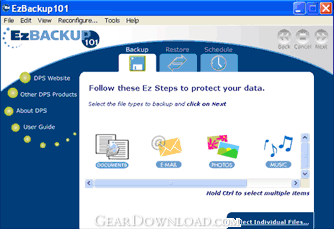 Click to enlarge screenshot
Software Description:
EzBackup101 - Automatic backup that's easy enough for beginners
EzBackup101 is designed especially for people who don't know a lot about computers. It's not confusing or complicated and doesn't fill your screen with all kinds of geeky stuff. Just install it, point it to your backup drive (such as an external USB drive) and you're good to go. Set up your own backup schedule if you prefer, backup manually, or just do nothing. EzBackup101 will automatically backup all of your new and changed files at the same time every day.
Automatic backup guarantees that your files get copied to your backup drive and will be available if you need to restore them. That means you don't have to remember to backup. You don't have to manually start a backup and then sit around unable to access your computer or do your work until it's finished. You work on your computer. EzBackup101 runs its backups in the background. Your data files get backup protection.
If you make a mistake and delete a file you really need or if a file becomes corrupted and unreadable, EzBackup101 can copy a saved version back to your computer. EzBackup101 doesn't overwrite your earlier backups with your new ones. It maintains multiple dated copies. If your Quicken file becomes corrupted and unusable on Wednesday, for example, you'll have a copy of Monday or Tuesday's uncorrupted version to restore from.
EzBackup101 is an easy backup software to use but it's also a powerful backup tool. You don't HAVE to do anything but there are lots of things you can do if you want to. File type icons representing your email files, music, photos, videos and documents make it easy to set up your own automatic backup schedules or to create backup job lists that can be saved and executed manually any time. If you've got one of those one-touch backup drives, you can start a backup by just pushing the button. If you want to permanently archive certain files, you can write them to CD or DVD.
Download a free trial of EzBackup101 and see how easy backup can be.
Limitations: 15 Days Trial
TAGS: backup software, automatic backup, backup drive, backup file
EzBackup101 is designed especially for people who don't know a lot about computers. It's not confusing or complicated and doesn't fill your screen with all kinds of geeky stuff. Just install it, point it to your backup drive (such as an external USB drive) and you're good to go. Set up your own backup schedule if you prefer, backup manually, or just do nothing. EzBackup101 will automatically backup all of your new and changed files at the same time every day.
Automatic backup guarantees that your files get copied to your backup drive and will be available if you need to restore them. That means you don't have to remember to backup. You don't have to manually start a backup and then sit around unable to access your computer or do your work until it's finished. You work on your computer. EzBackup101 runs its backups in the background. Your data files get backup protection.
If you make a mistake and delete a file you really need or if a file becomes corrupted and unreadable, EzBackup101 can copy a saved version back to your computer. EzBackup101 doesn't overwrite your earlier backups with your new ones. It maintains multiple dated copies. If your Quicken file becomes corrupted and unusable on Wednesday, for example, you'll have a copy of Monday or Tuesday's uncorrupted version to restore from.
EzBackup101 is an easy backup software to use but it's also a powerful backup tool. You don't HAVE to do anything but there are lots of things you can do if you want to. File type icons representing your email files, music, photos, videos and documents make it easy to set up your own automatic backup schedules or to create backup job lists that can be saved and executed manually any time. If you've got one of those one-touch backup drives, you can start a backup by just pushing the button. If you want to permanently archive certain files, you can write them to CD or DVD.
Download a free trial of EzBackup101 and see how easy backup can be.
Limitations: 15 Days Trial
TAGS: backup software, automatic backup, backup drive, backup file
100% Clean:
 EzBackup101 1.0 is 100% clean
This download was tested thoroughly and was found 100% clean. Click "Report Spyware" link on the top if you found this software contains any form of malware, including but not limited to: spyware, viruses, trojans and backdoors.
Related Software:
- ! - Oops 1.02 - ! Oops ! - the independant auto-save.
- ERS 2K/XP, Emergency Recovery System FAT/FAT32 6.01 - Win 2K/XP, Recover gracefully from a system crash with ERS 2K/XP.
- ERS 9x, Emergency Recovery System 9x 11.45 - Win 95/98/ME Recover gracefully from a system crash with ERS.
- Acronis True Image Enterprise Server 8.0 - Real-time disk backup, disk imaging, and bare metal restore for Windows servers
- NH Backup 3.0.74 - Get a fast, reliable and affordable backups solution.
- DataBK SQL Server Backup 11.0.6 - Backup and restore Microsoft SQL Server database to a local or network drive.
- Outlook Express Backup Restore 2.364 - Backup your Outlook Express and restore it when it is necessary.
- Backup4all Professional 6.1.180 - Customizable backup program. Full, incremental, differential and mirror backups
- MinuteMan Data Backup Suite 8.54 - MinuteMan Data Backup with MinZip and MinSelfEx.
- Adolix Outlook Express Backup 3.0 - The easiest way to backup email data from Top Email Clients
top 10 most downloaded


recommended software
-
- AppleXsoft Photo Recovery for Mac
- AppleXsoft Photo Recovery is the comprehensive digital media data rescue software designed for Mac users, it featuring innovative photo recovery algor...

-
- Cacheman
- Memory is one of the most important pieces of computer hardware as it is in constant use no matter what a PC is used for. There is a tremendous number...
