Index >> System Utilities >> Automation Tools >> Auto Shutdown PC
Report SpywareAuto Shutdown PC 7.0

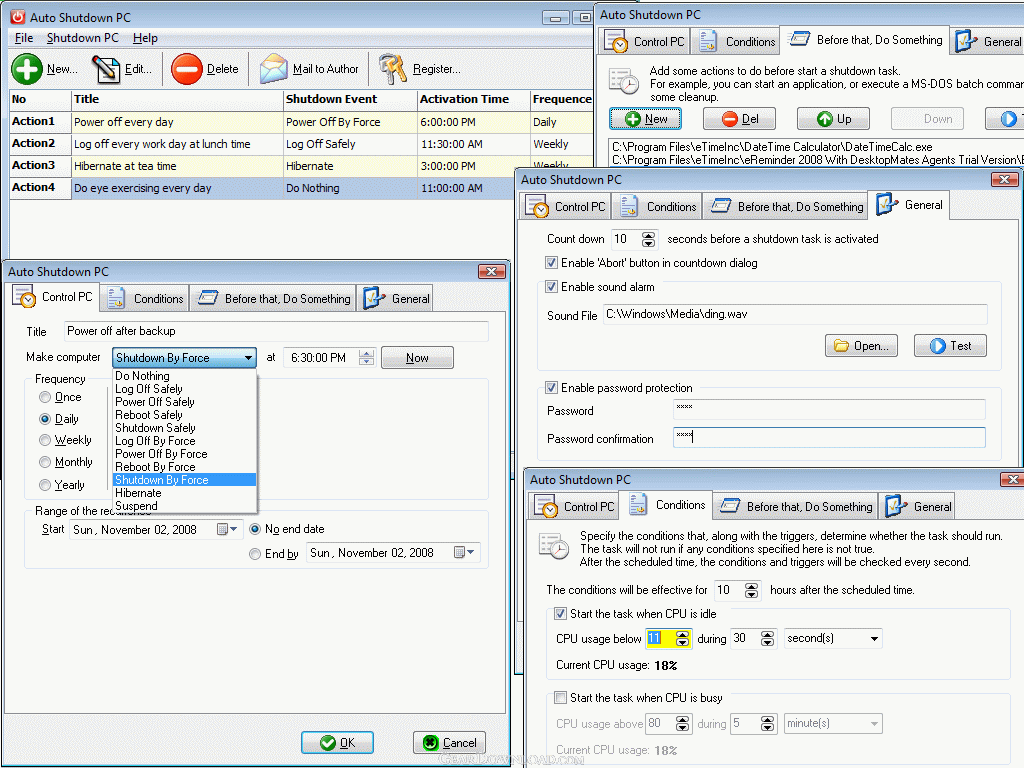 Click to enlarge screenshot
Software Description:
Auto Shutdown PC - Automatically shut down computers at scheduled time & conditions you specified.
Auto Shutdown PC is a handy software that help you automatically shut down, power off, reboot, hibernate, suspend or log off computers at scheduled time and conditions you specified. It can shut down computer at scheduled time even when no user is logged on, the computer is in suspended power conservation mode or the CPU usage is idle or too high. It gives you different ways to schedule the shutdown event for your needs, such as once, daily, weekly, monthly, and yearly. Moreover, before the shutdown, you can specify to start some applications or MS-DOS batch commands to make some cleanup.
Key features:
1. Shut down, power off, reboot, hibernate, suspend or log off computers at schedule time.
2. Shut down computers at schedule time when no user logs on.
3. Shut down computers at schedule time when computers are in suspended power conservation mode.
4. Shut down computers when computers have been idle for specifically time.
5. Shut down computers when CPU usage stays for specifically value and time.
6. Five different schedule ways to meet your needs.
7. Set password to avoid others changing your schedule configuration.
8. Customize alarm sound and countdown duration during shutdown.
9. Run programs and open files at any specified time.
10. Play mp3, wma, wav and flash at any specified time.
11. Provide menu shortcuts to shut down computer directly.
12. Log detailed shutdown events.
13. Provide sort option in the grid.
14. Provide Print, Print Preview function.
15. Provide keyboard shortcuts to shut down, power off, reboot or log off computers.
What's New: Minor Update of Auto Shutdown PC
Limitations: 30 Days Trial
Auto Shutdown PC is a handy software that help you automatically shut down, power off, reboot, hibernate, suspend or log off computers at scheduled time and conditions you specified. It can shut down computer at scheduled time even when no user is logged on, the computer is in suspended power conservation mode or the CPU usage is idle or too high. It gives you different ways to schedule the shutdown event for your needs, such as once, daily, weekly, monthly, and yearly. Moreover, before the shutdown, you can specify to start some applications or MS-DOS batch commands to make some cleanup.
Key features:
1. Shut down, power off, reboot, hibernate, suspend or log off computers at schedule time.
2. Shut down computers at schedule time when no user logs on.
3. Shut down computers at schedule time when computers are in suspended power conservation mode.
4. Shut down computers when computers have been idle for specifically time.
5. Shut down computers when CPU usage stays for specifically value and time.
6. Five different schedule ways to meet your needs.
7. Set password to avoid others changing your schedule configuration.
8. Customize alarm sound and countdown duration during shutdown.
9. Run programs and open files at any specified time.
10. Play mp3, wma, wav and flash at any specified time.
11. Provide menu shortcuts to shut down computer directly.
12. Log detailed shutdown events.
13. Provide sort option in the grid.
14. Provide Print, Print Preview function.
15. Provide keyboard shortcuts to shut down, power off, reboot or log off computers.
What's New: Minor Update of Auto Shutdown PC
Limitations: 30 Days Trial
Feature List:
- Shut down, power off, reboot, hibernate, suspend or log off computers at schedule time
- Shut down computers at schedule time when no user logs on
- Shut down computers at schedule time when computers are in suspended power conservation mode
- Four different schedule ways to meet your needs
- Set password to avoid others changing your schedule configuration
- Customize alarm sound and countdown duration during shutdown
- Run programs and open files at any specified time
- Play mp3, wma, wav and flash at any specified time
- Log detailed shutdown events
100% Clean:
 Auto Shutdown PC 7.0 is 100% clean
This download (AutoShutdownPC.exe) was tested thoroughly and was found 100% clean. Click "Report Spyware" link on the top if you found this software contains any form of malware, including but not limited to: spyware, viruses, trojans and backdoors.
Related Software:
- ByteWedge 2.7 - Acquire data from electronic devices through an RS232 interface
- Active Task Manager 1.70 - Start programs and display reminders using the flexible schedule or manually.
- Active Keys 2.41 - Make a controller capable of doing any action with single press of your keyboard
- WakeupOnStandBy 1.7.20.1 - Free software to wake up PC from sleep mode or hibernation at a predefined time.
- Auto-Keyboard 9.0 - Auto-Keyboard is a software that imitate keyboard keystroke and mouse action.
- Service Timer 2.0.0 - A smart assistant for administrator to control services or run program on time
- PC Auto Shutdown 5.6 - auto shutdown,power off, reboot, hibernate or suspend computers at schedule time
- Green Computing Shutdown Scheduler 1.1 - Save electricity by scheduling when your computer should shutdown or hibernate
- Icon Searcher 4.00 - This performs a fast scan of all local hard disks for icons.
- Keyboard Express 4.3.2.1 - Save time by creating macros to automate boring, repetitive computer tasks.
top 10 most downloaded


recommended software
-
- AppleXsoft Photo Recovery for Mac
- AppleXsoft Photo Recovery is the comprehensive digital media data rescue software designed for Mac users, it featuring innovative photo recovery algor...

-
- Cacheman
- Memory is one of the most important pieces of computer hardware as it is in constant use no matter what a PC is used for. There is a tremendous number...
