Index >> Security & Privacy >> Other >> WinShredder: Securely shred your files and folders
Report SpywareWinShredder: Securely shred your files and folders 1.0

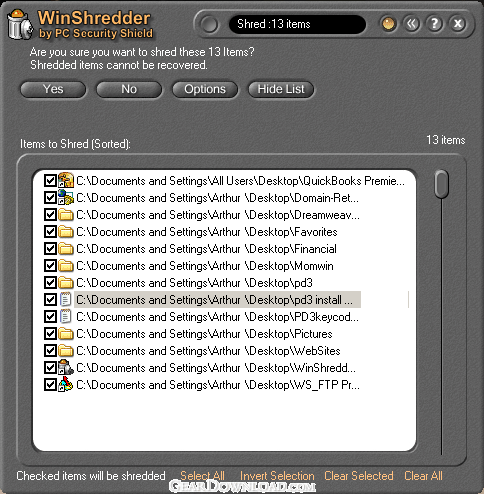 Click to enlarge screenshot
Software Description:
WinShredder: Securely shred your files and folders - NEW! Permanently erase your sensitive computer files using secure shredding.
Deleting files using Window's Delete function, or by dragging files to your Computer's Recycle Bin does not actually delete the files. In fact, the files still remain on your hard disk and can be completely recovered. Deleted files are the first thing hackers, privacy thiefs, and other computer experts look for. Employers routinely search for 'deleted' files to discover information about employees. WinShredder shreds files using the most advanced, 'military-grade' data deletion methods available. Indeed, the shred methods used by WinShredder (5022.22M) has been approved for use by both the U.S. Department of Defense (D.o.D.) and the U.S. National Security Agency (N.S.A.). Unlimited Shredding Most competitor products limit the user to only 1, or to a fixed number of data wipes when shredding. WinShredder permits an UNLIMITED number of data wipes. Unlimited 'Do Not Shred' Folder Locations A serious flaw in most competitor products is the inability to protect important folders from accidental shredding. This disastrous problem is solved with WinShredder. WinShredder permits an unlimited number of 'Do Not Shred' folder locations to be defined. Drag and Drop WinShredder supports all Windows drag and drop features. True Windows Explorer Integration (Right mouse-click menu integration) WinShredder integrates with all versions of the Windows operating system and appears as a new 'Delete with WinShredder' menu option when right mouse-clicking on a file or folder. Optional Instant Shredding Turn on the 'Instant Shred' option and you can start the shred process instantly just by dragging files to the desktop WinShredder trash can. No 'lock-ups' while Shredding Many competitor products lock up your computer while they are shredding files. Not WinShredder! You can continue to work while shredding is underway, seamlessly and smoothly. USE A VALID EMAIL WHEN ORDERING - Your Registration information is emailed within 24 hours to the email you provide.
Deleting files using Window's Delete function, or by dragging files to your Computer's Recycle Bin does not actually delete the files. In fact, the files still remain on your hard disk and can be completely recovered. Deleted files are the first thing hackers, privacy thiefs, and other computer experts look for. Employers routinely search for 'deleted' files to discover information about employees. WinShredder shreds files using the most advanced, 'military-grade' data deletion methods available. Indeed, the shred methods used by WinShredder (5022.22M) has been approved for use by both the U.S. Department of Defense (D.o.D.) and the U.S. National Security Agency (N.S.A.). Unlimited Shredding Most competitor products limit the user to only 1, or to a fixed number of data wipes when shredding. WinShredder permits an UNLIMITED number of data wipes. Unlimited 'Do Not Shred' Folder Locations A serious flaw in most competitor products is the inability to protect important folders from accidental shredding. This disastrous problem is solved with WinShredder. WinShredder permits an unlimited number of 'Do Not Shred' folder locations to be defined. Drag and Drop WinShredder supports all Windows drag and drop features. True Windows Explorer Integration (Right mouse-click menu integration) WinShredder integrates with all versions of the Windows operating system and appears as a new 'Delete with WinShredder' menu option when right mouse-clicking on a file or folder. Optional Instant Shredding Turn on the 'Instant Shred' option and you can start the shred process instantly just by dragging files to the desktop WinShredder trash can. No 'lock-ups' while Shredding Many competitor products lock up your computer while they are shredding files. Not WinShredder! You can continue to work while shredding is underway, seamlessly and smoothly. USE A VALID EMAIL WHEN ORDERING - Your Registration information is emailed within 24 hours to the email you provide.
100% Clean:
 WinShredder: Securely shred your files and folders 1.0 is 100% clean
This download (ws10setup.exe) was tested thoroughly and was found 100% clean. Click "Report Spyware" link on the top if you found this software contains any form of malware, including but not limited to: spyware, viruses, trojans and backdoors.
Related Software:
- Shield Firewall 2011 - Shield Firewall 5.0 - protect your files from hackers and viruses
- Visual Zip Password Recovery Processor 6.0 - A professional tool: recover lost passwords from ZIP archives
- WinLock 2000 2 - Cool security and administrative tool for Windows.Ideal for schools and educati
- Ardamax Keylogger 4.0.4 - Captures ALL keystrokes into a log file.
- ABF Password Recovery 1.74 - ABF Password Recovery is a program to retrieve lost or forgotten passwords.
- O&O SafeErase 6 6.0.85 - It securely deletes all sensitive files and internet traces from the Hard Disk
- Simply Accounting Password Recovery 1.0d - Recovers lost or forgotten passwords for Simply Accounting company files.
- R-Firewall 1.0 - R-Firewall is free and effective solution to secure your on-line activity.
- R-Wipe & Clean 9.9 - A complete solution to clean private records and free up disk space.
- ACT Password Recovery 1.0c - Recovers lost or forgotten passwords for ACT! contact management files.
top 10 most downloaded


recommended software
-
- Folder Lock
- Folder Lock is a data security solution that encrypt & secures your files, while keeping an automatic and real-time backup of encrypted files in the b...
-
- Emsisoft Anti-Malware
- Emsisoft Anti-Malware is a premium anti-malware program to clean and protect your PC from all internet threats: viruses, spyware, trojans, bots, adwar...