Index >> Security & Privacy >> Access Control >> Stop Software Installation Tool
Report SpywareStop Software Installation Tool 5.1.1.1

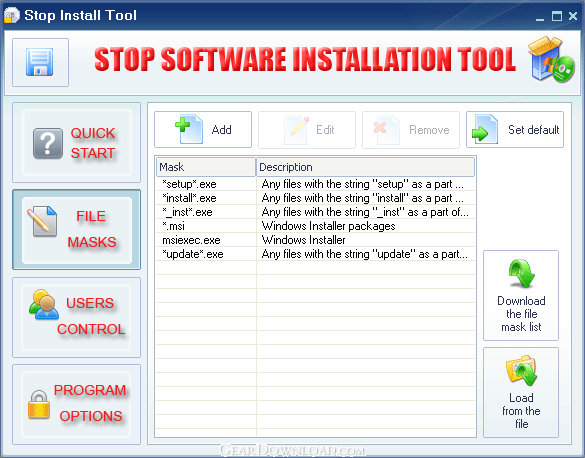 Click to enlarge screenshot
Software Description:
Stop Software Installation Tool - Prevent users from installing unwanted software with password protection
I do not approve of some of the programs or games that my child installs on my computer. Also I can not even control him to prevent software installation. What can I do?. How many times we heard this question from parents. Without good preventative measures, children can bring a functioning computer to its knees in a matter of minutes. Children are a leading cause of viruses, spyware, and adware being installed on computers. Children download programs, play games, and tinker with computers. Questionable programs and changes to settings can slow down your computer or disable important functions. Irreparable damage can be done to your operating system, files, and settings.
Is there a way to prevent them from doing this and how can you keep your children from destroying your computer ?
YES. The Stop Software Installation Tool allows you to prevent users of your computer from installing unwanted software with password protection. You can specify rules according files masks to block software installers execution.
Main features:
- set the administrator password to prevent software installation, change program settings, uninstall the Stop Software Installation Tool;
- specify the list of rules with files masks to block certain file execution;
- define users who may or not to install programs on your PC;
- start the program in the hidden mode or with the tray icon;
- use the hot key to activate the program;
- control users activities with the log file.
Keep PC in order and make your life easy with this tool.
What's New: new functions and features
Limitations: 14 Days Trial
I do not approve of some of the programs or games that my child installs on my computer. Also I can not even control him to prevent software installation. What can I do?. How many times we heard this question from parents. Without good preventative measures, children can bring a functioning computer to its knees in a matter of minutes. Children are a leading cause of viruses, spyware, and adware being installed on computers. Children download programs, play games, and tinker with computers. Questionable programs and changes to settings can slow down your computer or disable important functions. Irreparable damage can be done to your operating system, files, and settings.
Is there a way to prevent them from doing this and how can you keep your children from destroying your computer ?
YES. The Stop Software Installation Tool allows you to prevent users of your computer from installing unwanted software with password protection. You can specify rules according files masks to block software installers execution.
Main features:
- set the administrator password to prevent software installation, change program settings, uninstall the Stop Software Installation Tool;
- specify the list of rules with files masks to block certain file execution;
- define users who may or not to install programs on your PC;
- start the program in the hidden mode or with the tray icon;
- use the hot key to activate the program;
- control users activities with the log file.
Keep PC in order and make your life easy with this tool.
What's New: new functions and features
Limitations: 14 Days Trial
Feature List:
- Set the administrator password to prevent software installation, change program settings, uninstall the Stop Software Installation Tool
- Specify the list of rules with files masks to block certain file execution
- Define users who may or not to install programs on your PC
- Start the program in the hidden mode or with the tray icon
- Use the hot key to activate the program
- Control users activities with the log file
100% Clean:
 Stop Software Installation Tool 5.1.1.1 is 100% clean
This download (stopinst.zip) was tested thoroughly and was found 100% clean. Click "Report Spyware" link on the top if you found this software contains any form of malware, including but not limited to: spyware, viruses, trojans and backdoors.
Related Software:
- Windows Security Officer 7.5.5.56 - It enables you to protect and totally control access to you PC
- User Time Administrator 6.1.3.1 - It lets you limit time for PC users and restrict access
- 1st Security Center Pro 8.1.1.23 - 1st Security Center provides ultimate security level for Windows
- Invisible Private Folder 2.1.1.2 - Lock and Hide files from kids, friends and co-workers
- Dark Files 6.2.1.1 - This easy-to-use program allows you to protect your files and folders
- Protect Files Pro 3.7.1.2 - This easy-to-use program allows you to protect your files and folders
- IE Security Pro 8.0.1.26 - It customizes many aspects of the Internet Explorer Web browser
- 1st Privacy Tool for Windows 7.5.5.5 - 1st Privacy Tool protects your computer and Internet
- User Time Control 6.1.2.1 - It lets you specify when exactly and how long the computer can be used
- Security Desktop Tool 7.5.5.2 - Restrict users access to PC and limit kids time
top 10 most downloaded


recommended software
-
- Folder Lock
- Folder Lock is a data security solution that encrypt & secures your files, while keeping an automatic and real-time backup of encrypted files in the b...
-
- Emsisoft Anti-Malware
- Emsisoft Anti-Malware is a premium anti-malware program to clean and protect your PC from all internet threats: viruses, spyware, trojans, bots, adwar...