Index >> Security & Privacy >> Password Managers >> SecureSafe Pro
Report SpywareSecureSafe Pro 3.2

 Click to enlarge screenshot
Software Description:
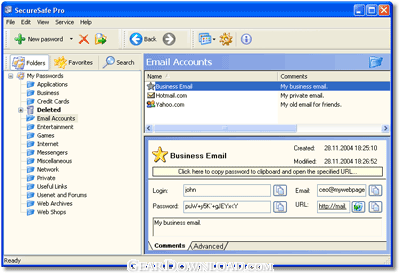
SecureSafe Pro - Need to store all confidential information in one place? This is the solution!
If you are having problems remembering all your access passwords and logins, would like to protect yourself against identity theft and need a reliable software solution to store files with confidential information in one place safely and securely, you need to get SecureSafe Pro. Sure, it may sound like a sales push, but you'll change your mind once you try it. After all, great software sells itself. And here is why:
First, SecureSafe Pro is 100% free to download and try. Second, it uses a military-grade encryption standard approved and used by the US Department of Defense (namely AES, Advanced Encryption Standard with 256-bit key). Third, it frees you from having to remember all of your passwords and logins. They are stored in a database tree, which is very easy to search and navigate.
When you visit a site, simply click the SecureSafe Pro icon conveniently located in the system tray, enter your access password and that's it. Never check "Remember my login and password" box on websites, since this is not safe and may lead to hackers getting access to your private information, or worse yet - stealing your identity. Use SecureSafe Pro instead.
The program also includes a number of safety precautions, such as the unloading of access data if the program is left idle, and a "tough password generator" feature.
This program is not just another password keeper. You can store regular files inside the program. The program can store any file and all files can be launched from SecureSafe Pro. The files stored with SecureSafe Pro won't be visible and accessible to anybody but you. There are no limits to how many entries you can store and the program is incredibly easy to use.
If you find any solution that works better than SecureSafe Pro, let us know. But since such a program has not yet been released, we suggest you take advantage of your free SecureSafe Pro test drive.
What's New: SecureSafe Pro works well under Windows 8. 24 new custom icons have been added. Now SecureSafe Pro allow you to choose from more than 330 icons for each item!
Limitations: You cannot add more than 20 items in the unregistered version.
If you are having problems remembering all your access passwords and logins, would like to protect yourself against identity theft and need a reliable software solution to store files with confidential information in one place safely and securely, you need to get SecureSafe Pro. Sure, it may sound like a sales push, but you'll change your mind once you try it. After all, great software sells itself. And here is why:
First, SecureSafe Pro is 100% free to download and try. Second, it uses a military-grade encryption standard approved and used by the US Department of Defense (namely AES, Advanced Encryption Standard with 256-bit key). Third, it frees you from having to remember all of your passwords and logins. They are stored in a database tree, which is very easy to search and navigate.
When you visit a site, simply click the SecureSafe Pro icon conveniently located in the system tray, enter your access password and that's it. Never check "Remember my login and password" box on websites, since this is not safe and may lead to hackers getting access to your private information, or worse yet - stealing your identity. Use SecureSafe Pro instead.
The program also includes a number of safety precautions, such as the unloading of access data if the program is left idle, and a "tough password generator" feature.
This program is not just another password keeper. You can store regular files inside the program. The program can store any file and all files can be launched from SecureSafe Pro. The files stored with SecureSafe Pro won't be visible and accessible to anybody but you. There are no limits to how many entries you can store and the program is incredibly easy to use.
If you find any solution that works better than SecureSafe Pro, let us know. But since such a program has not yet been released, we suggest you take advantage of your free SecureSafe Pro test drive.
What's New: SecureSafe Pro works well under Windows 8. 24 new custom icons have been added. Now SecureSafe Pro allow you to choose from more than 330 icons for each item!
Limitations: You cannot add more than 20 items in the unregistered version.
Feature List:
- Stores all your access passwords and logins
- Fully customizable fields for each item
- You can store regular files inside the program
- Very easy to search and navigate
- Program icon conveniently located in the system tray
- Uses military-grade encryption standard approved and used by the US Department of Defense (namely AES, Advanced Encryption Standard with 256-bit key)
- Tough password generator
- It frees you from having to remember all of your passwords and logins
- There are no limits to how many entries you can store
- More than 100 custom icons for each item
- Quick operation
100% Clean:
 SecureSafe Pro 3.2 is 100% clean
This download (securesafepro_setup.exe) was tested thoroughly and was found 100% clean. Click "Report Spyware" link on the top if you found this software contains any form of malware, including but not limited to: spyware, viruses, trojans and backdoors.
Related Software:
- Mar Password Generator 1.28 - Aallows to generate any quantity of passwords with one mouse click.
- PassMonster 2.25 - Passwords storing & management suite with 256-bit encryption for extra security
- SecureWallet 1.01 - SecureWallet is a digital key chains for your computer
- Atomic Asterisk Cracker 1.10 - Asterisk Cracker is designed for the hidden with asterisks fields scanning.
- Aqua Deskperience 1.3.14 - Copy/Paste unavailable?Capture any text visible on the screen with a hot key.
- Atomic Mailbox Password Recovery 2.90 - Recovers passwords to mail boxes of any e-mail client in less than no time.
- SpotAuditor 5.1.5 - SpotAuditor is password recovery software, recovers over 40 programs passwords.
- Atomic IE Password Recovery 2.00 - Recovers passwords saved in all versions of Internet Explorer in a while
- FaceCode Password Bank v - 1.0 - FaceCode Password Bank log you on to your secure websites using face recognition
- Captain Mnemo Pro 1.41 - This program will record all that you type as passwords automatically to a log.
top 10 most downloaded


recommended software
-
- Folder Lock
- Folder Lock is a data security solution that encrypt & secures your files, while keeping an automatic and real-time backup of encrypted files in the b...
-
- Emsisoft Anti-Malware
- Emsisoft Anti-Malware is a premium anti-malware program to clean and protect your PC from all internet threats: viruses, spyware, trojans, bots, adwar...