Index >> Security & Privacy >> Encryption Tools >> SafeBit Disk Encryption
Report SpywareSafeBit Disk Encryption 1.8

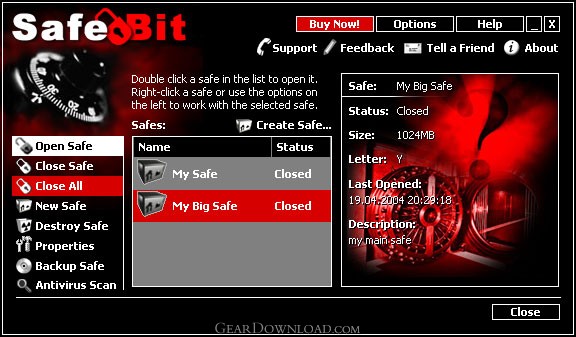 Click to enlarge screenshot
Software Description:
SafeBit Disk Encryption - Hide your sensitive files and important documents in virtual encrypted drives
SafeBit Disk Encryption is the perfect electronic vault you need for your privacy. It features on-the-fly AES encryption, by creating virtual encrypted disk drives, where you can hide files and folders, keep them encrypted all the time, but still work with them just like you work with normal files. Data is decrypted automatically during the transfer from disk to memory, and re-encrypted when data is written back to disk. This process is transparent to the user. Safes can be created on your local or external hard-disks, on USB sticks or other removable devices, on CD/DVD, and over the network, in full-rights mode, or read-only mode. You can save the passwords on removable disk devices, such as USB stick, memory cards, and use them as key to open your safes. SafeBit allows you to change the name, description, drive letter, password, size and you can also set to open safes automatically on Windows start-up. SafeBit maintains the security of data even in case of incorrect system shutdown or system crash by keeping the files always encrypted. Container files are protected against accidental deletion. Security is increased also by the "automatic closure system" and emergency hotkeys. To improve the security of your data you can use the Virtual Keyboard while entering the passwords, this will prevent any key logger software from stealing them. Safebit is the perfect supplement to a firewall and antivirus program, and stands as the last line of defense in case these fail. Nothing can crack the strong 256-bit AES encryption SafeBit uses (selected by the U.S. government as its official encryption standard). SafeBit has a very intuitive user interface which makes it friendly for computer beginners and also powerful for experienced IT experts that search for a reliable file encryption solution. It will protect your confidential information against possible thefts, or from your boss, wife, kids, competitors, hackers, viruses or trojans even if your firewall fails.
What's New: Windows 7 Compatibility, All platforms 64-bit compatibility, Command-line parameters support
Limitations: 15 Days Trial
SafeBit Disk Encryption is the perfect electronic vault you need for your privacy. It features on-the-fly AES encryption, by creating virtual encrypted disk drives, where you can hide files and folders, keep them encrypted all the time, but still work with them just like you work with normal files. Data is decrypted automatically during the transfer from disk to memory, and re-encrypted when data is written back to disk. This process is transparent to the user. Safes can be created on your local or external hard-disks, on USB sticks or other removable devices, on CD/DVD, and over the network, in full-rights mode, or read-only mode. You can save the passwords on removable disk devices, such as USB stick, memory cards, and use them as key to open your safes. SafeBit allows you to change the name, description, drive letter, password, size and you can also set to open safes automatically on Windows start-up. SafeBit maintains the security of data even in case of incorrect system shutdown or system crash by keeping the files always encrypted. Container files are protected against accidental deletion. Security is increased also by the "automatic closure system" and emergency hotkeys. To improve the security of your data you can use the Virtual Keyboard while entering the passwords, this will prevent any key logger software from stealing them. Safebit is the perfect supplement to a firewall and antivirus program, and stands as the last line of defense in case these fail. Nothing can crack the strong 256-bit AES encryption SafeBit uses (selected by the U.S. government as its official encryption standard). SafeBit has a very intuitive user interface which makes it friendly for computer beginners and also powerful for experienced IT experts that search for a reliable file encryption solution. It will protect your confidential information against possible thefts, or from your boss, wife, kids, competitors, hackers, viruses or trojans even if your firewall fails.
What's New: Windows 7 Compatibility, All platforms 64-bit compatibility, Command-line parameters support
Limitations: 15 Days Trial
100% Clean:
 SafeBit Disk Encryption 1.8 is 100% clean
This download (safebit.exe) was tested thoroughly and was found 100% clean. Click "Report Spyware" link on the top if you found this software contains any form of malware, including but not limited to: spyware, viruses, trojans and backdoors.
Related Software:
- Invisible Secrets 4.3 - The complete security suite for all your data/communication needs
- Invisible Secrets Encryption Software 4.7 - The complete security suite for all your data/communication needs
- Advanced Encryption Package 2008 Professional 4.8.7 - Military grade files encryption, AES, RSA, USB Flash support. 18 Wipe algs.
- Advanced Encryption Package 2017 6.06 - 128-2048 bit file encryption, secure file deletion, self-decrypting files
- Folder Lock 7.6.9 - Data Security Software, Cloud Backup and Encrypted Security Solution
- LetEncrypt 1.0.0.0 - Encrypt your text files with unlimited high levels of encryption algorithms.
- Accent Internet Password Recovery 1.00 - Instantly recover passwords from your Internet apps. Try iy free!
- Armor System5 2.2.2 - Professional, easy-to-use encryption program for serious users.
- AsMask 2.6 - Send secret data securely over the Internet by encrypt and hide it into images
- CryptoForge 5.1.0 - Data encryption software for email, folder and file encryption.
top 10 most downloaded


recommended software
-
- Folder Lock
- Folder Lock is a data security solution that encrypt & secures your files, while keeping an automatic and real-time backup of encrypted files in the b...
-
- Emsisoft Anti-Malware
- Emsisoft Anti-Malware is a premium anti-malware program to clean and protect your PC from all internet threats: viruses, spyware, trojans, bots, adwar...