Index >> Security & Privacy >> Encryption Tools >> PenProtect
Report SpywarePenProtect 1.45

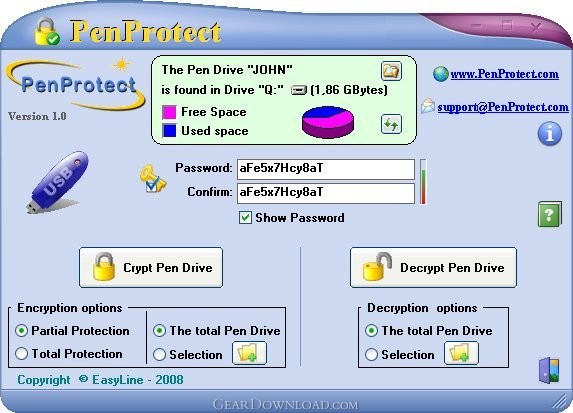 Click to enlarge screenshot
Software Description:
PenProtect - The encryption solution to secure your USB Flash Drive with AES 256 and Password
PenProtect is the most comprehensive and secure solution to protect the files within your USB Flash Drive, Flash Memory or Pen Drive.Files are encrypted and protected using your Password and a special technique (AES algorithm 256 bit key).
PenProtect requires no installation: it is a single file located in the home folder of your Flash Drive. Ability to encrypt or decrypt only required files. No size limit of encrypted files. Two protection levels (Partial and Total).
Unique and individual protection for every USB Flash Drive, Flash Memory or Pen Drive with your Password. Your own USB Flash Drive or Pen Drive is individually unique. The same encrypted files cannot be decrypted by a user utilizing PenProtect with your same password!The integrity of your data (Flash Drive or Pen Drive) is continually being monitored by PenProtect.Using PenProtect you can secure your data saved in your Flash Drive, Pen Drive, Flash Memory or any memory made with USB Flash Drive.The Flash Drive, Flash Memory or Pen Drive is a USB Flash Memory Drive and can support up to 128GB disk space. A 8GB is 5600 times more than a 1.44MB floppy disk! A Flash Drive USB disk is a plug and play device. Simply plug it into any USB port and the computer will automatically detect it as a removable drive. Now you can read, write, copy, delete and move data from your hard disk drive to the USB Flash Drive or vice versa.
Thanks to its small size, absence of mobile mechanisms (unlike a common hard disk) and affordable price, the USB Flash Drive or Pen Drive is becoming increasingly popular among consumers. Unfortunately, users can often forget their USB Flash Drive or Pen Drive in a computer, allowing other users to access their personal data. PenProtect is meant to secure your data in cases such as these. Finally a fast, secure and easy program using attractive graphics!
PenProtect is the most comprehensive and secure solution to protect the files within your USB Flash Drive, Flash Memory or Pen Drive.Files are encrypted and protected using your Password and a special technique (AES algorithm 256 bit key).
PenProtect requires no installation: it is a single file located in the home folder of your Flash Drive. Ability to encrypt or decrypt only required files. No size limit of encrypted files. Two protection levels (Partial and Total).
Unique and individual protection for every USB Flash Drive, Flash Memory or Pen Drive with your Password. Your own USB Flash Drive or Pen Drive is individually unique. The same encrypted files cannot be decrypted by a user utilizing PenProtect with your same password!The integrity of your data (Flash Drive or Pen Drive) is continually being monitored by PenProtect.Using PenProtect you can secure your data saved in your Flash Drive, Pen Drive, Flash Memory or any memory made with USB Flash Drive.The Flash Drive, Flash Memory or Pen Drive is a USB Flash Memory Drive and can support up to 128GB disk space. A 8GB is 5600 times more than a 1.44MB floppy disk! A Flash Drive USB disk is a plug and play device. Simply plug it into any USB port and the computer will automatically detect it as a removable drive. Now you can read, write, copy, delete and move data from your hard disk drive to the USB Flash Drive or vice versa.
Thanks to its small size, absence of mobile mechanisms (unlike a common hard disk) and affordable price, the USB Flash Drive or Pen Drive is becoming increasingly popular among consumers. Unfortunately, users can often forget their USB Flash Drive or Pen Drive in a computer, allowing other users to access their personal data. PenProtect is meant to secure your data in cases such as these. Finally a fast, secure and easy program using attractive graphics!
Feature List:
- PenProtect requires no installation. It is a single file located in the home folder of your Flash Drive, Flash Memory or Pen Drive
- Data protection is performed using an AES encryption (256-bit key) without changing the Flash Drive, Flash Memory or Pen Drive partition
- Two protection levels (Partial and Total)
- Ability to encrypt or decrypt only required files
- Immediate use of PenProtect
- No size limit of encrypted files
- Unique and individual protection for every Flash Drive, Flash Memory or Pen Drive with your Password
- PenProtect comes with an internal manual that can be viewed with no Internet connection
- Program PenProtect comes in many languages
- Free technical assistance
User Reviews:
- I have just found your product on the internet and have had a go at the demo version. Looks pretty easy to use, however when I try to access the encrypted file by running penprotect.exe within the usb drive it allows me to unencrypt it with the existing password, so anyone could do this if they had my usb flash drive. Thank you
Ale - July 26, 2010 - 5/5 stars
100% Clean:
 PenProtect 1.45 is 100% clean
This download (PenProtect.exe) was tested thoroughly and was found 100% clean. Click "Report Spyware" link on the top if you found this software contains any form of malware, including but not limited to: spyware, viruses, trojans and backdoors.
Related Software:
- Invisible Secrets 4.3 - The complete security suite for all your data/communication needs
- Advanced Encryption Package 2008 Professional 4.8.7 - Military grade files encryption, AES, RSA, USB Flash support. 18 Wipe algs.
- Advanced Encryption Package 2017 6.06 - 128-2048 bit file encryption, secure file deletion, self-decrypting files
- Folder Lock 7.6.9 - Data Security Software, Cloud Backup and Encrypted Security Solution
- LetEncrypt 1.0.0.0 - Encrypt your text files with unlimited high levels of encryption algorithms.
- Accent Internet Password Recovery 1.00 - Instantly recover passwords from your Internet apps. Try iy free!
- Armor System5 2.2.2 - Professional, easy-to-use encryption program for serious users.
- AsMask 2.6 - Send secret data securely over the Internet by encrypt and hide it into images
- CryptoForge 5.1.0 - Data encryption software for email, folder and file encryption.
- Secure Hive 1.3.0.2 - Encryption tool for emails, documents and part documents
top 10 most downloaded


recommended software
-
- Folder Lock
- Folder Lock is a data security solution that encrypt & secures your files, while keeping an automatic and real-time backup of encrypted files in the b...
-
- Emsisoft Anti-Malware
- Emsisoft Anti-Malware is a premium anti-malware program to clean and protect your PC from all internet threats: viruses, spyware, trojans, bots, adwar...