Index >> Security & Privacy >> Password Managers >> KeePass (2.x)
Report SpywareKeePass (2.x) 2.23

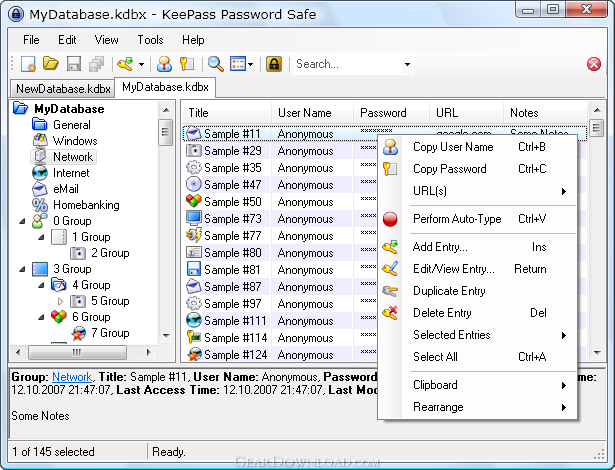 Click to enlarge screenshot
Software Description:
KeePass (2.x) - KeePass is a free, open source, light-weight and easy-to-use password manager.
KeePass is a free, open source, light-weight and easy-to-use password manager for Windows, Linux, Mac OS X and mobile devices. You can store your passwords in highly-encrypted databases, which can only be unlocked with one master password and/or a key file.
A database consists of only one file that can be transferred from one computer to another easily. The program supports password groups, in which you can sort your passwords into.
You can drag-n-drop passwords into almost any other window. The auto-type feature types your login information into other windows automatically (just press a hot key). Fast copying passwords or user names to the clipboard is possible by just double-clicking on the specific field in the password list.
KeePass can import data from various file formats. The password list can be exported to various formats, including TXT, HTML, XML and CSV files. The password list can of course also be printed (complete database or only current view).
Searching and sorting the password database is possible.
KeePass ships with a strong random password generator (you can define the possible output characters, length, patterns, rules and restrictions).
The program is available in over 40 languages. It has a plugin framework; plugins provide additional functionality like backup features, network features, integration with other applications, etc.; they are available from the KeePass website.
What's New: KeePass 2.23 mainly features a new password quality estimation algorithm, user interface enhancements (new toolbar buttons, context menu commands, ...), and various other minor new features and improvements.
KeePass is a free, open source, light-weight and easy-to-use password manager for Windows, Linux, Mac OS X and mobile devices. You can store your passwords in highly-encrypted databases, which can only be unlocked with one master password and/or a key file.
A database consists of only one file that can be transferred from one computer to another easily. The program supports password groups, in which you can sort your passwords into.
You can drag-n-drop passwords into almost any other window. The auto-type feature types your login information into other windows automatically (just press a hot key). Fast copying passwords or user names to the clipboard is possible by just double-clicking on the specific field in the password list.
KeePass can import data from various file formats. The password list can be exported to various formats, including TXT, HTML, XML and CSV files. The password list can of course also be printed (complete database or only current view).
Searching and sorting the password database is possible.
KeePass ships with a strong random password generator (you can define the possible output characters, length, patterns, rules and restrictions).
The program is available in over 40 languages. It has a plugin framework; plugins provide additional functionality like backup features, network features, integration with other applications, etc.; they are available from the KeePass website.
What's New: KeePass 2.23 mainly features a new password quality estimation algorithm, user interface enhancements (new toolbar buttons, context menu commands, ...), and various other minor new features and improvements.
100% Clean:
 KeePass (2.x) 2.23 is 100% clean
This download (KeePass-2.23-Setup.exe) was tested thoroughly and was found 100% clean. Click "Report Spyware" link on the top if you found this software contains any form of malware, including but not limited to: spyware, viruses, trojans and backdoors.
Related Software:
- KeePass (1.x) 1.26 - KeePass is a free, open source, light-weight and easy-to-use password manager.
- PassMonster 2.25 - Passwords storing & management suite with 256-bit encryption for extra security
- SecureWallet 1.01 - SecureWallet is a digital key chains for your computer
- Atomic Asterisk Cracker 1.10 - Asterisk Cracker is designed for the hidden with asterisks fields scanning.
- Aqua Deskperience 1.3.14 - Copy/Paste unavailable?Capture any text visible on the screen with a hot key.
- Atomic Mailbox Password Recovery 2.90 - Recovers passwords to mail boxes of any e-mail client in less than no time.
- SpotAuditor 5.1.5 - SpotAuditor is password recovery software, recovers over 40 programs passwords.
- Atomic IE Password Recovery 2.00 - Recovers passwords saved in all versions of Internet Explorer in a while
- FaceCode Password Bank v - 1.0 - FaceCode Password Bank log you on to your secure websites using face recognition
- Captain Mnemo Pro 1.41 - This program will record all that you type as passwords automatically to a log.
top 10 most downloaded


recommended software
-
- Folder Lock
- Folder Lock is a data security solution that encrypt & secures your files, while keeping an automatic and real-time backup of encrypted files in the b...
-
- Emsisoft Anti-Malware
- Emsisoft Anti-Malware is a premium anti-malware program to clean and protect your PC from all internet threats: viruses, spyware, trojans, bots, adwar...