Index >> Security & Privacy >> Anti-Spam & Anti-Spy Tools >> G-Lock SpamCombat
Report SpywareG-Lock SpamCombat 3.0

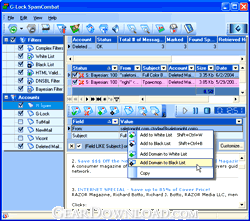 Click to enlarge screenshot
Software Description:
G-Lock SpamCombat - Your powerful solution for clearing Inbox from spam, virus, and junk emails
G-Lock SpamCombat is your powerful solution for clearing Inbox from spam, virus, and junk emails. G-Lock SpamCombat is antispam software that lets you eliminate all unwanted messages at the server level without receiving them with your email client.
G-Lock SpamCombat uses a powerful set of filters to prevent spam from entering your inbox: Complex Filter, Whitelist, Blacklist, HTML Validator, DNSBL filter, and the Bayesian filter.
G-Lock SpamCombat lets you preview incoming emails in the following formats: HTML, Message Source, and Message body (decoded message). HTML preview is absolutely safe. No pictures are actually downloaded, no hidden scripts, or codes are executed.
With G-Lock SpamCombat you can:
* Filter spam from POP3 and IMAP accounts
* Block Spam by Country of Origin
* Filter spam from the email accounts with secure protocols (SSL/TSL)
* Delete spam BEFORE it reaches your inbox
* Effectively stop viruses and malicious codes
* Safely preview all the emails - no pictures are downloaded, no hidden scripts or codes are executed
* Filter spam from multiple email accounts at a time in a fully automatic mode
* Cut down unproductive email traffic and save bandwidth
* Recover deleted emails in your regular email client
* Easily backup and restore your profile (accounts and filters settings).
* View comprehensive statistics graphs on processed messages
What's New: Available as FREEWARE. No paid version anymore. Added: ability to retrieve the whole message from the server. See Settings -> General.
G-Lock SpamCombat is your powerful solution for clearing Inbox from spam, virus, and junk emails. G-Lock SpamCombat is antispam software that lets you eliminate all unwanted messages at the server level without receiving them with your email client.
G-Lock SpamCombat uses a powerful set of filters to prevent spam from entering your inbox: Complex Filter, Whitelist, Blacklist, HTML Validator, DNSBL filter, and the Bayesian filter.
G-Lock SpamCombat lets you preview incoming emails in the following formats: HTML, Message Source, and Message body (decoded message). HTML preview is absolutely safe. No pictures are actually downloaded, no hidden scripts, or codes are executed.
With G-Lock SpamCombat you can:
* Filter spam from POP3 and IMAP accounts
* Block Spam by Country of Origin
* Filter spam from the email accounts with secure protocols (SSL/TSL)
* Delete spam BEFORE it reaches your inbox
* Effectively stop viruses and malicious codes
* Safely preview all the emails - no pictures are downloaded, no hidden scripts or codes are executed
* Filter spam from multiple email accounts at a time in a fully automatic mode
* Cut down unproductive email traffic and save bandwidth
* Recover deleted emails in your regular email client
* Easily backup and restore your profile (accounts and filters settings).
* View comprehensive statistics graphs on processed messages
What's New: Available as FREEWARE. No paid version anymore. Added: ability to retrieve the whole message from the server. See Settings -> General.
Feature List:
- Self learning. SpamCombat learns from the spam and good email you receive to provide you with great precision and accuracy in solving your spam problem
- Deletion of unwanted emails without downloading them into your inbox. You can preview the message in a quite safe and secure mode to decide if you want to delete this email or keep it. A great way to stop viruses, tracking codes, and large attachments
- Whitelist. Add known sources, from which you receive legitimate emails to the Whitelist and these emails will be always recognized as good
- Blacklist. Solid SpamCombat Blacklist provides you with the efficient way to stop most common types of spam and virus emails. You are also able to add your own items to the Blacklist
- Filtering. Can simultaneously filter emails from multiple email accounts and automatically delete spam so you will not even see it on the screen
- Automatic mode. Can check mail at different time intervals
- Recovering emails. If you accidentally deleted a good message, SpamCombat provides you the ability to recover it from the trash for further receiving with your email client
- Easy way to backup and restore profile. G-Lock SpamCombat provides you with a quick and easy way to backup and restore your profile (accounts and filters settings). It is very useful option if you would like to move the program on another computer or simply re-install it. You can save a backup of all your data and restore it in the new program installation at any time
- Statistics. Shows you the statistics on processed messages in comprehensive tables in grahps
- Easy customizable interface. You can customize the menus, toolbars, grids and message preview screen as you want: add/remove buttons and options from the toolbars and menus, show/hide columns within the grids, and choose the format of the message preview screen by yourself
- Simplicity. In spite of its sophisticated interface, SpamCombat is easy to use and doesn't require you to be a very experienced user. You just check your mail, mark unwanted messages for deletion and let SpamCombat delete them from the server
- Economy. Saves your bandwidth and money by cutting down unproductive email traffic
- Other features: Can work minimized to the system tray. Play a sound when a new email arrives, or notifies you visually. Comprehensive Help documentation provided with software. Printable User Manual (PDF) *. Quick Startup Guide
100% Clean:
 G-Lock SpamCombat 3.0 is 100% clean
This download (spamcombat.zip) was tested thoroughly and was found 100% clean. Click "Report Spyware" link on the top if you found this software contains any form of malware, including but not limited to: spyware, viruses, trojans and backdoors.
Related Software:
- Casper Spam Hunter 4.1 - The easiest way to check and manage your mail before you download it
- SpamSource 5.0.0.120 - SpamSource is a great tool for helping report junk email in Microsoft Outlook
- Out Spam 1.1 - It is a mail filter that removes spam from POP3 mail servers.
- Alchemy Spam Filter for Outlook Express 1.1 - Anti Spam plugin for Outlook Express with with Bayes filtering and rules
- Acronis Privacy Expert Suite 9.0 - The most comprehensive anti-spyware and security suite for your home PC
- My Privacy Total 3.3 - Analyze your privacy vulnerability!
- HiddenFinder 1.5.7 - A security tool to detect and kill the hidden spyware, backdoor, rootkit & virus
- Spyware and Adware Removal Training 1.0 - Training software to teach you what spyware is and how to get rid of it.
- SpyZooka 2.5 - SpyZooka guarantees 100% removal of spyware, adware, hijackers, and malware
- Max Spyware Detector 19.0.2.044 - Scans, Detects, Deletes Spyware, Malware giving you safe browsing experience
top 10 most downloaded


recommended software
-
- Folder Lock
- Folder Lock is a data security solution that encrypt & secures your files, while keeping an automatic and real-time backup of encrypted files in the b...
-
- Emsisoft Anti-Malware
- Emsisoft Anti-Malware is a premium anti-malware program to clean and protect your PC from all internet threats: viruses, spyware, trojans, bots, adwar...