Index >> Security & Privacy >> Access Control >> Desktop Security Rx
Report SpywareDesktop Security Rx 4.0

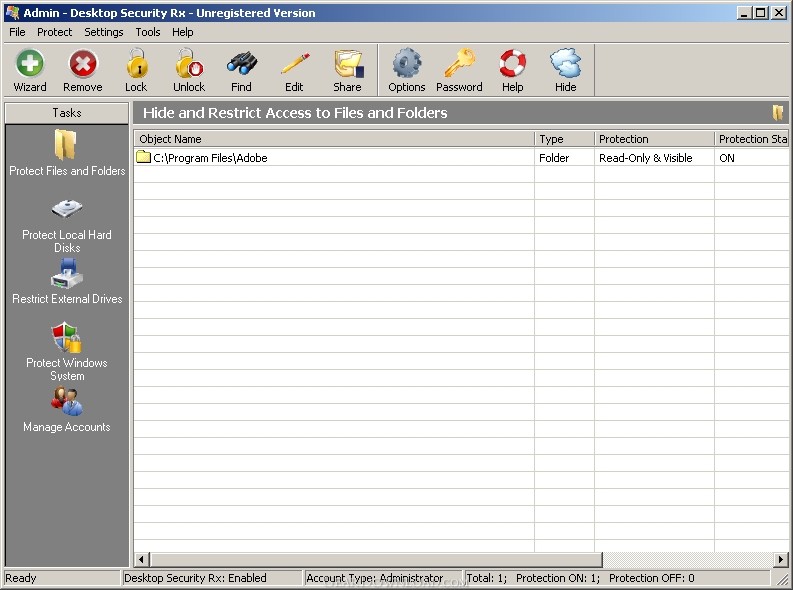 Click to enlarge screenshot
Software Description:
Desktop Security Rx - Desktop security solution that is ideal for locking-down computer configurations
Desktop Security Rx can disable access to Control Panel, Folder Options, Registry Editor, Command Prompt, Start Menu, Local Security Policy, and other critical settings of a Windows 2000/XP/Server 2003 system.
Disable automatic password caching
Disable display of last user name on the logon dialog
Delete pagefiles at Windows start up
Turn the ADMIN$ and drive sharing off
Disable access to workstation via the NetHood
Turn anonymous connections off
Turn the remote registry service off
Disable access to the Control Panel
Disable access to the Folder Options
Hide icons from the Desktop
Prevent modifications to the Start Menu
Remove the Run item from the Start Menu
Remove the Log Off item from the Start Menu
Disable the built-in Search function from Explorer
Remove the Shut Down item from the Start Menu
Disallow the deleting of Printer(s)
Disallow the addition of Printer(s)
Disable access to the Task Manager
Disable the Registry Editor
Disable Locking workstation
Disable Password Changing
Disable Network Drive Mapping
Display a customized Legal Notice before any logon
Desktop Security Rx keeps files and folders secure and safe by hiding and locking them, or by making them read-only with a password. When a file or folder is protected its' contents are invisible to all applications including Windows programs like Explorer, Office, and even MS-DOS programs. Our protection wizard offers four unique levels of protection:
Lock-down& Restrict Use of USB / External Drives
Desktop Security Rx offers you the ability to block local hard drives and removable media drives as well as any local file, folder, or executable. Additionally, you can also set removable drives to be accessible but read-only. This enables users to use USB drives (thumb drives/memory sticks) to transfer files to the PC(s) while preventing them from removing files out of the PC(s).
Desktop Security Rx can disable access to Control Panel, Folder Options, Registry Editor, Command Prompt, Start Menu, Local Security Policy, and other critical settings of a Windows 2000/XP/Server 2003 system.
Disable automatic password caching
Disable display of last user name on the logon dialog
Delete pagefiles at Windows start up
Turn the ADMIN$ and drive sharing off
Disable access to workstation via the NetHood
Turn anonymous connections off
Turn the remote registry service off
Disable access to the Control Panel
Disable access to the Folder Options
Hide icons from the Desktop
Prevent modifications to the Start Menu
Remove the Run item from the Start Menu
Remove the Log Off item from the Start Menu
Disable the built-in Search function from Explorer
Remove the Shut Down item from the Start Menu
Disallow the deleting of Printer(s)
Disallow the addition of Printer(s)
Disable access to the Task Manager
Disable the Registry Editor
Disable Locking workstation
Disable Password Changing
Disable Network Drive Mapping
Display a customized Legal Notice before any logon
Desktop Security Rx keeps files and folders secure and safe by hiding and locking them, or by making them read-only with a password. When a file or folder is protected its' contents are invisible to all applications including Windows programs like Explorer, Office, and even MS-DOS programs. Our protection wizard offers four unique levels of protection:
Lock-down& Restrict Use of USB / External Drives
Desktop Security Rx offers you the ability to block local hard drives and removable media drives as well as any local file, folder, or executable. Additionally, you can also set removable drives to be accessible but read-only. This enables users to use USB drives (thumb drives/memory sticks) to transfer files to the PC(s) while preventing them from removing files out of the PC(s).
100% Clean:
 Desktop Security Rx 4.0 is 100% clean
This download (desktop_security_client.zip) was tested thoroughly and was found 100% clean. Click "Report Spyware" link on the top if you found this software contains any form of malware, including but not limited to: spyware, viruses, trojans and backdoors.
Related Software:
- Hide Files & Folders 3.594 - Hide Files & Folders from viewing and searching, or protect them by password
- 1 Click & Lock 3.495 - Secure your desktop when you step away from your PC
- Advanced Desktop Shield 10.0 - Protect public access PCs, stop users from changing desktop wallpaper and screen
- Easy File & Folder Protector 5.131 - Password protect files and folders by a time schedule
- Host Security Personal 1.40.115 - Password-protect files, folders, and drives. Firewall network and stop hackers!
- Outlook Express Security 2.394 - Disable access to Outlook Express and password-protect its message base.
- Advanced Internet Kiosk 7.76 - Build Internet kiosks, public access PCs, or in-store terminals.
- Transparent Screen Lock PRO for WinNT/2000/XP/2003 4.50 - Password protect your workstation or server while viewing programs in background
- Windows Security Officer 7.5.5.56 - It enables you to protect and totally control access to you PC
- FaceCode v - 2.0 - FaceCode face recognition PC logon software protecting your personal information
top 10 most downloaded


recommended software
-
- Folder Lock
- Folder Lock is a data security solution that encrypt & secures your files, while keeping an automatic and real-time backup of encrypted files in the b...
-
- Emsisoft Anti-Malware
- Emsisoft Anti-Malware is a premium anti-malware program to clean and protect your PC from all internet threats: viruses, spyware, trojans, bots, adwar...