Index >> Security & Privacy >> Encryption Tools >> Crippin
Report SpywareCrippin 2.14

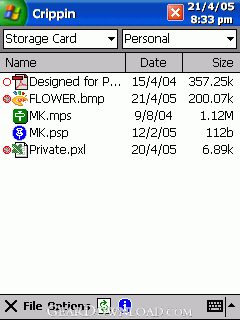 Click to enlarge screenshot
Software Description:
Crippin password-protects files in case a Pocket PC is lost or stolen.
Crippin was designed to protect confidential files (text documents, spreadsheets, graphics, photographs, multimedia, etc.) in case a Pocket PC is lost or stolen. It’s been designed to be quick-and-easy to use, small (minimal executable size), miserly (with respect to storage required both during and after encryption), and secure (using 128-bit RSA encryption, where available, and wiping both passwords and unencrypted data after use).
Crippin is compatible with all versions of the Pocket PC / Windows Mobile operating system and hardware, whether based on ARM, MIPS, SH3, or XScale processors. It doesn’t require .NET, Visual Basic, or MFC libraries - the only files it adds to the Windows system directory are shortcuts and a help file. It’s small and efficient and won’t put a strain on your Pocket PC’s resources.
Most Crippin-encrypted files are less than half the size of the originals, so it can be used purely for compression too. If you only want to use it for compression, just leave all the password fields blank.
With Crippin, you only need to type a password once in order to open an encrypted file, edit it and re-encrypt it. You do have to remember to close the application and re-encrypt the file once you’ve edited it, but that only takes a few taps of the screen so is not too onerous.
The appropriate dialogues pop up automatically, with fields pre-filled whenever it’s safe to do so. When encrypting a number of files with the same password, that password only has to be typed once for each file.
There are also various batch operations, allowing some or all files to be encrypted or decrypted using a single password. This allows multiple files to be processed efficiently, simply by placing them all in the same folder, or by setting or clearing their “hidden” attributes.
Crippin includes a tap-and-hold context menu, which allows it to be used as a simple file manager: moving, renaming, copying, deleting and changing of files’ hidden attributes.
What's New: Fixed installation for modern devices (Windows Mobile 6 and above).
Crippin was designed to protect confidential files (text documents, spreadsheets, graphics, photographs, multimedia, etc.) in case a Pocket PC is lost or stolen. It’s been designed to be quick-and-easy to use, small (minimal executable size), miserly (with respect to storage required both during and after encryption), and secure (using 128-bit RSA encryption, where available, and wiping both passwords and unencrypted data after use).
Crippin is compatible with all versions of the Pocket PC / Windows Mobile operating system and hardware, whether based on ARM, MIPS, SH3, or XScale processors. It doesn’t require .NET, Visual Basic, or MFC libraries - the only files it adds to the Windows system directory are shortcuts and a help file. It’s small and efficient and won’t put a strain on your Pocket PC’s resources.
Most Crippin-encrypted files are less than half the size of the originals, so it can be used purely for compression too. If you only want to use it for compression, just leave all the password fields blank.
With Crippin, you only need to type a password once in order to open an encrypted file, edit it and re-encrypt it. You do have to remember to close the application and re-encrypt the file once you’ve edited it, but that only takes a few taps of the screen so is not too onerous.
The appropriate dialogues pop up automatically, with fields pre-filled whenever it’s safe to do so. When encrypting a number of files with the same password, that password only has to be typed once for each file.
There are also various batch operations, allowing some or all files to be encrypted or decrypted using a single password. This allows multiple files to be processed efficiently, simply by placing them all in the same folder, or by setting or clearing their “hidden” attributes.
Crippin includes a tap-and-hold context menu, which allows it to be used as a simple file manager: moving, renaming, copying, deleting and changing of files’ hidden attributes.
What's New: Fixed installation for modern devices (Windows Mobile 6 and above).
100% Clean:
 Crippin 2.14 is 100% clean
This download (Crippin_2_14_Free_Setup.exe) was tested thoroughly and was found 100% clean. Click "Report Spyware" link on the top if you found this software contains any form of malware, including but not limited to: spyware, viruses, trojans and backdoors.
Related Software:
- Invisible Secrets 4.3 - The complete security suite for all your data/communication needs
- Advanced Encryption Package 2008 Professional 4.8.7 - Military grade files encryption, AES, RSA, USB Flash support. 18 Wipe algs.
- Advanced Encryption Package 2017 6.06 - 128-2048 bit file encryption, secure file deletion, self-decrypting files
- Folder Lock 7.6.9 - Data Security Software, Cloud Backup and Encrypted Security Solution
- LetEncrypt 1.0.0.0 - Encrypt your text files with unlimited high levels of encryption algorithms.
- Accent Internet Password Recovery 1.00 - Instantly recover passwords from your Internet apps. Try iy free!
- Armor System5 2.2.2 - Professional, easy-to-use encryption program for serious users.
- AsMask 2.6 - Send secret data securely over the Internet by encrypt and hide it into images
- CryptoForge 5.1.0 - Data encryption software for email, folder and file encryption.
- Secure Hive 1.3.0.2 - Encryption tool for emails, documents and part documents
top 10 most downloaded


recommended software
-
- Folder Lock
- Folder Lock is a data security solution that encrypt & secures your files, while keeping an automatic and real-time backup of encrypted files in the b...
-
- Emsisoft Anti-Malware
- Emsisoft Anti-Malware is a premium anti-malware program to clean and protect your PC from all internet threats: viruses, spyware, trojans, bots, adwar...