Index >> Network & Internet >> Trace & Ping Tools >> SI Trace
Report SpywareSI Trace 1.0

 Click to enlarge screenshot
Software Description:
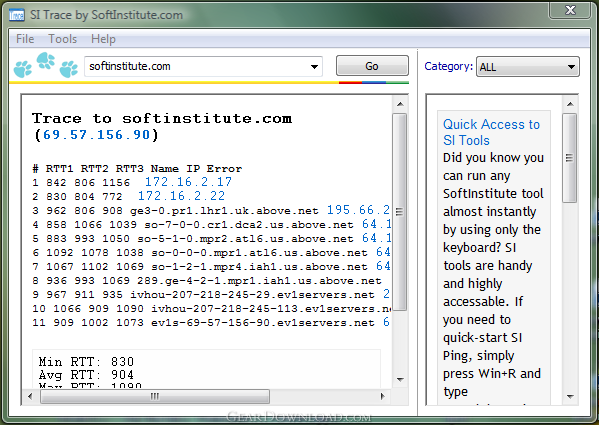
SI Trace - Free Windows tool determines the route packets travel across an IP network
If you cannot connect to a computer over a network, there might be something wrong with the remote PC or with your Internet connection. Or your router might need a reset. Or your Internet provider could be having a temporarily problem that they'll eventually solve. Or maybe it's the fault of one of the routers, switches, access points, servers, or other network hosts that are in between you and the remote computer. How would you know for sure?
In the beginning of the Internet, a tool called traceroute was introduced in Unix. Traceroute does exactly what its name suggests: it traces the route of IP packets while they travel from your PC to the remote destination. The tool essentially allows you to see exactly where the connectivity problem is, no matter how far it is from your computer. The last host to respond to traceroute is the last host that is working properly. The first one that fails to respond is the faulty one.
There is a free tool called tracert.exe that comes with most versions of Windows. You can use this tool to traceroute the remote PC. To use tracert.exe, you would typically invoke a command line, which would open a black console window, and type tracert.exe followed with the IP address of the computer you want to check. Usually you would get a response right in the console window in a matter of seconds. You get the response in a Spartan-looking black console window.
While there's nothing particularly wrong in using the supplied tracert.exe, we at Soft Institute wrapped the same thing into a much more convenient package. SI Trace provides clearly legible, well-formatted output by providing easy to understand numbers and well-explained results. It displays all the vital information from classic Unix traceroute and Windows tracert commands, and allows you to check more than one computer by simply selecting the address from a combo box. Thanks to its user-friendly interface, it is much more convenient to use than Windows tracert.
If you cannot connect to a computer over a network, there might be something wrong with the remote PC or with your Internet connection. Or your router might need a reset. Or your Internet provider could be having a temporarily problem that they'll eventually solve. Or maybe it's the fault of one of the routers, switches, access points, servers, or other network hosts that are in between you and the remote computer. How would you know for sure?
In the beginning of the Internet, a tool called traceroute was introduced in Unix. Traceroute does exactly what its name suggests: it traces the route of IP packets while they travel from your PC to the remote destination. The tool essentially allows you to see exactly where the connectivity problem is, no matter how far it is from your computer. The last host to respond to traceroute is the last host that is working properly. The first one that fails to respond is the faulty one.
There is a free tool called tracert.exe that comes with most versions of Windows. You can use this tool to traceroute the remote PC. To use tracert.exe, you would typically invoke a command line, which would open a black console window, and type tracert.exe followed with the IP address of the computer you want to check. Usually you would get a response right in the console window in a matter of seconds. You get the response in a Spartan-looking black console window.
While there's nothing particularly wrong in using the supplied tracert.exe, we at Soft Institute wrapped the same thing into a much more convenient package. SI Trace provides clearly legible, well-formatted output by providing easy to understand numbers and well-explained results. It displays all the vital information from classic Unix traceroute and Windows tracert commands, and allows you to check more than one computer by simply selecting the address from a combo box. Thanks to its user-friendly interface, it is much more convenient to use than Windows tracert.
100% Clean:
 SI Trace 1.0 is 100% clean
This download (sitrace_setup.exe) was tested thoroughly and was found 100% clean. Click "Report Spyware" link on the top if you found this software contains any form of malware, including but not limited to: spyware, viruses, trojans and backdoors.
Related Software:
- TraceAlarm 1.0 - Continuous watching and monitoring of any changes of route to the remote host.
- Magic NetTrace 3.0 - Ping, WHOIS and traceroute functions combined into friendly easy-to-use tool
- Pinkie 2.15 - Network tools: Ping,Traceroute,DNS,Subnet Calc,PingSweep,PortScanner,TFTPServer
- Path Analyzer Pro 2.7 - Path discovery, whois, firewall detection, network testing
- NetInfo 8.3 - Scan your network, diagnose problem, and start troubleshooting.
- Network Ping 1.2.9.5 - Network Ping is the network diagnostic utility
- Bopup Scanner 2.1.9 - Freeware LAN scanner that resolves NetBIOS, MAC, IP addresses, HTTP servers.
- Speed Test Gold 1.0.736 - Speed Test your Internet and network while monitoring system performance.
- Active Whois Browser 5.1 - Browse all information for an IP address or domain name with a single click!
- EMCO Monitor Live Connectivity 1.1.1 - Monitor your network IP/Host for Live Connectivity 24/7
top 10 most downloaded


recommended software
-
- Gear Software Manager
- Gear Software Manager is a free software version online check software. First, Gear Software Manager scans versions of all software installed in your...
-
- Gear Flash Downloader
- Gear Flash Downloader is a free handy tool to download SWF Flash files from web pages. Gear Flash Downloader is very easy to use. Simply copy and past...