Index >> Graphic Apps >> Icon Tools >> PC Icon Editor
Report SpywarePC Icon Editor 3.6

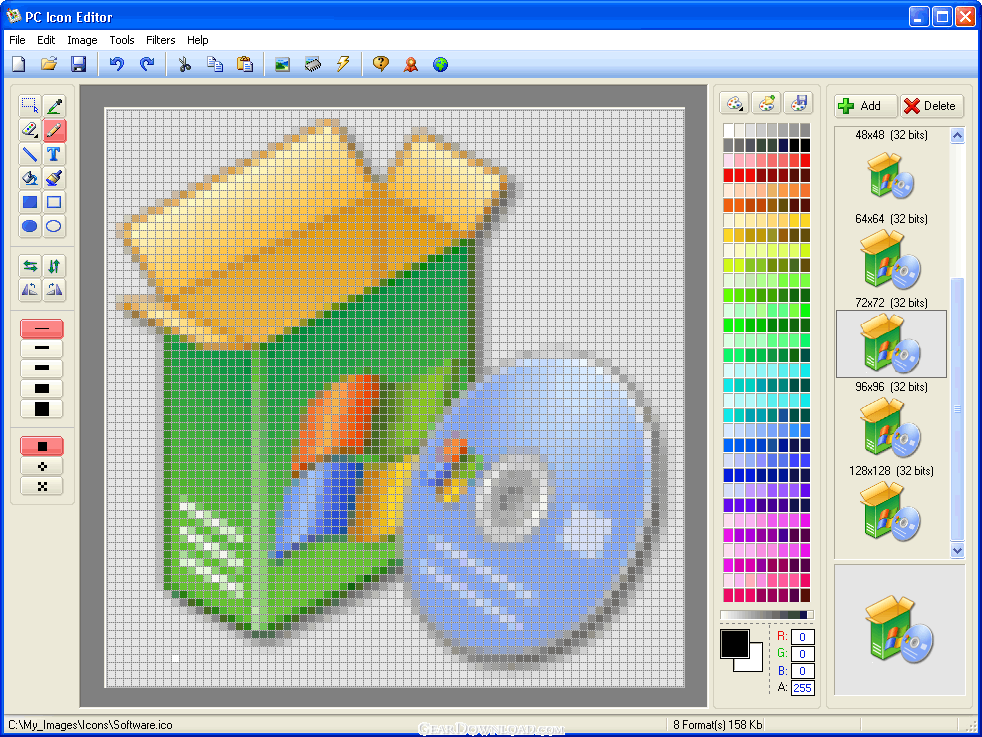 Click to enlarge screenshot
Software Description:
PC Icon Editor - Create and Edit Windows icons, cursors, and icon Library files.
PC Icon Editor is a powerful tool designed to Create, Edit, and Manage Windows icons, cursors, and Icon Library files. Create Windows icon from digital photos and images. Export icons to bitmap file with ability to define transparency color.
Also able to EXTRACT Windows icons from inside of EXE, DLL, DRV, SCR, and ICO files on your computer and save them into ICO and Icon Library file. The application has wizard and command line interfaces, it can completely support XP and Vista icons.
Makes wonderful icons by using more than 12 filtering effects (Blur, Rotate, Sharpen, Soften, Colorize, Drop
Shadow...). Supports all standard icon sizes from 16x16 until 128x128 and and custom sizes. Predefined Color
Palettes: Windows, Grayscale, Spectrum, Windows XP, 16 Colors, Web and Optimize. Built-in drop shadow effect
to create Windows XP compliant icons.
More than 13 drawing tools instruments (drawing Line, Rectangle, Ellipse or adding Text...) , Five styles to Brush:
Very Fine, Fine, Medium, Large and Extra Large, Three styles to Color Fill: Every Pixel, Even Pixels and Odd Pixels.
Everything you see on your desktop or in the Start menu can be edited with PC Icon Editor.
What's New: Application installer improved;
PC Icon Editor is a powerful tool designed to Create, Edit, and Manage Windows icons, cursors, and Icon Library files. Create Windows icon from digital photos and images. Export icons to bitmap file with ability to define transparency color.
Also able to EXTRACT Windows icons from inside of EXE, DLL, DRV, SCR, and ICO files on your computer and save them into ICO and Icon Library file. The application has wizard and command line interfaces, it can completely support XP and Vista icons.
Makes wonderful icons by using more than 12 filtering effects (Blur, Rotate, Sharpen, Soften, Colorize, Drop
Shadow...). Supports all standard icon sizes from 16x16 until 128x128 and and custom sizes. Predefined Color
Palettes: Windows, Grayscale, Spectrum, Windows XP, 16 Colors, Web and Optimize. Built-in drop shadow effect
to create Windows XP compliant icons.
More than 13 drawing tools instruments (drawing Line, Rectangle, Ellipse or adding Text...) , Five styles to Brush:
Very Fine, Fine, Medium, Large and Extra Large, Three styles to Color Fill: Every Pixel, Even Pixels and Odd Pixels.
Everything you see on your desktop or in the Start menu can be edited with PC Icon Editor.
What's New: Application installer improved;
Feature List:
- Create Windows icon from digital photos and images
- Extract Windows icons from inside of application files
- Create smooth semi-transparent icons
- Support and save Icon Library
- Save and Load user defined Color Palettes
- Support 100% XP Alpha Channel icons
- More than 11 filtering effects (Blur, Rotate, Sharpen, Soften, Colorize, Drop Shadow...)
- Support different icon colors including Monochrome (1 bit), 16 Colors (4 bits), Grayscale (8 bits), 256 Colors (8 bits), True Color (24 bits) and XP Alpha Channel (32 bits)
- More than 12 drawing tools instruments (drawing Line, Rectangle, Ellipse or adding Text...)
- Support different icon sizes include Windows Vista icons
- Export icons to bitmap file with ability of defining transparency color
- Free update for any new version
100% Clean:
 PC Icon Editor 3.6 is 100% clean
This download (PCiconEditorSetup.exe) was tested thoroughly and was found 100% clean. Click "Report Spyware" link on the top if you found this software contains any form of malware, including but not limited to: spyware, viruses, trojans and backdoors.
Related Software:
- IconUtils 5.40 - Let your imagination embody in an icon format. IconUtils have all you need.
- Image Icon Converter 1.3.5 - Converts BMP, JPEG, GIF, PNG, TGA, TIF and PCX formats into Windows icons.
- Icon Processor 3.14 - Personalize your desktop with nifty icons converted from your photos or images
- Any to Icon 3.53 - A wizard converter to produce your own icons from any image or a Mac OS icon
- Image2Ico 2.3 - Powerful and easy-to-use utility for convert bitmap and gif images to icon
- Icon Seizer 1.9 - Explore, view and extract icons from various file types.
- Sib Icon Replacer 2.32 - A compact tool which will take great care of all your icon management needs
- IconEdit2 7.2 - Create and edit icon files with professional yet easy-to-use Icon Editor.
- IconXP 3.34 - You can edit icons and other small images and customize desktop and folder icons
- Axialis IconWorkshop 6.90 - Tool designed to make, edit, convert icons for Windows, MacOS and toolbars
top 10 most downloaded


recommended software
-
- 1AVCenter
- With 1AVCenter you can record your entire screen or part of it directly to AVI or WMV, capture screenshots in JPG, share your screen over the internet...

-
- IconEdit2
- Create and edit icon files for Windows, iPhone, iPad, Apple Watch, and Android with professional yet easy-to-use Icon Editor. IconEdit2 has full suppo...
