Index >> Graphic Apps >> Font Tools >> FontViewOK
Report SpywareFontViewOK 3.83

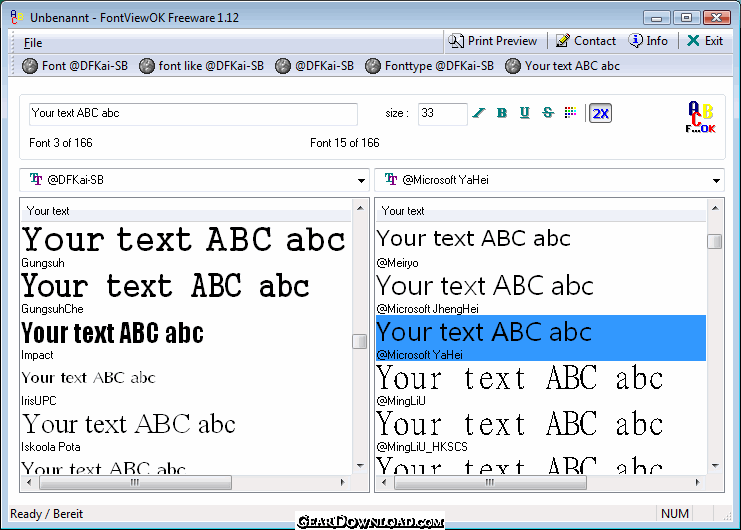 Click to enlarge screenshot
Software Description:
Only the written form is remembered, but the name is forgotten. FontViewOK help!
The problem is well known: Only the written form is remembered, but the name is forgotten.
Here FontViewOK can help.
It creates a quick visual overview of all installed fonts.
The deployment is so simple, a help file is not required.
Features:
Quick overview of all fonts.
Printing with print preview function
Changeable font size, style and color
An installation of FontViewOK is not required.
New in 1.21 // 24.APR.2008
1. Optional customize for the right font preview: text, text-type, size and color.
2. Correction in the display / printing of the "&" characters.
New in 1.12 // 03.FEB.2008
English translation
New in Ver.1.11 22.01.2008
1. Name change: FontView to FontViewOK.
2. Functionable under Windows Vista.
3. New features: printing with print preview.
4. Dual font preview for quick comparisons.
5. Changeable font color
The help file is not necessary, I hope you will understand ;) !
What's New: 1. New language in FontViewOK: Finish 2. Small changes and some improvements for Windows 8.1, plus updating the language files.
The problem is well known: Only the written form is remembered, but the name is forgotten.
Here FontViewOK can help.
It creates a quick visual overview of all installed fonts.
The deployment is so simple, a help file is not required.
Features:
Quick overview of all fonts.
Printing with print preview function
Changeable font size, style and color
An installation of FontViewOK is not required.
New in 1.21 // 24.APR.2008
1. Optional customize for the right font preview: text, text-type, size and color.
2. Correction in the display / printing of the "&" characters.
New in 1.12 // 03.FEB.2008
English translation
New in Ver.1.11 22.01.2008
1. Name change: FontView to FontViewOK.
2. Functionable under Windows Vista.
3. New features: printing with print preview.
4. Dual font preview for quick comparisons.
5. Changeable font color
The help file is not necessary, I hope you will understand ;) !
What's New: 1. New language in FontViewOK: Finish 2. Small changes and some improvements for Windows 8.1, plus updating the language files.
Feature List:
- Quick overview of all fonts
- Printing with print preview function
- Changeable font size, style and color
100% Clean:
 FontViewOK 3.83 is 100% clean
This download (FontViewOK.zip) was tested thoroughly and was found 100% clean. Click "Report Spyware" link on the top if you found this software contains any form of malware, including but not limited to: spyware, viruses, trojans and backdoors.
Related Software:
- CDH Image Explorer Pro 7.2 - All-in-one imaging solution supporting 70+ formats and many powerful features!
- FTMaster 1.4.2 - FTMaster is font editing, designing and converting tool
- FontExpert 2013 12.0 - Font manager: preview, print fonts, and examine your system for font errors.
- Fontonizer 1.3 - Easy to use Font Organizer that helps you keep track of all your fonts
- FontCreator 6.5 - Create your own signature, logo and handwriting and more with this font editor.
- X-Fonter 8.2.0 - Advanced Font Manager and Font Viewer for Windows
- IDAutomation MICR E13B Font Advantage 11.1 - MICR fonts that include calibration software and placement tools.
- IDAutomation UPC EAN Barcode Fonts 11.2 - Print EAN and UPC barcodes as fonts; TrueType, Opentype, PostScript and PCL.
- Sib Font Editor 2.2 - A handy tool to create fonts, transfer font symbols and modify font properties
- MainType 4.0 - Browse, preview, install, load, organize and print fonts with this font manager.
top 10 most downloaded


recommended software
-
- 1AVCenter
- With 1AVCenter you can record your entire screen or part of it directly to AVI or WMV, capture screenshots in JPG, share your screen over the internet...

-
- IconEdit2
- Create and edit icon files for Windows, iPhone, iPad, Apple Watch, and Android with professional yet easy-to-use Icon Editor. IconEdit2 has full suppo...
