Index >> Development >> Source Editors >> VbsEdit
Report SpywareVbsEdit 6.7.9

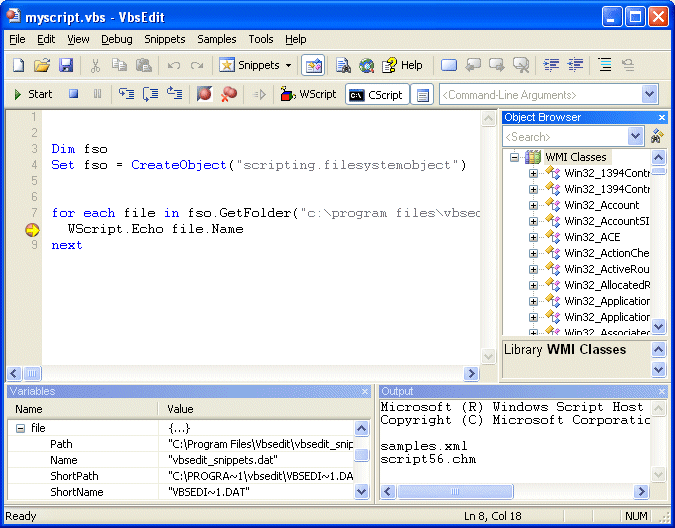 Click to enlarge screenshot
Software Description:
VbsEdit - VBScript editor that dramatically reduces the time you spend writing VBS scripts
Vbsedit (www.vbsedit.com) is an award-winning VBScript editor that dramatically reduces the time you spend writing .VBS scripts. VbsEdit has an integrated debugger that make troubleshooting a seamless experience.The editor displays the values assigned to variables during debugging. VbsEdit lets you set breakpoints and step through the code one line at a time. Vbsedit provides the ability to run your scripts directly from within the editor in either console (cscript) or window (wscript) mode. VbsEdit has the Microsoft VBScript 5.6 help file integrated into its editor, so all you need to do is press F1 to open the Help file and jump to the word under the cursor.VbsEdit integrates the hundred of samples from the Microsoft Script repository. After the name of a class or object, type a . (period) for an object instance : VbsEdit displays a list of valid member variables or functions for the appropriate object or class. After the name of a function, type an open parenthesis : Vbsedit displays the complete declaration for the function in a pop-up window just under the insertion point. The Object Browser allows you to examine and discover WMI classes and objects used in the current script and their members. Vbsedit generates WMI scripts for you (like Scriptomatic). Vbsedit support syntax coloring and can display line numbers. Code snippets are one of the coolest new features in VbsEdit. Code snippets are customizable code fragments intended to accomplish simple to intermediate tasks quickly; they can be inserted into your code with just a few keystrokes. What really makes code snippets so convenient to use is the replacement fields, highlighted areas that identify the values you may commonly want to replace to fit the snippet to your specific task. You can use F4 to move through replacement fields (ex: Type "select" and press F4).
What's New: New features and major improvements
Limitations: restrictions in the use of the debugger
Vbsedit (www.vbsedit.com) is an award-winning VBScript editor that dramatically reduces the time you spend writing .VBS scripts. VbsEdit has an integrated debugger that make troubleshooting a seamless experience.The editor displays the values assigned to variables during debugging. VbsEdit lets you set breakpoints and step through the code one line at a time. Vbsedit provides the ability to run your scripts directly from within the editor in either console (cscript) or window (wscript) mode. VbsEdit has the Microsoft VBScript 5.6 help file integrated into its editor, so all you need to do is press F1 to open the Help file and jump to the word under the cursor.VbsEdit integrates the hundred of samples from the Microsoft Script repository. After the name of a class or object, type a . (period) for an object instance : VbsEdit displays a list of valid member variables or functions for the appropriate object or class. After the name of a function, type an open parenthesis : Vbsedit displays the complete declaration for the function in a pop-up window just under the insertion point. The Object Browser allows you to examine and discover WMI classes and objects used in the current script and their members. Vbsedit generates WMI scripts for you (like Scriptomatic). Vbsedit support syntax coloring and can display line numbers. Code snippets are one of the coolest new features in VbsEdit. Code snippets are customizable code fragments intended to accomplish simple to intermediate tasks quickly; they can be inserted into your code with just a few keystrokes. What really makes code snippets so convenient to use is the replacement fields, highlighted areas that identify the values you may commonly want to replace to fit the snippet to your specific task. You can use F4 to move through replacement fields (ex: Type "select" and press F4).
What's New: New features and major improvements
Limitations: restrictions in the use of the debugger
100% Clean:
 VbsEdit 6.7.9 is 100% clean
This download (vbsedit.exe) was tested thoroughly and was found 100% clean. Click "Report Spyware" link on the top if you found this software contains any form of malware, including but not limited to: spyware, viruses, trojans and backdoors.
Related Software:
- VbsEdit Embedded 8 - VBScript editor and debugger lets you add VBScript macros to your application
- CNC Syntax Editor 3.1.1.830 - CNC programs editor with specific tools, features and syntax highlighting
- EditPad Pro 7.2.1 - Convenient, powerful and versatile text editor to edit all kinds of text files
- Perl Express 2.5 - A free Perl IDE for Windows
- Perl Editor 2012 2012 - SannySoft Perl Editor is a fully integrated developer environment.
- LopeEdit Pro 5.0 - Powerful programming editor and replacement of Windows Notepad
- Perl Builder 2.0m - Perl Builder is a complete development tool for perl and cgi.
- NeoBook Object Commander 2.0 - Developed specifically for NeoBook developers, and written entirely with NeoBook
- HTMLPad 2016 14.3 - Quick, intelligent and powerful HTML, CSS, JavaScript editor
- NoteTab Pro 7.1 - A powerful, award-winning text and HTML editor. Ideal for the power user.
top 10 most downloaded


recommended software
-
- HelpSmith
- HelpSmith is an innovative help authoring tool which allows you to create CHM Help files, Web Help , Word RTF, and Manuals from a single source. The r...
-
- EditPlus
- EditPlus is a text editor, HTML editor, PHP editor and Java editor for Windows. While it can serve as a good Notepad replacement, it also offers many ...