Report SpywareJunior Icon Editor 4.33

 Click to enlarge screenshot
Software Description:
Junior Icon Editor - Create your multi-resolution icons for apps and web with this free icon editor
Junior Icon Editor allows you to edit icons for Windows 8, 7, Vista, XP, 2003, 2000, ME, 98, 95, NT, iOS, Linux, Android, web and other. This free icon editor supports ICO, PNG, XPM, XBM and ICPR icon formats. Using this program you can create and edit icons in either standard or custom sizes, with color depths up to 32-bit True Color with 8-bit alpha channel. Paint tools include: color replacer, color selector, spray can, pencil, brush, flood fill, text tool, line tool, rectangle, curve and ellipse. For Windows XP and Windows Vista/7/8 icons, you get to use semi-transparency.
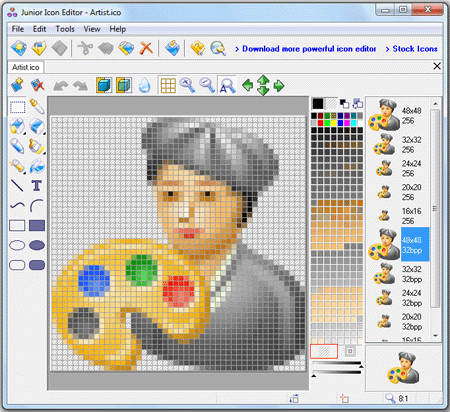
Launching Junior Icon Editor opens a window with a interface similar to the Windows paint program. You can set Junior Icon Editor to open to a new icon window or nothing. The new icon window shows a grid display with the grid matching the resolution of the icon you want to create. Along the left side are a set of drawing tools typical to most paint programs, including a color picker, eraser, pencil, air brush, paint brush and bucket (flood fill), text, rectangles, ellipses and lines. On the right side of the grid is a color chart (256) to choose from 256 colors. The grid overlay is tabbed, allowing you to open and work on more than one icon, either different sizes of the same icon, or completely different icons. Also shown on the right is a display of how your icon(s) appears actual size. With these tools, anyone can take advantage of the grid overlay and fill in the squares to create an icon that maximizes your artistic skills.
Junior Icon Editor is easy free icon editor!
Coming soon: iPhone Icon Extractor
What's New: Fixed: bug with text color
Junior Icon Editor allows you to edit icons for Windows 8, 7, Vista, XP, 2003, 2000, ME, 98, 95, NT, iOS, Linux, Android, web and other. This free icon editor supports ICO, PNG, XPM, XBM and ICPR icon formats. Using this program you can create and edit icons in either standard or custom sizes, with color depths up to 32-bit True Color with 8-bit alpha channel. Paint tools include: color replacer, color selector, spray can, pencil, brush, flood fill, text tool, line tool, rectangle, curve and ellipse. For Windows XP and Windows Vista/7/8 icons, you get to use semi-transparency.
Launching Junior Icon Editor opens a window with a interface similar to the Windows paint program. You can set Junior Icon Editor to open to a new icon window or nothing. The new icon window shows a grid display with the grid matching the resolution of the icon you want to create. Along the left side are a set of drawing tools typical to most paint programs, including a color picker, eraser, pencil, air brush, paint brush and bucket (flood fill), text, rectangles, ellipses and lines. On the right side of the grid is a color chart (256) to choose from 256 colors. The grid overlay is tabbed, allowing you to open and work on more than one icon, either different sizes of the same icon, or completely different icons. Also shown on the right is a display of how your icon(s) appears actual size. With these tools, anyone can take advantage of the grid overlay and fill in the squares to create an icon that maximizes your artistic skills.
Junior Icon Editor is easy free icon editor!
Coming soon: iPhone Icon Extractor
What's New: Fixed: bug with text color
Feature List:
- Create and edit icons in color depths up to 16 million colors
- Create and edit icons for Windows XP in 32-bit color depth with 8-bit alpha channel
- Paint images with pen, brush, airbrush, ellipse, rectangle, line, curve tools
- Roll, shift and rotate images
- Import and export .ico, .bmp, .png, .xpm, .xbm, and .icpr formats
- Sort images inside icons
- Copy and paste images to other applications
- Copy and paste color values from the clipboard
100% Clean:
 Junior Icon Editor 4.33 is 100% clean
This download (junior-icon-editor.exe) was tested thoroughly and was found 100% clean. Click "Report Spyware" link on the top if you found this software contains any form of malware, including but not limited to: spyware, viruses, trojans and backdoors.
Related Software:
- Medical Icon Set 3.8 - The SibCode Medical Icon Library is a fantastic set of medicine-related icons!
- Smile Icon Set 3.11 - An extensive set of emoticons for application and website developers
- Navigation Icon Set 2.8 - 118 liquid-smooth navigation icons to enhance software and Web interfaces
- Professional Icon Set 3.9 - Professional Icon Set lets you spice up your soft or websites with fine icons
- i-Commerce Icon Set 4.0 - 114 liquid-smooth icons to enhance an interface of e-commerce projects
- Science Icon Set 3.8 - Stock icons representing scientific concepts and objects
- Travel Icon Set 3.71 - Royalty-free icons representing objects and concepts related to travel industry
- Love Icon Set 2013.1 - Enhance online dating sites with ready-made Love Icons
- Folder Icon Set 2.9 - Icon sets of liquid-smooth folder icons to enhance software and web interfaces
- Military Icon Set 7.0 - Ready-made royalty-free military icons in raster and vector formats
top 10 most downloaded


recommended software
-
- Weeny Free Alarm Clock
- Weeny Free Alarm Clock is a free alarm clock software for Windows to set as many alarms as you want. You can set one-time alarms or repeating alarms w...
-
- Fresh Desktop
- Fresh Desktop is a useful utility that lets you manage vast collections of wallpapers for your desktop with ease. Fresh Desktop changes your wallpap...