Report SpywareiOS Tab Bar Icon Set 2015.1

 Click to enlarge screenshot
Software Description:
iOS Tab Bar Icon Set - A fast way to design tab bars for iPhone and iPad applications
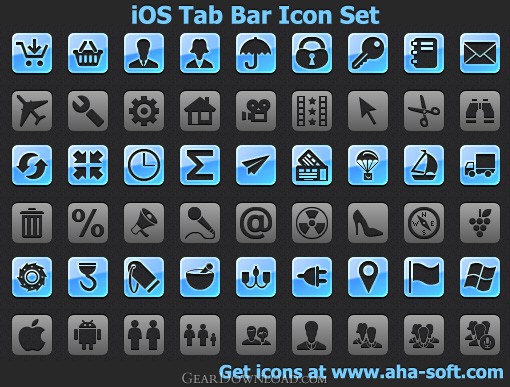
Here is a iOS Tab Bar Icon Set, which will help each iPhone or iPad application developer get his graphic user interface in order. The icons from this set can be used in navigation, tab bars and toolbars, as they specifically meet the icon guidelines for iOS application design.
A wide range of buttons, including symbols for User, Business, Camera, Zoom, E-mail, Cut, Copy, Save, Profile, Search, Help, Lock and Unlock, along with navigation arrows and lots of other general purpose graphics is included into this collection. All the images have a transparent background and are available in two colors: black and white.
Technically, there are 565 unique app icons created in matching style in a PNG format. The sizes for navigation bars of the following devices are available: 20x20 and 40x40 pixels (high resolution) for iPhone and iPod touch, 20x20 pixels for iPad. The tab bar sizes include a 30x30 pixels icons for iPad and 30x30 and 60x60 pixels icons for iPhone and iPod touch.
All the icons from this set are available for immediate online preview. A trial download is also provided for your convenience.
After you've decided on the appearance of your icon, follow these guidelines as you create it:
Use pure white with appropriate alpha transparency.
Do not include a drop shadow.
Use anti-aliasing.
If you decide to add a bevel, be sure that it is 90 degrees (to help you do this, imagine a light source positioned at the top of the icon).
For toolbar and navigation bar icons, create an icon in the following sizes:
For iPhone and iPod touch:
About 20 x 20 pixels
About 40 x 40 pixels (high resolution)
For iPad:
About 20 x 20 pixels
For tab bar icons, create an icon in the following sizes:
For iPhone and iPod touch:
About 30 x 30 pixels
About 60 x 60 pixels (high resolution)
For iPad:
About 30 x 30 pixels
These icons are here: http://www.aha-soft.com/iconlibs.htm
What's New: New icon set for iOS was updated
Limitations: 3 demo icons
TAGS: icon, ico, collection
Here is a iOS Tab Bar Icon Set, which will help each iPhone or iPad application developer get his graphic user interface in order. The icons from this set can be used in navigation, tab bars and toolbars, as they specifically meet the icon guidelines for iOS application design.
A wide range of buttons, including symbols for User, Business, Camera, Zoom, E-mail, Cut, Copy, Save, Profile, Search, Help, Lock and Unlock, along with navigation arrows and lots of other general purpose graphics is included into this collection. All the images have a transparent background and are available in two colors: black and white.
Technically, there are 565 unique app icons created in matching style in a PNG format. The sizes for navigation bars of the following devices are available: 20x20 and 40x40 pixels (high resolution) for iPhone and iPod touch, 20x20 pixels for iPad. The tab bar sizes include a 30x30 pixels icons for iPad and 30x30 and 60x60 pixels icons for iPhone and iPod touch.
All the icons from this set are available for immediate online preview. A trial download is also provided for your convenience.
After you've decided on the appearance of your icon, follow these guidelines as you create it:
Use pure white with appropriate alpha transparency.
Do not include a drop shadow.
Use anti-aliasing.
If you decide to add a bevel, be sure that it is 90 degrees (to help you do this, imagine a light source positioned at the top of the icon).
For toolbar and navigation bar icons, create an icon in the following sizes:
For iPhone and iPod touch:
About 20 x 20 pixels
About 40 x 40 pixels (high resolution)
For iPad:
About 20 x 20 pixels
For tab bar icons, create an icon in the following sizes:
For iPhone and iPod touch:
About 30 x 30 pixels
About 60 x 60 pixels (high resolution)
For iPad:
About 30 x 30 pixels
These icons are here: http://www.aha-soft.com/iconlibs.htm
What's New: New icon set for iOS was updated
Limitations: 3 demo icons
TAGS: icon, ico, collection
100% Clean:
 iOS Tab Bar Icon Set 2015.1 is 100% clean
This download (ios-tab-bar-icon-set.zip) was tested thoroughly and was found 100% clean. Click "Report Spyware" link on the top if you found this software contains any form of malware, including but not limited to: spyware, viruses, trojans and backdoors.
Related Software:
- Free 3d Printer Icon Set 2014.1 - Free 3d Printer Icon Set set is a great icon pack for 3d design software
- Perfect Website Icons 2012.1 - Plenty of quality website icons to enhance interfaces of web applications
- CustomIcons 4.3 - Replace, colorize and export standard Windows icons, modify desktop attributes
- IconLover 5.40 - Icon editor to make icons, manage icon collections. Made with love!
- Vista Toolbar Icons 2013.2 - Enhance your interface with Vista Toolbar Stock Icons to make it look up-to-date
- Basic Icons for Vista 2015.1 - Make your software look as nice as Win 7 with basic stock icons
- Database Icon Set 2013.1 - A library of sleek modern-looking toolbar and menu icons for database software
- Design Icon Set 2013.2 - Design Icon Set is what you need for developing graphic applications
- Large Icons for Vista 2013.2 - Make your project look as nice as Vista with lumina stock icons
- Health Care Icons 2011.3 - A fine set of distinct and rich-colored icons representing healthcare matters
top 10 most downloaded


recommended software
-
- Weeny Free Alarm Clock
- Weeny Free Alarm Clock is a free alarm clock software for Windows to set as many alarms as you want. You can set one-time alarms or repeating alarms w...
-
- Fresh Desktop
- Fresh Desktop is a useful utility that lets you manage vast collections of wallpapers for your desktop with ease. Fresh Desktop changes your wallpap...