Index >> Desktop >> Cursors & Fonts >> FontMassive
Report SpywareFontMassive 2.0

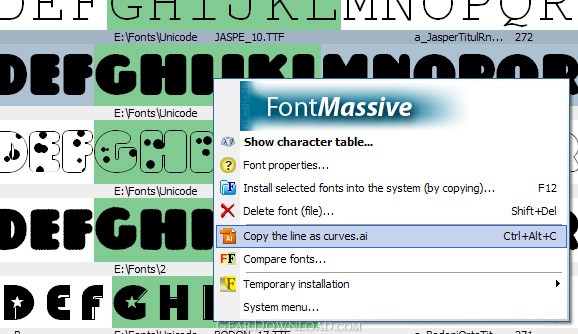 Click to enlarge screenshot
Software Description:
FontMassive - font manager and viewer
FontMassive - font manager and viewer
Tasks
* Displaying fonts as a list.
* Symbols table.
* Distribution of font files into folders.
* Installing fonts into the system.
* Deleting fonts from the system (To do this just open the folder "Fonts" in FM and delete the file - Shift+Del).
Properties
* Working with formats: TrueType (.ttf), OpenType (.otf), PostScript Type1 (.pfm + .pfb), .fon.
* Previewing fonts without installation from any source (folder, CD/DVD-ROM, Network).
* Filling lists very quickly (working with lists is already possible, it just continues to be added).
* Opening Subfolders. For example, when dragging from the Explorer hold Ctrl.
* Large quantity of sort variants (for example, the width of the text -helps "by eye" to find similar fonts).
* Warning when deleting system fonts.
* Export to images (including, to PNG with alpha-canals).
* Copying drawings to curves in Adobe Illustrator Format.
* Viewing curved symbols -at the same time able to choose from the list (Ctrl+Alt + click).
* Own folder tree.
* Favorite-folder.
* Folder history.
* Indexing folders - for opening extra font styles (if available).
* Visual comparison panel.
* Comparing "snapshots" of installed fonts after the installation.
* Grouping /Highlighting with attached styles.
* Working without installing.
* Ability to configure elements displayed in the list.
What's New: Displaying fonts as a list. Symbols table. Distribution of font files into folders. Installing fonts into the system. Deleting fonts from the system (To do this just open the folder «Fonts» in FM and delete the file - Shift+Del).
Limitations: 30 Days Trial
FontMassive - font manager and viewer
Tasks
* Displaying fonts as a list.
* Symbols table.
* Distribution of font files into folders.
* Installing fonts into the system.
* Deleting fonts from the system (To do this just open the folder "Fonts" in FM and delete the file - Shift+Del).
Properties
* Working with formats: TrueType (.ttf), OpenType (.otf), PostScript Type1 (.pfm + .pfb), .fon.
* Previewing fonts without installation from any source (folder, CD/DVD-ROM, Network).
* Filling lists very quickly (working with lists is already possible, it just continues to be added).
* Opening Subfolders. For example, when dragging from the Explorer hold Ctrl.
* Large quantity of sort variants (for example, the width of the text -helps "by eye" to find similar fonts).
* Warning when deleting system fonts.
* Export to images (including, to PNG with alpha-canals).
* Copying drawings to curves in Adobe Illustrator Format.
* Viewing curved symbols -at the same time able to choose from the list (Ctrl+Alt + click).
* Own folder tree.
* Favorite-folder.
* Folder history.
* Indexing folders - for opening extra font styles (if available).
* Visual comparison panel.
* Comparing "snapshots" of installed fonts after the installation.
* Grouping /Highlighting with attached styles.
* Working without installing.
* Ability to configure elements displayed in the list.
What's New: Displaying fonts as a list. Symbols table. Distribution of font files into folders. Installing fonts into the system. Deleting fonts from the system (To do this just open the folder «Fonts» in FM and delete the file - Shift+Del).
Limitations: 30 Days Trial
100% Clean:
 FontMassive 2.0 is 100% clean
This download (FM_Light_2_0.zip) was tested thoroughly and was found 100% clean. Click "Report Spyware" link on the top if you found this software contains any form of malware, including but not limited to: spyware, viruses, trojans and backdoors.
Related Software:
- ArtCursors 5.25 - You can find, create, edit, import, export cursors and manage cursor libraries
- CursorXP 1.31 - Use CursorXP to customize your Windows XP cursors.
- IDAutomation OCR-A and OCR-B Font Package 7.2 - OCR-A and OCR-B Fonts in TrueType, OpenType and PCL.
- Sib Cursor Editor 3.13 - Try a fresh version of a smart mouse pointer editor!
- Art Deco Fonts 4.1 - 10 Art Deco style OpenType fonts for Windows or the Mac
- Fixed Wdith Fonts 2.0 - Nine Fixed Width or Monospaced OpenType Fonts for Windows
- Headline Fonts 5.0 - Ten Headline style OpenType fonts for Windows
- Script and Calligraphy Fonts 4.1 - 10 Script, Calligraphy, and hand printing OpenType fonts for Windows / Mac
- EuroCheck 1.4 - Check your fonts, printer, keyboard and operating system for euro symbol support
- IDAutomation OCR-A and OCR-B Font Package 7.2 - OCR-A and OCR-B Fonts in TrueType, OpenType and PCL.
top 10 most downloaded


recommended software
-
- Weeny Free Alarm Clock
- Weeny Free Alarm Clock is a free alarm clock software for Windows to set as many alarms as you want. You can set one-time alarms or repeating alarms w...
-
- Fresh Desktop
- Fresh Desktop is a useful utility that lets you manage vast collections of wallpapers for your desktop with ease. Fresh Desktop changes your wallpap...