Index >> Desktop >> Clocks & Alarms >> 1st Clock
Report Spyware1st Clock 5.0

 Click to enlarge screenshot
Software Description:
1st Clock - Add date, world clock, alarms, atomic time, calendar etc to the taskbar clock
See the date as well as the time from multiple time zones in your taskbar clock. Find today's date and time around the world with a glance! Specify what and how to display in the clock, select any color, size, font and background. Monitor computer's CPU performance and memory load. Copy date and time to the clipboard.
Never miss important moments in your life with powerful and reliable alarms and reminders, with unique unobtrusive notifications! Set any number of one-time and repeating alarms with custom messages, sounds, colors, fonts, icons and actions.
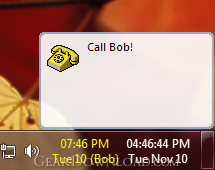
When the alarm goes off, it displays a balloon notification near the clock area for a few seconds. Click the balloon to open the alarm window or just leave it gently blinking in your taskbar. High priority alarms display their message straight in the center of the screen.
1st Clock has been deliberately designed to handle the multitude of alarms with ease. You can browse, search and manage alarms, view their schedule for any period of time. Transfer alarms between computers using the backup and restore feature.
1st Clock never forgets your alarms. All alarms left unattended will display after the reboot. The unique Alarm Recycle Bin comes to the rescue if you accidentally delete an important alarm!
Have a super-accurate time reference on your desktop, with extremely precise time synchronization (up to 1/50s accuracy). Adjust the time with atomic time servers either once or regularly at the specified intervals. 1st Clock queries several servers to improve reliability and precision of your computer's time. You can keep a log of time updates, use proxies, and apply a custom offset to the atomic time.
Use 1st Clock time server to synchronize time in the entire network.
Click the clock once to open 1- or 2-months calendar view. Use it to find the difference between dates, to review and add alarms.
1st Clock is fully compatible with Windows 7 and supports both 32- and 64-bit versions of Windows.
What's New: World clock - display time from multiple time zones in the taskbar or on the desktop Clock transparency Full Windows 7 support (32 and 64 bit)
Limitations: 30 Days Trial
See the date as well as the time from multiple time zones in your taskbar clock. Find today's date and time around the world with a glance! Specify what and how to display in the clock, select any color, size, font and background. Monitor computer's CPU performance and memory load. Copy date and time to the clipboard.
Never miss important moments in your life with powerful and reliable alarms and reminders, with unique unobtrusive notifications! Set any number of one-time and repeating alarms with custom messages, sounds, colors, fonts, icons and actions.
When the alarm goes off, it displays a balloon notification near the clock area for a few seconds. Click the balloon to open the alarm window or just leave it gently blinking in your taskbar. High priority alarms display their message straight in the center of the screen.
1st Clock has been deliberately designed to handle the multitude of alarms with ease. You can browse, search and manage alarms, view their schedule for any period of time. Transfer alarms between computers using the backup and restore feature.
1st Clock never forgets your alarms. All alarms left unattended will display after the reboot. The unique Alarm Recycle Bin comes to the rescue if you accidentally delete an important alarm!
Have a super-accurate time reference on your desktop, with extremely precise time synchronization (up to 1/50s accuracy). Adjust the time with atomic time servers either once or regularly at the specified intervals. 1st Clock queries several servers to improve reliability and precision of your computer's time. You can keep a log of time updates, use proxies, and apply a custom offset to the atomic time.
Use 1st Clock time server to synchronize time in the entire network.
Click the clock once to open 1- or 2-months calendar view. Use it to find the difference between dates, to review and add alarms.
1st Clock is fully compatible with Windows 7 and supports both 32- and 64-bit versions of Windows.
What's New: World clock - display time from multiple time zones in the taskbar or on the desktop Clock transparency Full Windows 7 support (32 and 64 bit)
Limitations: 30 Days Trial
Feature List:
- Fully customizable clock display
- Powerful alarms
- Atomic time synchronization
- Time zones
- Configurable advanced tooltip
- Calendar
- Quick reminders
- Performance monitoring
- Date/time copy to clipboard
- Swatch Internet time
- Customizable keyboard shortcuts
- Powerful popup menu
100% Clean:
 1st Clock 5.0 is 100% clean
This download (1stclock.exe) was tested thoroughly and was found 100% clean. Click "Report Spyware" link on the top if you found this software contains any form of malware, including but not limited to: spyware, viruses, trojans and backdoors.
Related Software:
- Power Reminder 1.0 - Never miss important moments with reliable and unobtrusive alarms and reminders
- 1st Clock Classic 4.0 - Add date, time zones, calendar and more to the tray clock
- Alarm Clock 1.0.62 - This program is a customizable alarm clock with multipul alarms.
- ShadowClock 5.0 - Analog clock for desktop, clock with transparent arrows and clock face.
- Dynamic Notes 3.68 - Dynamic Notes is a multi-featured scheduler, reminder, organizer for Windows.
- 7art Clock Bundle ScreenSaver 1.1 - Get 14 original Clock at your desktop in one single clock screensaver !
- 7art Cheerful Clock ScreenSaver 1.2 - Get 14 cheerful Clock at your desktop in one single clock screensaver !
- 7art Energizer Clock ScreenSaver 1.3 - Recharge your life butteries with 7art Energizer Clock screensaver!
- Alarmbelle 1.0 - PC alarm clock with stopwatch, timer and metric conversion
- Wallpaper Sequencer Ultra 4.62 - New, more powerful wallpaper manager with desktop clock skins.
top 10 most downloaded


recommended software
-
- Weeny Free Alarm Clock
- Weeny Free Alarm Clock is a free alarm clock software for Windows to set as many alarms as you want. You can set one-time alarms or repeating alarms w...
-
- Fresh Desktop
- Fresh Desktop is a useful utility that lets you manage vast collections of wallpapers for your desktop with ease. Fresh Desktop changes your wallpap...