Index >> Business >> Office Suites & Tools >> SharePoint RichText Boost
Report SpywareSharePoint RichText Boost 1.16.820.1

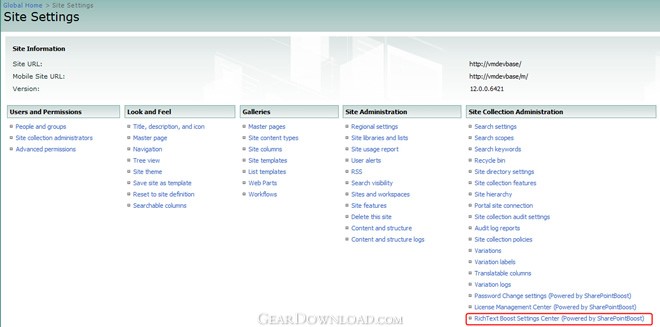 Click to enlarge screenshot
Software Description:
SharePoint RichText Boost - alter RichText area size, insert image easily, hide empty entry.
Quickly increase or decrease the size of the rich text editor area without changing list settings;
Upload and insert images, flash movies and hyperlinks to any rich text field directly;
Includes option to automatically resize images as they are uploaded to the rich text editor area or preserve the original dimensions of the image;
Customizable rich text editor control panel allows users to enable or disable any RichText Boost functionality;
Configure rich text editor settings from the list level or from the site collection level;
Integrated memory function will store rich text editor area dimensions between item edits for a more user-friendly viewing experience.
SharePoint RichText Boost dramatically enhances the functionality of the default SharePoint rich text editor without creating a new column type. It adds the ability to upload and insert images, hyperlinks, and flash movies directly into any rich text column without first storing them in a document library, making it ideal for storing complex and formatted content in any SharePoint list. Moreover, SharePoint RichText Boost adds the option to automatically resize images as they are uploaded to the rich text editor area or preserve the original dimensions of the image.
Once an image or flash movie has been added, users have the option to quickly increase or decrease the size of the rich text editor area without changing list settings: maximize the rich text editor area to window borders, or gradually increase or decrease the height and width of the rich text editor area to ensure that all important content is visible as the item is edited. An integrated memory function will store the rich text editor area dimensions between item edits for a more user-friendly viewing experience, meaning that the next time the item is edited, the rich text editor area will automatically resize to the appropriate dimensions.
What's New: New Feature: - Supports German.
Limitations: 30 Days Trial
Quickly increase or decrease the size of the rich text editor area without changing list settings;
Upload and insert images, flash movies and hyperlinks to any rich text field directly;
Includes option to automatically resize images as they are uploaded to the rich text editor area or preserve the original dimensions of the image;
Customizable rich text editor control panel allows users to enable or disable any RichText Boost functionality;
Configure rich text editor settings from the list level or from the site collection level;
Integrated memory function will store rich text editor area dimensions between item edits for a more user-friendly viewing experience.
SharePoint RichText Boost dramatically enhances the functionality of the default SharePoint rich text editor without creating a new column type. It adds the ability to upload and insert images, hyperlinks, and flash movies directly into any rich text column without first storing them in a document library, making it ideal for storing complex and formatted content in any SharePoint list. Moreover, SharePoint RichText Boost adds the option to automatically resize images as they are uploaded to the rich text editor area or preserve the original dimensions of the image.
Once an image or flash movie has been added, users have the option to quickly increase or decrease the size of the rich text editor area without changing list settings: maximize the rich text editor area to window borders, or gradually increase or decrease the height and width of the rich text editor area to ensure that all important content is visible as the item is edited. An integrated memory function will store the rich text editor area dimensions between item edits for a more user-friendly viewing experience, meaning that the next time the item is edited, the rich text editor area will automatically resize to the appropriate dimensions.
What's New: New Feature: - Supports German.
Limitations: 30 Days Trial
100% Clean:
 SharePoint RichText Boost 1.16.820.1 is 100% clean
This download was tested thoroughly and was found 100% clean. Click "Report Spyware" link on the top if you found this software contains any form of malware, including but not limited to: spyware, viruses, trojans and backdoors.
Related Software:
- SharePoint Lookup Tracker 1.10.509.5 - SharePoint Lookup Tracker can search all items related to the specific item.
- SharePoint Form Validation 1.7.507.2 - Do form validation when you create or edit a list item in a form.
- SharePoint Permission Boost 4.5.701.1 - Assign permissions to item-relegated person/group
- SharePoint Discussion Column 2.0.802.1 - Record discussion and change history without creating new versions.
- SharePoint AD Information Sync 2.3.508.3 - Sync AD information to WSS or SharePoint Foundation User Profile List.
- SharePoint Document Auto Title 1.5.517.3 - Auto set a boostsolutions document title with its file name.
- SharePoint Cascaded Lookup 4.3.701.1 - Keep Cascaded Lookup settings when converting into SharePoint Lookup column.
- SharePoint Column/View Permission 4.5.521.0 - Administrator alsocan prevent certain users from creating views in the lists.
- SharePoint List Collection 3.3.508.4 - consolidate, view, and manipulate different items in a single grid view web part
- SharePoint Item Permission Batch 4.4.509.4 - Manually configure custom permission settings on a per-list or per-item basis.
top 10 most downloaded


recommended software
-
- A VIP Organizer
- VIP Organizer is a time and task management software which uses To Do List method to help you get through more work spending less time. It increases y...

-
- Salon Calendar
- Salon Calendar is a software tool designed specially for hair salons, beauty, manicure or aesthetic shops, tanning salons, fitness studios, wedding sa...
