Index >> Business >> Office Suites & Tools >> SharePoint Discussion Column
Report SpywareSharePoint Discussion Column 2.0.802.1

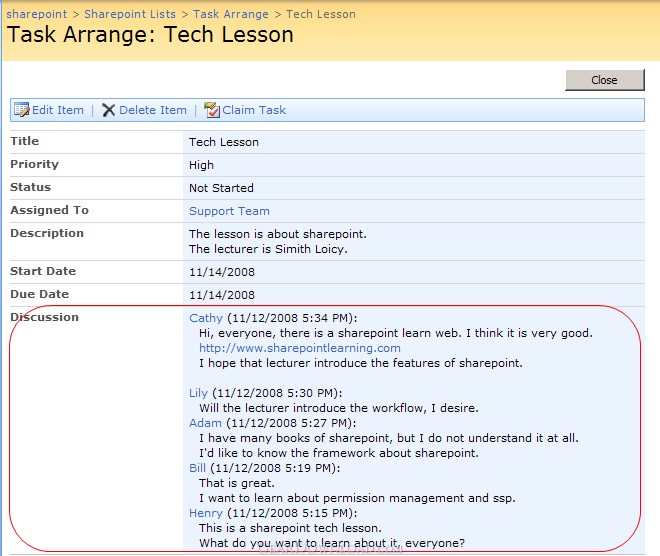 Click to enlarge screenshot
Software Description:
SharePoint Discussion Column - Record discussion and change history without creating new versions.
SharePoint Discussion Column is a custom column to record users' discussion when they edit the item. The SharePoint discussion thread can be listed in chronological order with discussion contents and discussants' names.
With SharePoint Discussion Column, you don't have to choose "create version each time you edit an item in the list" when you select the "Append Changes to Existing Text" option of Rich text column.
SharePoint out-of-box Multiple lines of text column provides an option "Append Changes to Existing Text" to let users append their own comments and discussion without replacing others.
But it has two defects.
First, you must enable version creation when item edited, but it's troublesome when you don't want to create new version every time you append changes.
Second, every time you edit the item, a new record will be produced in the record history whether empty or not. It is inconvenient for users to view a lot of records with empty contents.
We develop SharePoint Discussion Column to solve these problems. When you append records to SharePoint discussion thread, with our SharePoint Discussion Column, new version will not appear and empty records will not display.
SharePoint Discussion Column provides a custom column that allows users to record their discussion in the item without creating new version and recording empty contents.
What's New: New Features: - Server License is available; - Announced compatibility with SharePoint 2010.
Limitations: 30 Days Trial
SharePoint Discussion Column is a custom column to record users' discussion when they edit the item. The SharePoint discussion thread can be listed in chronological order with discussion contents and discussants' names.
With SharePoint Discussion Column, you don't have to choose "create version each time you edit an item in the list" when you select the "Append Changes to Existing Text" option of Rich text column.
SharePoint out-of-box Multiple lines of text column provides an option "Append Changes to Existing Text" to let users append their own comments and discussion without replacing others.
But it has two defects.
First, you must enable version creation when item edited, but it's troublesome when you don't want to create new version every time you append changes.
Second, every time you edit the item, a new record will be produced in the record history whether empty or not. It is inconvenient for users to view a lot of records with empty contents.
We develop SharePoint Discussion Column to solve these problems. When you append records to SharePoint discussion thread, with our SharePoint Discussion Column, new version will not appear and empty records will not display.
SharePoint Discussion Column provides a custom column that allows users to record their discussion in the item without creating new version and recording empty contents.
What's New: New Features: - Server License is available; - Announced compatibility with SharePoint 2010.
Limitations: 30 Days Trial
100% Clean:
 SharePoint Discussion Column 2.0.802.1 is 100% clean
This download was tested thoroughly and was found 100% clean. Click "Report Spyware" link on the top if you found this software contains any form of malware, including but not limited to: spyware, viruses, trojans and backdoors.
Related Software:
- SharePoint RichText Boost 1.16.820.1 - alter RichText area size, insert image easily, hide empty entry.
- SharePoint Lookup Tracker 1.10.509.5 - SharePoint Lookup Tracker can search all items related to the specific item.
- SharePoint Form Validation 1.7.507.2 - Do form validation when you create or edit a list item in a form.
- SharePoint Permission Boost 4.5.701.1 - Assign permissions to item-relegated person/group
- SharePoint AD Information Sync 2.3.508.3 - Sync AD information to WSS or SharePoint Foundation User Profile List.
- SharePoint Document Auto Title 1.5.517.3 - Auto set a boostsolutions document title with its file name.
- SharePoint Cascaded Lookup 4.3.701.1 - Keep Cascaded Lookup settings when converting into SharePoint Lookup column.
- SharePoint Column/View Permission 4.5.521.0 - Administrator alsocan prevent certain users from creating views in the lists.
- SharePoint List Collection 3.3.508.4 - consolidate, view, and manipulate different items in a single grid view web part
- SharePoint Item Permission Batch 4.4.509.4 - Manually configure custom permission settings on a per-list or per-item basis.
top 10 most downloaded


recommended software
-
- A VIP Organizer
- VIP Organizer is a time and task management software which uses To Do List method to help you get through more work spending less time. It increases y...

-
- Salon Calendar
- Salon Calendar is a software tool designed specially for hair salons, beauty, manicure or aesthetic shops, tanning salons, fitness studios, wedding sa...
