Index >> Business >> PIMS & Calendars >> Mindful
Report SpywareMindful 2.2.0.0

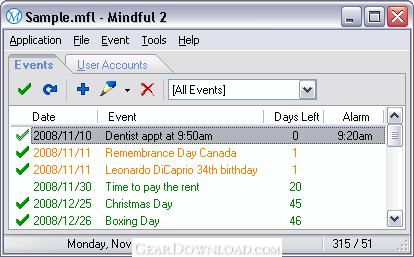 Click to enlarge screenshot
Software Description:
Mindful, Event Reminder and Password Manager in one simple application
Mindful combines an event reminder, password manager and many related tools into a simple system tray application.
The event reminder in Mindful helps you remember appointments, meetings, anniversaries, statutory holidays, TV shows, payments due or any other events that occur over time - repeatedly or not - and that you don't want to miss. In addition to defining your own events, Mindful allows you to select from a list of 72 pre-defined events including many Canadian, American and Jewish holidays. You can quickly check your next event due at any time by positioning the mouse pointer over the Mindful icon in the notification area (system tray).
The password manager in Mindful provides a secure central repository for all the logon details for your Internet accounts and password-protected applications. Instead of using the same password over and over, you can use complex passwords that differ between accounts, making it much safer than using the same password everywhere without the need to remember any of them except your master password, which gives you access to your entire list of user accounts. The password manager also includes an auto-logon feature. Mindful allows you to quickly open the link to any of your user accounts' logon page or form, and then complete your logon simply by pressing a global hot key (default is CTRL+SHIFT+L).
Mindful starts automatically each time you start your computer. When minimized, it remains in the notification area (system tray) ready for you to use at any time. From there you can restore it by clicking its icon or by pressing its activation global hot key (default is CTRL+SHIFT+M). When you right-click the Mindful icon in the notification area, a shortcut menu appears with commands to access Mindful's main features and tools directly.
Mindful is simple, but loaded with features and tools that can be used day after day, all year long. It consumes very few resources and resides in the notification area when minimized.
What's New: Minor enhancement, minor fix.
Limitations: 30 Days Trial
TAGS: birthday reminder, calendar, anniversary
Mindful combines an event reminder, password manager and many related tools into a simple system tray application.
The event reminder in Mindful helps you remember appointments, meetings, anniversaries, statutory holidays, TV shows, payments due or any other events that occur over time - repeatedly or not - and that you don't want to miss. In addition to defining your own events, Mindful allows you to select from a list of 72 pre-defined events including many Canadian, American and Jewish holidays. You can quickly check your next event due at any time by positioning the mouse pointer over the Mindful icon in the notification area (system tray).
The password manager in Mindful provides a secure central repository for all the logon details for your Internet accounts and password-protected applications. Instead of using the same password over and over, you can use complex passwords that differ between accounts, making it much safer than using the same password everywhere without the need to remember any of them except your master password, which gives you access to your entire list of user accounts. The password manager also includes an auto-logon feature. Mindful allows you to quickly open the link to any of your user accounts' logon page or form, and then complete your logon simply by pressing a global hot key (default is CTRL+SHIFT+L).
Mindful starts automatically each time you start your computer. When minimized, it remains in the notification area (system tray) ready for you to use at any time. From there you can restore it by clicking its icon or by pressing its activation global hot key (default is CTRL+SHIFT+M). When you right-click the Mindful icon in the notification area, a shortcut menu appears with commands to access Mindful's main features and tools directly.
Mindful is simple, but loaded with features and tools that can be used day after day, all year long. It consumes very few resources and resides in the notification area when minimized.
What's New: Minor enhancement, minor fix.
Limitations: 30 Days Trial
TAGS: birthday reminder, calendar, anniversary
100% Clean:
 Mindful 2.2.0.0 is 100% clean
This download was tested thoroughly and was found 100% clean. Click "Report Spyware" link on the top if you found this software contains any form of malware, including but not limited to: spyware, viruses, trojans and backdoors.
Related Software:
- Mindful Lite 2.2.0.0 - Mindful Lite, Event Reminder and Password Manager
- Life Organizer 1.0 - Life Organizer enables individuals and families to organize their lives.
- NaturCalendar ST - Intuitive Desktop Calendar and Scheduler for Your PC.
- A Better Calendar 2.1.8 - Keep your notes, schedules and audio in classic "paper calendar" format.
- m9P Phonebook2 2.1 - Advanced Phonebook Manager!
- Our Scheduler 2.1.8 - The EASIEST and BEST wide range scheduling software available. Network Ready
- Tree Notes 3.064 - Notes organizer. Hierarchical notes manager that has a tree with icons.
- Visual eNote Desktop Edition 1.59 - One of the most popular, virtual-sticky-notes & reminder software for windows !
- Visual eNote Standard Edition 1.59 - One of the most popular, virtual-sticky-notes & reminder software for windows !
- Aml Pages 9.73b2654 - Aml Pages keeps all your notes, information, web pages, passwords, and etc
top 10 most downloaded


recommended software
-
- A VIP Organizer
- VIP Organizer is a time and task management software which uses To Do List method to help you get through more work spending less time. It increases y...

-
- Salon Calendar
- Salon Calendar is a software tool designed specially for hair salons, beauty, manicure or aesthetic shops, tanning salons, fitness studios, wedding sa...
