Index >> Business >> Office Suites & Tools >> Classic Menu Helper
Report SpywareClassic Menu Helper 2.1

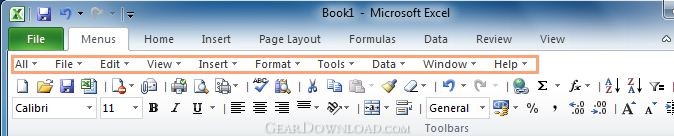 Click to enlarge screenshot
Software Description:
Classic Menu Helper is fully free for all users of Classic Menu for Office
Classic Menu Helper helps you to automatically drop down menus and buttons in toolbar without clicks.
Classic Menu Helper is designed for Classic Menu for Office specially, and the Classic Menu Helper is fully free for all users (personal and commercial) of Classic Menu for Office.
No click, just move mouse over menus to drop down old menus, and over commands on toolbars to show more command options, as well as galleries and split buttons
You'll save endless clicks with your mouse when you are using Classic Menu for Office in Microsoft Office 2007 or 2010. With Classic Menu Helper, it is easy to switch among menus and commands on Toolbar.
Addintools provides Classic Menu for Office to bring back old menus and toolbars in Microsoft Office 2007 or 2010 Ribbon. At present, Addintools released the Classic Menu Helper, which is designed for our users of Classic Menu for Office specially, just move mouse over the menus and open and switch menus from one to the other easily without boring repeated clicking. No matter you will use classic menu helper personally or for commercial use, Classic Menu Ribbon is fully free - that's the gift we prepared for our Classic Menu for Office users.
Classic Menu Helper is fully compatible with:
Microsoft Office 2007 or Microsoft Office 2010 (32-bit and 64-bit).
Windows XP 32/64, Vista 32/64, Windows 7 32/64, Windows Server 2003 32/64 and Server 2008. Citrix System and Windows Terminal (Remote Desktop) Server.
You can configure the settings, such as the following options:
(1) Enable/disable automatically expanding classic menus.
(2) Adjust the speed of expanding classic menus.
(3) Change mode of expanding classic menus.
What's New: 1.Support opening the drop down list of buttons in Office 2007/2010 tabs; 2.Revise the description; 3.Modify the manger and register dialog box, fix the close button bug. 4.Request to install Classic Menu for Office during installing Classic Menu Helper.
Classic Menu Helper helps you to automatically drop down menus and buttons in toolbar without clicks.
Classic Menu Helper is designed for Classic Menu for Office specially, and the Classic Menu Helper is fully free for all users (personal and commercial) of Classic Menu for Office.
No click, just move mouse over menus to drop down old menus, and over commands on toolbars to show more command options, as well as galleries and split buttons
You'll save endless clicks with your mouse when you are using Classic Menu for Office in Microsoft Office 2007 or 2010. With Classic Menu Helper, it is easy to switch among menus and commands on Toolbar.
Addintools provides Classic Menu for Office to bring back old menus and toolbars in Microsoft Office 2007 or 2010 Ribbon. At present, Addintools released the Classic Menu Helper, which is designed for our users of Classic Menu for Office specially, just move mouse over the menus and open and switch menus from one to the other easily without boring repeated clicking. No matter you will use classic menu helper personally or for commercial use, Classic Menu Ribbon is fully free - that's the gift we prepared for our Classic Menu for Office users.
Classic Menu Helper is fully compatible with:
Microsoft Office 2007 or Microsoft Office 2010 (32-bit and 64-bit).
Windows XP 32/64, Vista 32/64, Windows 7 32/64, Windows Server 2003 32/64 and Server 2008. Citrix System and Windows Terminal (Remote Desktop) Server.
You can configure the settings, such as the following options:
(1) Enable/disable automatically expanding classic menus.
(2) Adjust the speed of expanding classic menus.
(3) Change mode of expanding classic menus.
What's New: 1.Support opening the drop down list of buttons in Office 2007/2010 tabs; 2.Revise the description; 3.Modify the manger and register dialog box, fix the close button bug. 4.Request to install Classic Menu for Office during installing Classic Menu Helper.
100% Clean:
 Classic Menu Helper 2.1 is 100% clean
This download (ClassicMenuHelper.exe) was tested thoroughly and was found 100% clean. Click "Report Spyware" link on the top if you found this software contains any form of malware, including but not limited to: spyware, viruses, trojans and backdoors.
Related Software:
- Classic Menu for Office 2007 7.0 - Show Classic Menus and Toolbars on the Ribbon of Microsoft Office 2007
- Classic Menu for Office Home and Business 2010 5.00 - Bring back the classic toolbar and menu to Office Home and Business 2010
- Classic Menu for Excel 2007 7.00 - Show Classic Menus and Toolbars on the Ribbon of Microsoft Excel 2007
- Classic Menu for PowerPoint 2007 7.00 - Show Classic Menus and Toolbars on the Ribbon of Microsoft PowerPoint 2007
- Classic Menu for Word 2007 7.00 - Show Classic Menus and Toolbars on the Ribbon of Microsoft Word 2007
- Classic Menu for Office Enterprise 2010 and 2013 5.51 - Brings Back Classic Toolbars and Menus to Microsoft Office 2010/2013
- Ribbon Customizer for Office 2007 4.10 - Customize your Ribbon in Microsoft Office 2007 as you need
- Classic Menu for Office 2010 and 2013 5.50 - Show Classic Toolbars and Menus in Microsoft Office 2010 and 2013
- Classic Menu for Word 2010 5.00 - Show Classic Menus and Toolbars on Ribbon of Microsoft Word 2010
- Classic Menu for Office 2010 and 2013 5.50 - Show Classic Toolbars and Menus in Microsoft Office 2010 and 2013
top 10 most downloaded


recommended software
-
- A VIP Organizer
- VIP Organizer is a time and task management software which uses To Do List method to help you get through more work spending less time. It increases y...

-
- Salon Calendar
- Salon Calendar is a software tool designed specially for hair salons, beauty, manicure or aesthetic shops, tanning salons, fitness studios, wedding sa...
