Index >> Business >> Office Suites & Tools >> Classic Menu for Excel 2007
Report SpywareClassic Menu for Excel 2007 7.00

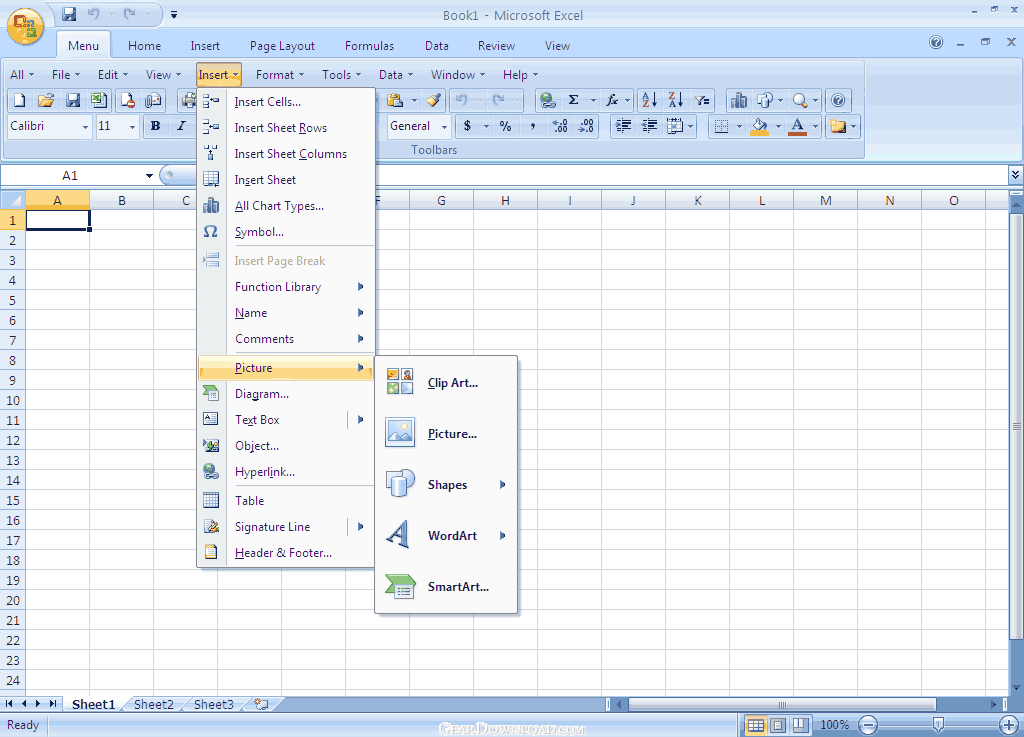 Click to enlarge screenshot
Software Description:
Classic Menu for Excel 2007 - Show Classic Menus and Toolbars on the Ribbon of Microsoft Excel 2007
Frustrated by endless searches for features on the Ribbon? You can use Excel 2007 immediately without any training or tutorials if you used Excel 2003 before. Download and install this software to bring back the familiar menus and toolbars to Microsoft Excel 2007. The software allows you to work with Excel 2007 as if it were Excel 2003.
All the new features in Microsoft Excel 2007 have been added into the Main Menu, the Standard Toolbar and Formatting Toolbar.
User can browse the whole menus with keyboard shortcuts (insert Q into the original shortcuts of Office 2003. For example: press Alt + T to open the "Tools" menu in Office 2003, you just need to press Alt, Q, T to open the "Tools" menu in Office 2007).
Supports all languages that are supported by Microsoft Excel 2007 including: English, French, German, Italian, Spanish, Portuguese, Japanese, Chinese, and more.
Add the menus and toolbars to the Quick Access Toolbar, and you can use Excel without the ribbon.
Easy to enable or disable the menus and toolbars.
Easy to install and uninstall.
Quickly find and execute the command that you need.
The Menus tab can be shown on the left of Home tab, or shown as the last tab.
Just press Alt-Q, to use the familiar keyboard shortcuts to browse the whole menu.
What's New: The recent files and recent folders command items have been included.
Limitations: 15 Days Trial
Frustrated by endless searches for features on the Ribbon? You can use Excel 2007 immediately without any training or tutorials if you used Excel 2003 before. Download and install this software to bring back the familiar menus and toolbars to Microsoft Excel 2007. The software allows you to work with Excel 2007 as if it were Excel 2003.
All the new features in Microsoft Excel 2007 have been added into the Main Menu, the Standard Toolbar and Formatting Toolbar.
User can browse the whole menus with keyboard shortcuts (insert Q into the original shortcuts of Office 2003. For example: press Alt + T to open the "Tools" menu in Office 2003, you just need to press Alt, Q, T to open the "Tools" menu in Office 2007).
Supports all languages that are supported by Microsoft Excel 2007 including: English, French, German, Italian, Spanish, Portuguese, Japanese, Chinese, and more.
Add the menus and toolbars to the Quick Access Toolbar, and you can use Excel without the ribbon.
Easy to enable or disable the menus and toolbars.
Easy to install and uninstall.
Quickly find and execute the command that you need.
The Menus tab can be shown on the left of Home tab, or shown as the last tab.
Just press Alt-Q, to use the familiar keyboard shortcuts to browse the whole menu.
What's New: The recent files and recent folders command items have been included.
Limitations: 15 Days Trial
100% Clean:
 Classic Menu for Excel 2007 7.00 is 100% clean
This download (Setup_ExcelMenu.exe) was tested thoroughly and was found 100% clean. Click "Report Spyware" link on the top if you found this software contains any form of malware, including but not limited to: spyware, viruses, trojans and backdoors.
Related Software:
- Classic Menu for Office 2007 7.0 - Show Classic Menus and Toolbars on the Ribbon of Microsoft Office 2007
- Classic Menu for Office Home and Business 2010 5.00 - Bring back the classic toolbar and menu to Office Home and Business 2010
- Classic Menu for PowerPoint 2007 7.00 - Show Classic Menus and Toolbars on the Ribbon of Microsoft PowerPoint 2007
- Classic Menu for Word 2007 7.00 - Show Classic Menus and Toolbars on the Ribbon of Microsoft Word 2007
- Classic Menu for Office Enterprise 2010 and 2013 5.51 - Brings Back Classic Toolbars and Menus to Microsoft Office 2010/2013
- Ribbon Customizer for Office 2007 4.10 - Customize your Ribbon in Microsoft Office 2007 as you need
- Classic Menu for Office 2010 and 2013 5.50 - Show Classic Toolbars and Menus in Microsoft Office 2010 and 2013
- Classic Menu for Word 2010 5.00 - Show Classic Menus and Toolbars on Ribbon of Microsoft Word 2010
- Classic Menu for Office 2010 and 2013 5.50 - Show Classic Toolbars and Menus in Microsoft Office 2010 and 2013
- Classic Menu for Office Professional 2010 5.00 - Bring Back the Classic Toolbar and Menu to Office Professional 2010
top 10 most downloaded


recommended software
-
- A VIP Organizer
- VIP Organizer is a time and task management software which uses To Do List method to help you get through more work spending less time. It increases y...

-
- Salon Calendar
- Salon Calendar is a software tool designed specially for hair salons, beauty, manicure or aesthetic shops, tanning salons, fitness studios, wedding sa...
