Index >> Business >> Office Suites & Tools >> Classic Menu for Office Standard 2010
Report SpywareClassic Menu for Office Standard 2010 5.00

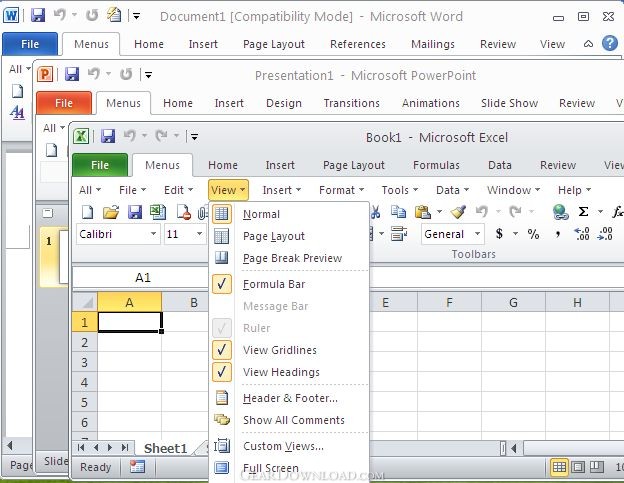 Click to enlarge screenshot
Software Description:
Classic Menu for Office Standard 2010 - Bring back the classic toolbar and menu to Office Standard 2010
If you have spent a lot of time adjusting yourself to the Ribbon interface of Microsoft Office Standard 2010, or being frustrated by searches for new features on the Ribbon interface, Classic Menu for Office Standard 2010 will help to solve your problem.
The software adds a Menus tab to the whole interface of Office Standard 2010, and then brings back the familiar Office 2003 and 2007 toolbars and menus into work. It is developed by Addintools (a company provides professional software, add-ins and tools for Microsoft Office) and helps improve your working manner and efficiency.
Don't be afraid that the new feature of Microsoft Office Standard 2010 will be lost. Classic Menu for Office Standard 2010 presents all the new features in the classic style interface.
It is very easy to deploy the software to client computers in your enterprise or organization. Your colleagues or employees don't need trainings or tutorials any more after upgrading to Microsoft Office Standard 2010.
Supports all languages that are supported by Microsoft Office 2010 including: English, French, German, Italian, Spanish, Portuguese, Japanese, Dutch, Chinese, and more.
The software is fully compatible with Windows 7, Windows 7 x64, Vista, Vista x64, XP, XP x64, Windows 2003 Server and 2008 Server.
Combine 32-bit and 64-bit Classic Menu into one single Exe installation package, so that users don't need to know whether they are using 32-bit or 64-bit Microsoft Office 2010.
The Classic Menu suite includes following applications:
Classic Menu for Word 2010,
Classic Menu for Excel 2010,
Classic Menu for PowerPoint 2010,
Classic Menu for Outlook 2010,
Classic Menu for Publisher 2010,
Classic Menu for OneNote 2010.
You could find the product at the Microsoft Office Marketplace.
Easy to install, uninstall and use.
Easy to show or hide the classic menus and toolbars.
What's New: The recent files and recent folders command items have been included. Combine 32-bit and 64-bit Classic Menu into one single Exe installation package, so that users don't need to know whether they are using 32-bit or 64-bit Microsoft Office 2010.
Limitations: 15 Days Trial
If you have spent a lot of time adjusting yourself to the Ribbon interface of Microsoft Office Standard 2010, or being frustrated by searches for new features on the Ribbon interface, Classic Menu for Office Standard 2010 will help to solve your problem.
The software adds a Menus tab to the whole interface of Office Standard 2010, and then brings back the familiar Office 2003 and 2007 toolbars and menus into work. It is developed by Addintools (a company provides professional software, add-ins and tools for Microsoft Office) and helps improve your working manner and efficiency.
Don't be afraid that the new feature of Microsoft Office Standard 2010 will be lost. Classic Menu for Office Standard 2010 presents all the new features in the classic style interface.
It is very easy to deploy the software to client computers in your enterprise or organization. Your colleagues or employees don't need trainings or tutorials any more after upgrading to Microsoft Office Standard 2010.
Supports all languages that are supported by Microsoft Office 2010 including: English, French, German, Italian, Spanish, Portuguese, Japanese, Dutch, Chinese, and more.
The software is fully compatible with Windows 7, Windows 7 x64, Vista, Vista x64, XP, XP x64, Windows 2003 Server and 2008 Server.
Combine 32-bit and 64-bit Classic Menu into one single Exe installation package, so that users don't need to know whether they are using 32-bit or 64-bit Microsoft Office 2010.
The Classic Menu suite includes following applications:
Classic Menu for Word 2010,
Classic Menu for Excel 2010,
Classic Menu for PowerPoint 2010,
Classic Menu for Outlook 2010,
Classic Menu for Publisher 2010,
Classic Menu for OneNote 2010.
You could find the product at the Microsoft Office Marketplace.
Easy to install, uninstall and use.
Easy to show or hide the classic menus and toolbars.
What's New: The recent files and recent folders command items have been included. Combine 32-bit and 64-bit Classic Menu into one single Exe installation package, so that users don't need to know whether they are using 32-bit or 64-bit Microsoft Office 2010.
Limitations: 15 Days Trial
Feature List:
- Easily deploy classic menu and toolbars in Classic Menu Manager
- Easily show or hide Classic Menu and toolbars in Microsoft Office Standard 2010
- The classic menu can stay at far right of Ribbon, or between 'File' and 'Home' tabs in Ribbon
- The Microsoft Office Standard 2003 interface can be positioned along with the Ribbon of Microsoft Office Standard 2010 or you can completely overlay the latter
- Easily show or hide 'Menus' tab in the Ribbon
- Quickly find and execute the command that you want
100% Clean:
 Classic Menu for Office Standard 2010 5.00 is 100% clean
This download (OfficeMenu2010-Standard.exe) was tested thoroughly and was found 100% clean. Click "Report Spyware" link on the top if you found this software contains any form of malware, including but not limited to: spyware, viruses, trojans and backdoors.
Related Software:
- Classic Menu for Office 2007 7.0 - Show Classic Menus and Toolbars on the Ribbon of Microsoft Office 2007
- Classic Menu for Office Home and Business 2010 5.00 - Bring back the classic toolbar and menu to Office Home and Business 2010
- Classic Menu for Excel 2007 7.00 - Show Classic Menus and Toolbars on the Ribbon of Microsoft Excel 2007
- Classic Menu for PowerPoint 2007 7.00 - Show Classic Menus and Toolbars on the Ribbon of Microsoft PowerPoint 2007
- Classic Menu for Word 2007 7.00 - Show Classic Menus and Toolbars on the Ribbon of Microsoft Word 2007
- Classic Menu for Office Enterprise 2010 and 2013 5.51 - Brings Back Classic Toolbars and Menus to Microsoft Office 2010/2013
- Ribbon Customizer for Office 2007 4.10 - Customize your Ribbon in Microsoft Office 2007 as you need
- Classic Menu for Office 2010 and 2013 5.50 - Show Classic Toolbars and Menus in Microsoft Office 2010 and 2013
- Classic Menu for Word 2010 5.00 - Show Classic Menus and Toolbars on Ribbon of Microsoft Word 2010
- Classic Menu for Office 2010 and 2013 5.50 - Show Classic Toolbars and Menus in Microsoft Office 2010 and 2013
top 10 most downloaded


recommended software
-
- A VIP Organizer
- VIP Organizer is a time and task management software which uses To Do List method to help you get through more work spending less time. It increases y...

-
- Salon Calendar
- Salon Calendar is a software tool designed specially for hair salons, beauty, manicure or aesthetic shops, tanning salons, fitness studios, wedding sa...
