Index >> System Utilities >> Other >> WizKey
Report SpywareWizKey 1.5.0.5

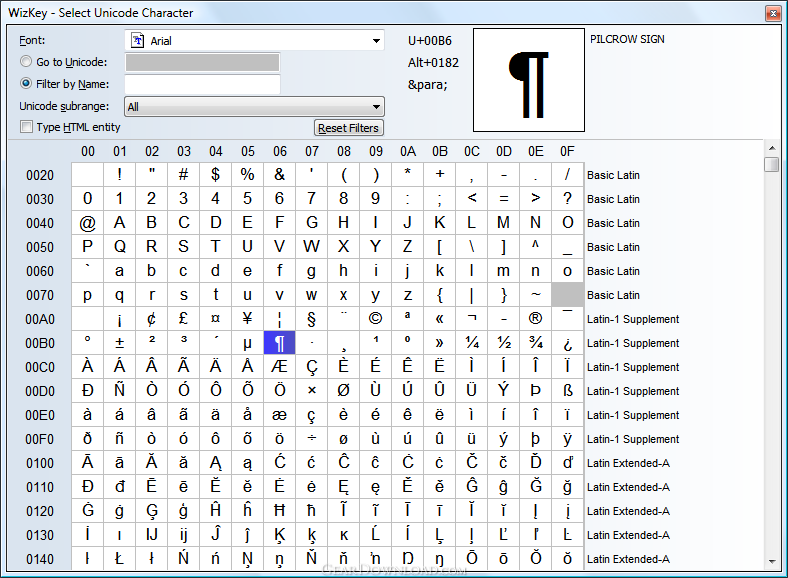 Click to enlarge screenshot
Software Description:
WizKey - Type accented and other special Unicode characters easily.
WizKey is a keyboard enhancement utility that makes the typing of accented and other special characters easy. The most common characters can be typed using easy to remember keyboard shortcuts, and less common characters can be selected and searched for by code or name using the built in Unicode character browser. A useful feature for those who work on web sites is the option to type characters as html entities.
For example, to type an e with a grave accent, just press Ctrl+` (grave key), then press e. Other letters and symbols are configured with easy to remember keyboard shortcuts. If you forget a shortcut just activate the WizKey Main Menu by tapping the Ctrl key twice and use your mouse or the arrow keys to navigate through the different character types.
Press Ctrl+\\ (backslash) to activate the Unicode Character Browser which allows you to browse and filter through all the Unicode characters supported by the currently selected font.
What's New: Fixed startup problems on Windows Vista/7 when running 'as administrator'.
Limitations: 30 Days Trial; After 30 days a purchase reminder message appears when WizKey starts
WizKey is a keyboard enhancement utility that makes the typing of accented and other special characters easy. The most common characters can be typed using easy to remember keyboard shortcuts, and less common characters can be selected and searched for by code or name using the built in Unicode character browser. A useful feature for those who work on web sites is the option to type characters as html entities.
For example, to type an e with a grave accent, just press Ctrl+` (grave key), then press e. Other letters and symbols are configured with easy to remember keyboard shortcuts. If you forget a shortcut just activate the WizKey Main Menu by tapping the Ctrl key twice and use your mouse or the arrow keys to navigate through the different character types.
Press Ctrl+\\ (backslash) to activate the Unicode Character Browser which allows you to browse and filter through all the Unicode characters supported by the currently selected font.
What's New: Fixed startup problems on Windows Vista/7 when running 'as administrator'.
Limitations: 30 Days Trial; After 30 days a purchase reminder message appears when WizKey starts
Feature List:
- Type accented letters like é, à, ?, and symbols like ?, ?, € with easy to remember shortcut keys
- Works with any Windows application
- Type any unicode character supported by your current application's font with the Unicode Character Browser
- Search for unicode characters by name or category with the Unicode Character Browser
- Optionally type the html entity code (e.g. type '& Uuml;' instead of ü) with the Unicode Character Browser
- Save time - You'll never need to remember Alt-Key combinations again
- No need to switch between keyboard input languages - Supports Spanish, German, French, Czech, Italian, Hungarian, Polish, Romanian, Swedish, Turkish, Portuguese accents and alphabets
100% Clean:
 WizKey 1.5.0.5 is 100% clean
This download (wizkey_1_5_0_5_setup.exe) was tested thoroughly and was found 100% clean. Click "Report Spyware" link on the top if you found this software contains any form of malware, including but not limited to: spyware, viruses, trojans and backdoors.
Related Software:
- WizMouse 1.7.0.2 - Scroll the window under the mouse pointer with the mousewheel. No click needed.
- Advanced-Password-Manager 3.0 - Advance Password Manager is a safe & user friendly password management utility.
- FastSum Standard Edition 1.6 - Check the integrity and track changes within your important files
- Acronis True Image Corporate Workstation 8.0 - Data and system backup and restore solution for corporate workstations
- Ashampoo PowerUp 3 3.23 - More protection, more control, faster and easier than ever
- Odbc 4 All 2.3 - Easy connection to ODBC data sources for any application, DOS and scripts too !
- Antechinus eBook Wizard 3.2 - Use eBook Wizard to compile your highly-compressed eBooks easily and in no time.
- O&O DriveLED 2.0 - O&O DriveLED permanently monitors the status of the hard disks in the background
- Unusual Works Utility Pack 1.0 - CD Ejector and Note Manager programs.
- 1-abc.net Surf Trail Washer 7.00 - Tool to delete your internet trail (files, cookies, history, URLs) permanently!
top 10 most downloaded


recommended software
-
- AppleXsoft Photo Recovery for Mac
- AppleXsoft Photo Recovery is the comprehensive digital media data rescue software designed for Mac users, it featuring innovative photo recovery algor...

-
- Cacheman
- Memory is one of the most important pieces of computer hardware as it is in constant use no matter what a PC is used for. There is a tremendous number...
