Index >> System Utilities >> File & Disk Management >> WinTools.net Classic
Report SpywareWinTools.net Classic 19.3

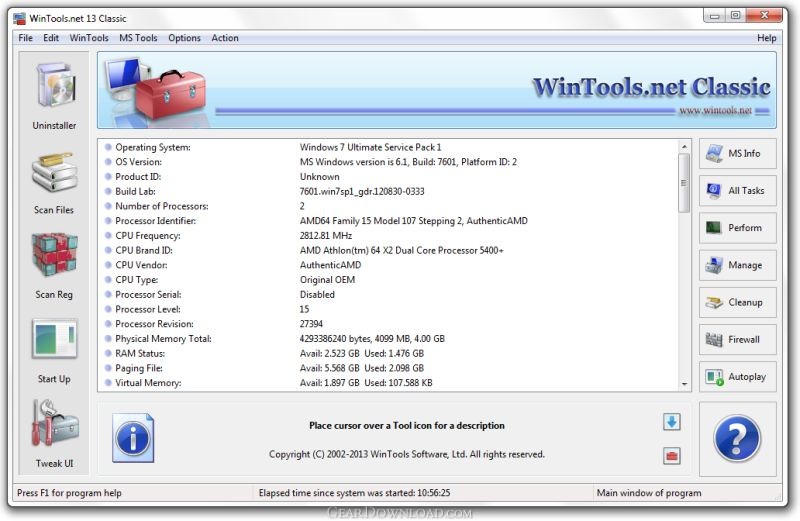 Click to enlarge screenshot
Software Description:
WinTools.net Classic - Suite of tools for increasing MS Windows operating system performance.
WinTools.net is a suite of tools for increasing operating system performance. WinTools.net cleanly removes unwanted software from disk drives and dead references from the Windows registry. WinTools.net puts you in control of the Windows start up process, memory monitoring and gives you the power to customize desktop and system settings to fit your needs.
WinTools.net features the following tools:
Clean Uninstaller - This tool is used for both correctly removing software and for monitoring changes made to the hard drive, MS Windows registry and system files during program installations.
Scan Files - This tool is used for periodic cleaning of your hard drive from dead references, junk and obsolete files produced by different software. These files and references remain on the hard disk and increase drive access time.
Scan Registry - This tool is used for periodic cleaning of the MS Windows registry from unused applications remained after uninstallation and from invalid references which decrease system speed and system loading time.
Start Up - This is a startup manager. This tool allows you to monitor, add, remove, enable and/or disable individual startup items. You can also adjust applications initialized during the loading process of the operating system.
Tweak UI - This is a set of additional adjustments related to safety, system capacity and user preferences and which are not included into basic components of MS Windows.
What's New: version 19.3 (April 03, 2019) + Scan Files algorithm was optimized + software compiler was updated
Limitations: 21 Days Trial
TAGS: tool, windows, utility, registry, x64, cleaner, startup, optimizer, clean, ram, disk, fixer, tweaker, xp, vista
WinTools.net is a suite of tools for increasing operating system performance. WinTools.net cleanly removes unwanted software from disk drives and dead references from the Windows registry. WinTools.net puts you in control of the Windows start up process, memory monitoring and gives you the power to customize desktop and system settings to fit your needs.
WinTools.net features the following tools:
Clean Uninstaller - This tool is used for both correctly removing software and for monitoring changes made to the hard drive, MS Windows registry and system files during program installations.
Scan Files - This tool is used for periodic cleaning of your hard drive from dead references, junk and obsolete files produced by different software. These files and references remain on the hard disk and increase drive access time.
Scan Registry - This tool is used for periodic cleaning of the MS Windows registry from unused applications remained after uninstallation and from invalid references which decrease system speed and system loading time.
Start Up - This is a startup manager. This tool allows you to monitor, add, remove, enable and/or disable individual startup items. You can also adjust applications initialized during the loading process of the operating system.
Tweak UI - This is a set of additional adjustments related to safety, system capacity and user preferences and which are not included into basic components of MS Windows.
What's New: version 19.3 (April 03, 2019) + Scan Files algorithm was optimized + software compiler was updated
Limitations: 21 Days Trial
TAGS: tool, windows, utility, registry, x64, cleaner, startup, optimizer, clean, ram, disk, fixer, tweaker, xp, vista
100% Clean:
 WinTools.net Classic 19.3 is 100% clean
This download (wintools.zip) was tested thoroughly and was found 100% clean. Click "Report Spyware" link on the top if you found this software contains any form of malware, including but not limited to: spyware, viruses, trojans and backdoors.
Related Software:
- Extra Drive Creator Professional 7.3 - Extra Drive Creator Pro - suite of tools for creating Extra Drives on your PC.
- Extra Subst 4 - Create, edit and remove virtual drives on your computer.
- Extra Subst 4.7 - Create, edit and remove virtual drives on your computer.
- Folder Cache 2.6 - Access to the recently used & favorite folders from the Save and Open dialogs.
- O&O Defrag Professional Edition 16.0 - Faster system starts, accelerated programs, and professional settings
- Visual Comparer 1.40 - Visual file compare and merge of the text files with syntax hightlight
- Advanced CATaloguer Pro 2.6 - Professional software for cataloguing on all kinds of media
- EF Duplicate Files Manager 7.10 - Find out duplicate files with same name, same size, same content
- EF Find 8.00 - EF Find is a powerful search program also inside archive files.
- Visual Multitool 4.4 - It is a file viewer, finder and editor with text tools.
top 10 most downloaded


recommended software
-
- MiniTool Power Data Recovery Free
- MiniTool Power Data Recovery is an easy-to-use and all in one free file recovery software for home users. With this most effective free file recovery ...
-
- Cacheman
- Memory is one of the most important pieces of computer hardware as it is in constant use no matter what a PC is used for. There is a tremendous number...
