Index >> System Utilities >> System Maintenance >> WinBootInfo
Report SpywareWinBootInfo 1.0

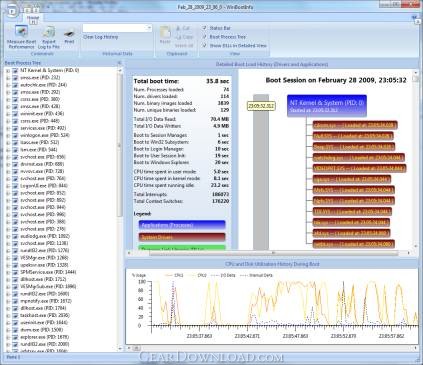 Click to enlarge screenshot
Software Description:
WinBootInfo is the advanced Boot Analyzer that logs details about windows boot
WinBootInfo is the advanced Windows Boot Analyzer that logs drivers and applications loaded during system boot, measures Windows boot times, records CPU and I/O activity during the boot, and much more!
- You want to know what is actually happening during the Windows Boot?
- You noticed that your computer takes ages to become operable after power-on, but you didn’t know how to see what actually gets to be loaded in your computer’s memory?
- You need a reliable tool for monitoring Windows boot performance over time?
- You want to optimize your computer’s performance and need detailed information about loaded system components?
Then WinBootInfo is the perfect solution for you! For only $14.95 (30 day trial is FREE) you will get the powerful system boot monitoring tool with following features included:
- Windows Boot Time Logging
- Detailed information about loaded drivers, applications and system DLLs
- Each loaded system component is displayed on the detailed time map
- Tree-View of Loaded Processes sorted in time, with all belonging DLLs/Drivers
- Different times logged (boot to Login Prompt, Explorer, Session Manager)
- Detailed CPU utilization tracking during boot, per every CPU core
- I/O activity tracking during boot
- System Interrupt / Context Switch tracking during boot
- Text Log generation and Printing
- History Feature, for comparing current with the past boot results
WinBootInfo supports 32-bit and 64-bit Windows Systems starting with Windows XP and including Windows Vista and Windows Server 2008. Please note that 32-bit and 64-bit versions of WinBootInfo come in separate download archives. You cannot use 32-bit version of WinBootInfo on a 64-bit system and vice-versa.
Limitations: 30 Days Trial
WinBootInfo is the advanced Windows Boot Analyzer that logs drivers and applications loaded during system boot, measures Windows boot times, records CPU and I/O activity during the boot, and much more!
- You want to know what is actually happening during the Windows Boot?
- You noticed that your computer takes ages to become operable after power-on, but you didn’t know how to see what actually gets to be loaded in your computer’s memory?
- You need a reliable tool for monitoring Windows boot performance over time?
- You want to optimize your computer’s performance and need detailed information about loaded system components?
Then WinBootInfo is the perfect solution for you! For only $14.95 (30 day trial is FREE) you will get the powerful system boot monitoring tool with following features included:
- Windows Boot Time Logging
- Detailed information about loaded drivers, applications and system DLLs
- Each loaded system component is displayed on the detailed time map
- Tree-View of Loaded Processes sorted in time, with all belonging DLLs/Drivers
- Different times logged (boot to Login Prompt, Explorer, Session Manager)
- Detailed CPU utilization tracking during boot, per every CPU core
- I/O activity tracking during boot
- System Interrupt / Context Switch tracking during boot
- Text Log generation and Printing
- History Feature, for comparing current with the past boot results
WinBootInfo supports 32-bit and 64-bit Windows Systems starting with Windows XP and including Windows Vista and Windows Server 2008. Please note that 32-bit and 64-bit versions of WinBootInfo come in separate download archives. You cannot use 32-bit version of WinBootInfo on a 64-bit system and vice-versa.
Limitations: 30 Days Trial
Feature List:
- Windows Boot Time Logging
- Detailed information about loaded drivers, applications and system DLLs
- Each loaded system component is displayed on the detailed time map
- Tree-View of Loaded Processes sorted in time, with all belonging DLLs/Drivers
- Different times logged (boot to Login Prompt, Explorer, Session Manager)
- Detailed CPU utilization tracking during boot, per every CPU core
- I/O activity tracking during boot
- System Interrupt / Context Switch tracking during boot
- Text Log generation and Printing
- History Feature, for comparing current with the past boot results
100% Clean:
 WinBootInfo 1.0 is 100% clean
This download (SetupWinBootInfo_x86.exe) was tested thoroughly and was found 100% clean. Click "Report Spyware" link on the top if you found this software contains any form of malware, including but not limited to: spyware, viruses, trojans and backdoors.
Related Software:
- Casper RAM Cleaner 2.3 - Casper RAM Cleaner increases your system performance.
- StartPro 2.0 - Gain control of your Windows startup
- Serial Splitter 3.0 - Enable all applications to receive same data from a serial port simultaneously.
- PC Tweaker 2.20 - Using PC Tweaker you can improve software and internet connection productivity.
- Actions Monitor 1.02 - Monitor and display system activity.
- ActiveStartup 1.45 - Windows startup manager. Supports backup/restore configurations.
- Key Transformation 8.1701 - Customize keyboard layout; Change key on keyboard; On screen keyboard.
- SystemAI 1.5 - SystemAI™ creates an ideal virtual computer for each of your applications.
- Fast PC 1.0 - Fast PC makes your PC faster, error-free and more efficient!
- Cleanse Uninstaller Pro 10.2 - Cleanse the fast,easy, complete uninstaller
top 10 most downloaded


recommended software
-
- AppleXsoft Photo Recovery for Mac
- AppleXsoft Photo Recovery is the comprehensive digital media data rescue software designed for Mac users, it featuring innovative photo recovery algor...

-
- Cacheman
- Memory is one of the most important pieces of computer hardware as it is in constant use no matter what a PC is used for. There is a tremendous number...
