Index >> System Utilities >> Other >> USB Flash Drives Control
Report SpywareUSB Flash Drives Control 2.3

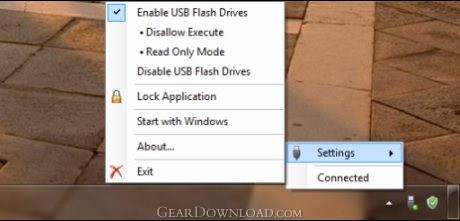 Click to enlarge screenshot
Software Description:
USB Flash Drives Control provides quick access to control the your USB drives.
What's new in version 2.3
√ Updated the setup program.
√ Improved interface with easily understandable icons in the system tray.
√ Show detailed informations for the connected USB flash drives, like the drive letter, drive name, volume name, size and free space.
√ Start with Windows, will run the program with administrative privileges, for all administrator accounts.
Product Overview
√ USB Flash Drives Control is a small and easy to use program that runs in taskbar, next to the system clock, and provides quick access to control the way in which USB flash drives are used on your computer. USB Flash Drives Control offers access to few, but powerful, options that helps you to control how your flash storage drives are used.
Program Features
√ Just one small size executable file, all features are packed in the same single executable file. The same executable file is the setup program as well the program itself, and has only 131 KB.
√ Easy to use, intuitive menus placed right next to your system clock, which allows you to configure easily the program.
√ Enable or disable USB flash drives with a single mouse click.
√ Automatically starts with Windows.
√ Protection to uninstallation accidentally the program when is locked with a password.
Features for registered users only
√ Deny execute access to all executable files on all flash drives used on current computer. Available only for Microsoft Windows 7.
√ Deny write access on all flash drives used on current computer. Prevents stealing your personal data.
√ Lock the current configuration of the program with a password. Useful if you don't want other users to alter program settings.
√ Show for the connected USB flash drives, extended informations like, volume name, size and free space.
√ Lock drive and unmount volume, with a single click, for selected USB flash drives. This is accomplished faster than the default option, Safely Remove Hardware.
What's new in version 2.3
√ Updated the setup program.
√ Improved interface with easily understandable icons in the system tray.
√ Show detailed informations for the connected USB flash drives, like the drive letter, drive name, volume name, size and free space.
√ Start with Windows, will run the program with administrative privileges, for all administrator accounts.
Product Overview
√ USB Flash Drives Control is a small and easy to use program that runs in taskbar, next to the system clock, and provides quick access to control the way in which USB flash drives are used on your computer. USB Flash Drives Control offers access to few, but powerful, options that helps you to control how your flash storage drives are used.
Program Features
√ Just one small size executable file, all features are packed in the same single executable file. The same executable file is the setup program as well the program itself, and has only 131 KB.
√ Easy to use, intuitive menus placed right next to your system clock, which allows you to configure easily the program.
√ Enable or disable USB flash drives with a single mouse click.
√ Automatically starts with Windows.
√ Protection to uninstallation accidentally the program when is locked with a password.
Features for registered users only
√ Deny execute access to all executable files on all flash drives used on current computer. Available only for Microsoft Windows 7.
√ Deny write access on all flash drives used on current computer. Prevents stealing your personal data.
√ Lock the current configuration of the program with a password. Useful if you don't want other users to alter program settings.
√ Show for the connected USB flash drives, extended informations like, volume name, size and free space.
√ Lock drive and unmount volume, with a single click, for selected USB flash drives. This is accomplished faster than the default option, Safely Remove Hardware.
Feature List:
- Just one small size executable file, all features are packed in the same single executable file. The same executable file is the setup program as well the program itself, and has only 95 KB
- Easy to use, intuitive menus placed right next to your system clock, which allows you to configure easily Windows Firewall
- Enable or disable USB flash drives with a single mouse click
- Predefined rules for Internet Explorer, Remote Desktop Connection and Windows Update, with simple buttons within the program interface
- Lock the configuration of the program with a password
- Automatically starts with Windows
- Protection to uninstallation accidentally the program when is locked with a password
- Deny execute access to all executable files on all flash drives used on current computer (REGISTERED USERS ONLY)
- Deny write access on all flash drives used on current computer. (REGISTERED USERS ONLY)
- Lock the current configuration with a password. Useful if you don't want other users to change your settings you have made in the program (REGISTERED USERS ONLY)
- Have your own registered name and license in the program (REGISTERED USERS ONLY)
- Reset a forgotten password used to lock the configuration of the program (REGISTERED USERS ONLY)
100% Clean:
 USB Flash Drives Control 2.3 is 100% clean
This download (usbc.exe) was tested thoroughly and was found 100% clean. Click "Report Spyware" link on the top if you found this software contains any form of malware, including but not limited to: spyware, viruses, trojans and backdoors.
Related Software:
- Advanced-Password-Manager 3.0 - Advance Password Manager is a safe & user friendly password management utility.
- FastSum Standard Edition 1.6 - Check the integrity and track changes within your important files
- Acronis True Image Corporate Workstation 8.0 - Data and system backup and restore solution for corporate workstations
- Ashampoo PowerUp 3 3.23 - More protection, more control, faster and easier than ever
- Odbc 4 All 2.3 - Easy connection to ODBC data sources for any application, DOS and scripts too !
- Antechinus eBook Wizard 3.2 - Use eBook Wizard to compile your highly-compressed eBooks easily and in no time.
- O&O DriveLED 2.0 - O&O DriveLED permanently monitors the status of the hard disks in the background
- Unusual Works Utility Pack 1.0 - CD Ejector and Note Manager programs.
- 1-abc.net Surf Trail Washer 7.00 - Tool to delete your internet trail (files, cookies, history, URLs) permanently!
- txt2pdf 10.2 - txt2pdf is a flexible and powerful converter from text files to PDFs
top 10 most downloaded


recommended software
-
- AppleXsoft Photo Recovery for Mac
- AppleXsoft Photo Recovery is the comprehensive digital media data rescue software designed for Mac users, it featuring innovative photo recovery algor...

-
- Cacheman
- Memory is one of the most important pieces of computer hardware as it is in constant use no matter what a PC is used for. There is a tremendous number...
