Index >> System Utilities >> System Maintenance >> Uninstall Gold Free Version
Report SpywareUninstall Gold Free Version 2.0.2.122

 Click to enlarge screenshot
Software Description:
Uninstall Gold Free Version - Remove remnants of unneeded programs on personal computer
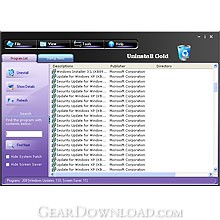
Uninstall Gold is system software designed to remove remnants of unneeded programs on personal computer. Normally, Uninstall Gold scans personal computer and shows all found files, folders and registry items for users to find the desired programs to uninstall.
Unlike other uninstall software, Uninstall Gold can remove unneeded program completely, even the remnants of folders or broken registry keys. It's more convenient, faster and secure for users to clean their computer. Still, Uninstall Gold offers some hotkeys for users to operate easily and fast. It's built-in Startup items make users know more about the programs that are automatically started by Windows.
Advantages of using Uninstall Gold:
Friendly and easy to use Interface.
List all installed programs, system updates and screen savers quickly.
Backup the registry info of all installed programs.
Add comments for selected programs in the registry.
Export any program uninstall information to registry file.
Provide different ways of application view (Icons, List and Details).
View all details any application installed on your computer.
Clean up remnants of program files and registry keys after uninstalling.
Ability to uninstall screen savers.
Quickly open program Install folders, company sites or support sites.
Create a full report for installed programs and save reports to a text file.
What's New: unspecified updates, enhancements, or bug fixes.
Limitations: 7 Days Trial; 7 days/ 14 free trials
Uninstall Gold is system software designed to remove remnants of unneeded programs on personal computer. Normally, Uninstall Gold scans personal computer and shows all found files, folders and registry items for users to find the desired programs to uninstall.
Unlike other uninstall software, Uninstall Gold can remove unneeded program completely, even the remnants of folders or broken registry keys. It's more convenient, faster and secure for users to clean their computer. Still, Uninstall Gold offers some hotkeys for users to operate easily and fast. It's built-in Startup items make users know more about the programs that are automatically started by Windows.
Advantages of using Uninstall Gold:
Friendly and easy to use Interface.
List all installed programs, system updates and screen savers quickly.
Backup the registry info of all installed programs.
Add comments for selected programs in the registry.
Export any program uninstall information to registry file.
Provide different ways of application view (Icons, List and Details).
View all details any application installed on your computer.
Clean up remnants of program files and registry keys after uninstalling.
Ability to uninstall screen savers.
Quickly open program Install folders, company sites or support sites.
Create a full report for installed programs and save reports to a text file.
What's New: unspecified updates, enhancements, or bug fixes.
Limitations: 7 Days Trial; 7 days/ 14 free trials
100% Clean:
 Uninstall Gold Free Version 2.0.2.122 is 100% clean
This download (UninstallGold.exe) was tested thoroughly and was found 100% clean. Click "Report Spyware" link on the top if you found this software contains any form of malware, including but not limited to: spyware, viruses, trojans and backdoors.
Related Software:
- Memory Improve Ultimate Free Version 5.2.1.302 - It frees up and compresses system memory to make processes run faster
- Memory Improve Ultimate 5.2.1.319 - Free up wasted RAM and compresses system memory make processes run faster.
- Casper RAM Cleaner 2.3 - Casper RAM Cleaner increases your system performance.
- StartPro 2.0 - Gain control of your Windows startup
- Serial Splitter 3.0 - Enable all applications to receive same data from a serial port simultaneously.
- PC Tweaker 2.20 - Using PC Tweaker you can improve software and internet connection productivity.
- Actions Monitor 1.02 - Monitor and display system activity.
- ActiveStartup 1.45 - Windows startup manager. Supports backup/restore configurations.
- Key Transformation 8.1701 - Customize keyboard layout; Change key on keyboard; On screen keyboard.
- SystemAI 1.5 - SystemAI™ creates an ideal virtual computer for each of your applications.
top 10 most downloaded


recommended software
-
- AppleXsoft Photo Recovery for Mac
- AppleXsoft Photo Recovery is the comprehensive digital media data rescue software designed for Mac users, it featuring innovative photo recovery algor...

-
- Cacheman
- Memory is one of the most important pieces of computer hardware as it is in constant use no matter what a PC is used for. There is a tremendous number...
