Index >> System Utilities >> Other >> Type it Easy
Report SpywareType it Easy 1.5

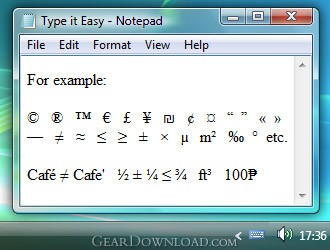 Click to enlarge screenshot
Software Description:
Type it Easy - Allows you to type many typographical characters into any application.
Type it Easy is a free software that allows you to easily insert many unavailable on the keyboard typographical characters into any application. For example, it can be em and en dashes, typographic quotation marks, copyright and trademark symbols, euro and other currency signs, miscellaneous math characters, diacritical marks and so on.
It works very simply: just hold down the control key (the AltGr button by default) and press the necessary alphanumeric key. For example, pressing AltGr and the "C" key simultaneously will type the copyright symbol: ©. While pressing AltGr and "E" will insert the euro sign: €.
Features:
- Now it is possible to type text in an easy way in accordance with the typographical rules.
- You can easily insert acute and grave accents, umlauts and most other diacritical marks without using a special keyboard layout.
- Selecting the control key out of five available options: AltGr, left and right Ctrl, left and right Win.
- The program is easily enabled and disabled with the help of the corresponding command from the context menu or the hotkey (Win+Z by default).
- At any moment you can open the on-screen hint from the context menu of the program or with the corresponding hotkey (AltGr+F1 by default).
- You can use the mouse wheel to adjust the transparency of the hint window after you click it.
- The program requires little space on the hard drive and RAM.
- Type it Easy is designed to run in the Windows 2000/XP/Vista environment.
- It can be automatically launched at Windows startup.
- Convenient and flexible installation and removal software.
Type it Easy is a free software that allows you to easily insert many unavailable on the keyboard typographical characters into any application. For example, it can be em and en dashes, typographic quotation marks, copyright and trademark symbols, euro and other currency signs, miscellaneous math characters, diacritical marks and so on.
It works very simply: just hold down the control key (the AltGr button by default) and press the necessary alphanumeric key. For example, pressing AltGr and the "C" key simultaneously will type the copyright symbol: ©. While pressing AltGr and "E" will insert the euro sign: €.
Features:
- Now it is possible to type text in an easy way in accordance with the typographical rules.
- You can easily insert acute and grave accents, umlauts and most other diacritical marks without using a special keyboard layout.
- Selecting the control key out of five available options: AltGr, left and right Ctrl, left and right Win.
- The program is easily enabled and disabled with the help of the corresponding command from the context menu or the hotkey (Win+Z by default).
- At any moment you can open the on-screen hint from the context menu of the program or with the corresponding hotkey (AltGr+F1 by default).
- You can use the mouse wheel to adjust the transparency of the hint window after you click it.
- The program requires little space on the hard drive and RAM.
- Type it Easy is designed to run in the Windows 2000/XP/Vista environment.
- It can be automatically launched at Windows startup.
- Convenient and flexible installation and removal software.
Feature List:
- Now it is possible to type text in an easy way in accordance with the typographical rules
- You can easily insert acute and grave accents (?U? umlauts (??) and most other diacritical marks without using a special keyboard layout
- Selecting the control key out of five available options: AltGr, left and right Ctrl, left and right Win
- The program is easily enabled and disabled with the help of the corresponding command from the context menu or the hotkey (Win+Z by default)
- At any moment you can open the on-screen hint from the context menu of the program or with the corresponding hotkey (AltGr+F1 by default)
- You can use the mouse wheel to adjust the transparency of the hint window after you click it
- The program requires little space on the hard drive and RAM
- Type it Easy is designed to run in the Windows 2000/XP/Vista environment
- It can be automatically launched at Windows startup
- Convenient and flexible installation and removal software
100% Clean:
 Type it Easy 1.5 is 100% clean
This download (typeasy.en.setup.exe) was tested thoroughly and was found 100% clean. Click "Report Spyware" link on the top if you found this software contains any form of malware, including but not limited to: spyware, viruses, trojans and backdoors.
Related Software:
- Advanced-Password-Manager 3.0 - Advance Password Manager is a safe & user friendly password management utility.
- FastSum Standard Edition 1.6 - Check the integrity and track changes within your important files
- Acronis True Image Corporate Workstation 8.0 - Data and system backup and restore solution for corporate workstations
- Ashampoo PowerUp 3 3.23 - More protection, more control, faster and easier than ever
- Odbc 4 All 2.3 - Easy connection to ODBC data sources for any application, DOS and scripts too !
- Antechinus eBook Wizard 3.2 - Use eBook Wizard to compile your highly-compressed eBooks easily and in no time.
- O&O DriveLED 2.0 - O&O DriveLED permanently monitors the status of the hard disks in the background
- Unusual Works Utility Pack 1.0 - CD Ejector and Note Manager programs.
- 1-abc.net Surf Trail Washer 7.00 - Tool to delete your internet trail (files, cookies, history, URLs) permanently!
- txt2pdf 10.2 - txt2pdf is a flexible and powerful converter from text files to PDFs
top 10 most downloaded


recommended software
-
- AppleXsoft Photo Recovery for Mac
- AppleXsoft Photo Recovery is the comprehensive digital media data rescue software designed for Mac users, it featuring innovative photo recovery algor...

-
- Cacheman
- Memory is one of the most important pieces of computer hardware as it is in constant use no matter what a PC is used for. There is a tremendous number...
