Index >> System Utilities >> Clipboard Tools >> Text Monkey PRO
Report SpywareText Monkey PRO 1.0.1

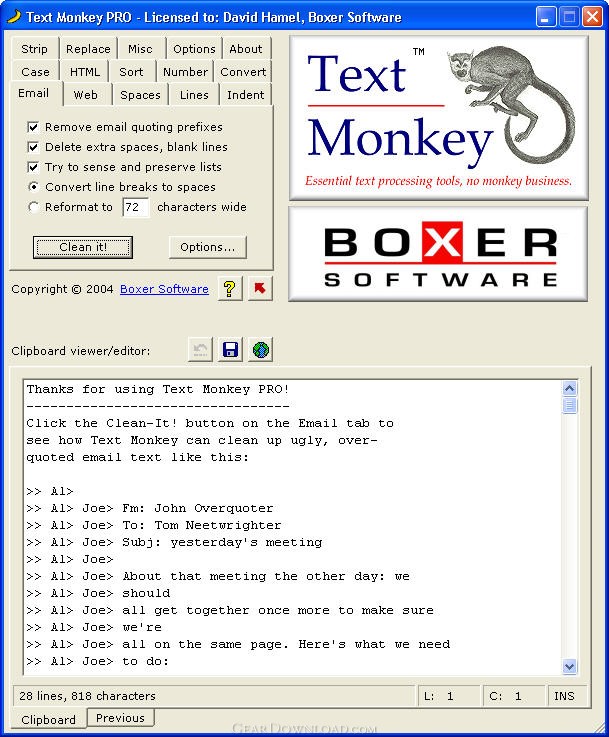 Click to enlarge screenshot
Software Description:
Text Monkey PRO - Clean up ugly, over-quoted email text with just one click; 40+ other functions
Text Monkey PRO is a clever program that cleans up ugly, over-quoted email text. The program also includes 40+ other handy functions. Text Monkey operates on text as it resides on the Windows clipboard, so it extends the functionality of every program you use.
Example 1: You just received an important email, but it's been forwarded and quoted so many times it's almost impossible to read. With Text Monkey, cleanup is a snap: just copy the message to the clipboard and paste back the cleaned text. How could it be so simple? Text Monkey senses when messy email text has been copied to the clipboard and cleans the text automatically, or upon your confirmation.
Example 2: You have several paragraphs of text that you need to publish as a web page on short notice. Simply copy the text to the clipboard, click a button in Text Monkey, and you'll find that all the appropriate tags have been added to make a legal HTML document. (Text Monkey also handles the opposite case: it can remove HTML tags from a web document so that only the readable text remains.)
Example 3: You're editing a list of items in the memo field of a large application. You realize that you'd like to number the list (or sort it, or delete duplicates, or indent it, or convert its character case, or...). Not to worry: just copy the text to clipboard, click a button in Text Monkey, and paste back the result.
In addition to email clean-up, Text Monkey Pro includes dozens of other useful functions, all related to cleaning, formatting, or filtering text. Most of its functions require the click of just a single button. One button converts plain text to an HTML document, applying all the tags necessary to preserve formatting and create a web-publishable document. Other commands are available to sort, auto-number, delete blank lines, delete duplicate lines, count occurrences of strings, convert tabs to spaces, perform case conversions, encode/decode special HTML characters, and more.
What's New: Initial release
Limitations: 10 Days Trial; counts only days of actual use
Text Monkey PRO is a clever program that cleans up ugly, over-quoted email text. The program also includes 40+ other handy functions. Text Monkey operates on text as it resides on the Windows clipboard, so it extends the functionality of every program you use.
Example 1: You just received an important email, but it's been forwarded and quoted so many times it's almost impossible to read. With Text Monkey, cleanup is a snap: just copy the message to the clipboard and paste back the cleaned text. How could it be so simple? Text Monkey senses when messy email text has been copied to the clipboard and cleans the text automatically, or upon your confirmation.
Example 2: You have several paragraphs of text that you need to publish as a web page on short notice. Simply copy the text to the clipboard, click a button in Text Monkey, and you'll find that all the appropriate tags have been added to make a legal HTML document. (Text Monkey also handles the opposite case: it can remove HTML tags from a web document so that only the readable text remains.)
Example 3: You're editing a list of items in the memo field of a large application. You realize that you'd like to number the list (or sort it, or delete duplicates, or indent it, or convert its character case, or...). Not to worry: just copy the text to clipboard, click a button in Text Monkey, and paste back the result.
In addition to email clean-up, Text Monkey Pro includes dozens of other useful functions, all related to cleaning, formatting, or filtering text. Most of its functions require the click of just a single button. One button converts plain text to an HTML document, applying all the tags necessary to preserve formatting and create a web-publishable document. Other commands are available to sort, auto-number, delete blank lines, delete duplicate lines, count occurrences of strings, convert tabs to spaces, perform case conversions, encode/decode special HTML characters, and more.
What's New: Initial release
Limitations: 10 Days Trial; counts only days of actual use
100% Clean:
 Text Monkey PRO 1.0.1 is 100% clean
This download (textmonkeypro.exe) was tested thoroughly and was found 100% clean. Click "Report Spyware" link on the top if you found this software contains any form of malware, including but not limited to: spyware, viruses, trojans and backdoors.
Related Software:
- Text Monkey Lite 1.0.1 - Clean up ugly, over-quoted email text with just one click
- ! - M8 Multi Clipboard 5.Release - The M8 multi clipboard captures all clips and Screen Shots
- 101 Clips 19.00 - Free Multi-Clipboard and Clip Organizer
- Speed Dial for Phone Cards 2.00 - Speed Dial for Phone Cards
- Speed Dial 13.07.01 - This computer speed dial software program makes dialing the phone easy
- WinM8 4.01.03 - The original multi clipboard
- CopyPlus 2.02.33 - Now you can copy as often as you like and paste all your clips at the same time.
- I Love Clipboard 1.3 - ILoveClipboard is a useful software to manage Windows clipboard.
- M8 Multi Clipboard 9.73.11 - Multi clipboard, organizer, text and graphics editors all rolled into one.
- Alpha Clipboard Recorder 9.03 - Free Clipboard Recorder
top 10 most downloaded


recommended software
-
- AppleXsoft Photo Recovery for Mac
- AppleXsoft Photo Recovery is the comprehensive digital media data rescue software designed for Mac users, it featuring innovative photo recovery algor...

-
- Cacheman
- Memory is one of the most important pieces of computer hardware as it is in constant use no matter what a PC is used for. There is a tremendous number...
