Index >> System Utilities >> Launchers & Task Managers >> Task Commander
Report SpywareTask Commander 2.5

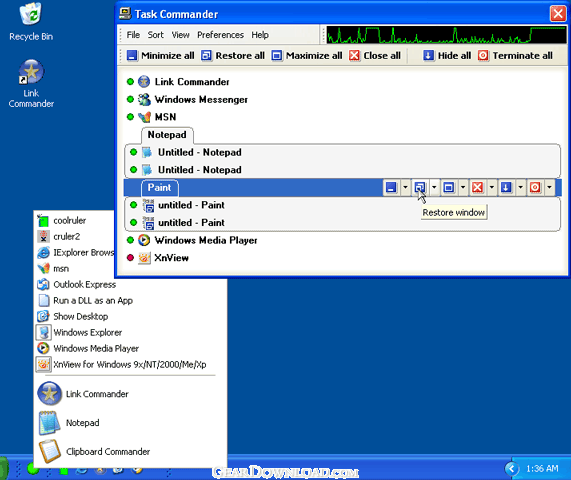 Click to enlarge screenshot
Software Description:
Task Commander - Free up taskbar space! Fully control apps behavior! Launch them with one click!
Modern operating systems offer many cool interface features to make our lives easier. However, the ever-increasing number of various programs we use on a daily basis makes the task of managing open windows, running programs and processes way too complicated and time-consuming.
As our taskbars get overloaded with buttons and panels, our Quick Launch panels stretch to galactic sizes. We tend to get completely lost in windows, buttons, sidebars and other controls, all designed initially to provide better accessibility. No wonder this happens...we have more memory, more processing power, better multitasking and voila...dozens of open windows clutter our desktops! So, is there a solution?
In fact, there is! Introducing Task Commander by Resort Labs, the unique Windows task management and application launcher\maintenance solution capable of freeing up valuable desktop, taskbar and Quick Launch panel space as well as providing one-click access to your favorite applications and files!
Task Commander installs a tiny icon on your taskbar. As soon as your mouse cursor hovers over it, a menu appears containing the most popular and recently used applications that can be launched with just a click. This menu is highly customizable, allowing you to create your own convenient data access menu. In addition, the program adds a "minimize to tray" option and other cool features to each window on the system. This way, it's easy to minimize, roll-up, roll-down and/or hide any windows or groups of windows.
The application features an Alt-Tab task switcher replacement allowing for total control over application management on-the-fly. Built-in process and memory usage monitor displays the most resource-hungry apps and helps prevent lock-ups and slowdowns. Tight integration with desktop context menu, taskbar, IE and Windows Explorer makes advanced applications management universally available system-wide!
Download FREE trial version today and see the difference!
What's New: Added possibility to specify categories for the programs in the Hot Launch menu; Added possibility to change the 'Stay on top' property for the running applications; Added the 'Shoutdown' submenu to the tray menu; Many updates and fixes.
Limitations: 30 Days Trial
Modern operating systems offer many cool interface features to make our lives easier. However, the ever-increasing number of various programs we use on a daily basis makes the task of managing open windows, running programs and processes way too complicated and time-consuming.
As our taskbars get overloaded with buttons and panels, our Quick Launch panels stretch to galactic sizes. We tend to get completely lost in windows, buttons, sidebars and other controls, all designed initially to provide better accessibility. No wonder this happens...we have more memory, more processing power, better multitasking and voila...dozens of open windows clutter our desktops! So, is there a solution?
In fact, there is! Introducing Task Commander by Resort Labs, the unique Windows task management and application launcher\maintenance solution capable of freeing up valuable desktop, taskbar and Quick Launch panel space as well as providing one-click access to your favorite applications and files!
Task Commander installs a tiny icon on your taskbar. As soon as your mouse cursor hovers over it, a menu appears containing the most popular and recently used applications that can be launched with just a click. This menu is highly customizable, allowing you to create your own convenient data access menu. In addition, the program adds a "minimize to tray" option and other cool features to each window on the system. This way, it's easy to minimize, roll-up, roll-down and/or hide any windows or groups of windows.
The application features an Alt-Tab task switcher replacement allowing for total control over application management on-the-fly. Built-in process and memory usage monitor displays the most resource-hungry apps and helps prevent lock-ups and slowdowns. Tight integration with desktop context menu, taskbar, IE and Windows Explorer makes advanced applications management universally available system-wide!
Download FREE trial version today and see the difference!
What's New: Added possibility to specify categories for the programs in the Hot Launch menu; Added possibility to change the 'Stay on top' property for the running applications; Added the 'Shoutdown' submenu to the tray menu; Many updates and fixes.
Limitations: 30 Days Trial
Feature List:
- Information presentation about running, selected and frequently used applications
- Launch and switching between applications simplicity
- Support of all managing duties with active application windows
- Support of group managing duties with all simultaneously running applications windows
- Support of all group managing duties with all instances of a running application
- Processor usage monitoring
- Processor usage history
- Hotkeys programming for application windows control
- Task Commander launching from Quick Launch panel, IE Toolbar, Windows Explorer Toolbar
100% Clean:
 Task Commander 2.5 is 100% clean
This download (tc_setup.exe) was tested thoroughly and was found 100% clean. Click "Report Spyware" link on the top if you found this software contains any form of malware, including but not limited to: spyware, viruses, trojans and backdoors.
Related Software:
- Astatix Launcher 1.63 - Quick start any application in a single click and control Winamp with hotkeys.
- ActiveActions 1.25 - ActiveActions is an launch tool that also acts like hotkey manager.
- eXtended Task Manager 2.15 - Extended windows task manager and performance monitoring tool
- Window Magician 1.1.3 - Small utility that can hide windows, system tray icons or run screensaver
- Program Sleuth 2.0.6 - Find out what is really running on your computer.
- RLauncher 2.3 - RLauncher is an easy to use application launcher.
- Pokki Start Menu 260.11.291 - Pokki Windows 8 Start menu lets you access & search all the stuff on your PC.
- FireDaemon Pro 3.14.2755 - A utility to install and run any application or script as a Windows service
- JetStart Free 4.4 - Launch Start Menu shortcuts faster and easier than ever
- DE Launcher 2.2 - Desktop utility that provides an alternative method of launching applications
top 10 most downloaded


recommended software
-
- AppleXsoft Photo Recovery for Mac
- AppleXsoft Photo Recovery is the comprehensive digital media data rescue software designed for Mac users, it featuring innovative photo recovery algor...

-
- Cacheman
- Memory is one of the most important pieces of computer hardware as it is in constant use no matter what a PC is used for. There is a tremendous number...
