Index >> System Utilities >> Other >> System Uptime full Plus
Report SpywareSystem Uptime full Plus 7.6

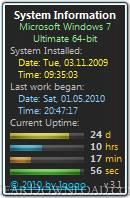 Click to enlarge screenshot
Software Description:
System Uptime full Plus - Allows you to see how much time has passed since you last restarted your PC.
System Uptime Full Plus refers to the time during which a system is working without failure and has had zero downtimes. Over a period of time, a system can end up slowing down or breaking down due to excessive usage. One way of checking the current uptime of the system is through the Performance tab of the task manager and via the command prompt. However, one might need more information to get a better comparison of system performance by checking the uptime from numerous intervals. System Uptime Full Plus is a Windows Gadget that displays the system uptime from the time of system installation, current uptime and uptime of the last time the system was used.
It also displays some general information, including operating system type, version, date and time of operating system installation. This way you can compare your system’s uptime since the first time the OS was installed to the last and current usage. The gadget also displays the date and time of the last system usage which can be quite handy to track if the system is being over-used.
Gadget have three modes - full, small and wide. Some users may want to increase the size of the gadget’s display to make it better readable, which can be helpful especially on larger displays. Save settings to file. (File will created - Path: %APPDATA% Filename: gadgetname_Settings.ini). Color changeable for all gadget's elements, including background. The gadget is compatible with 32-bit and 64-bit editions of Windows Vista, Windows 7 and Windows Server 2008.
System Uptime Full Plus refers to the time during which a system is working without failure and has had zero downtimes. Over a period of time, a system can end up slowing down or breaking down due to excessive usage. One way of checking the current uptime of the system is through the Performance tab of the task manager and via the command prompt. However, one might need more information to get a better comparison of system performance by checking the uptime from numerous intervals. System Uptime Full Plus is a Windows Gadget that displays the system uptime from the time of system installation, current uptime and uptime of the last time the system was used.
It also displays some general information, including operating system type, version, date and time of operating system installation. This way you can compare your system’s uptime since the first time the OS was installed to the last and current usage. The gadget also displays the date and time of the last system usage which can be quite handy to track if the system is being over-used.
Gadget have three modes - full, small and wide. Some users may want to increase the size of the gadget’s display to make it better readable, which can be helpful especially on larger displays. Save settings to file. (File will created - Path: %APPDATA% Filename: gadgetname_Settings.ini). Color changeable for all gadget's elements, including background. The gadget is compatible with 32-bit and 64-bit editions of Windows Vista, Windows 7 and Windows Server 2008.
100% Clean:
 System Uptime full Plus 7.6 is 100% clean
This download was tested thoroughly and was found 100% clean. Click "Report Spyware" link on the top if you found this software contains any form of malware, including but not limited to: spyware, viruses, trojans and backdoors.
Related Software:
- GPU Monitor 8.4 - GPU Monitor lets you monitor the most recent stats of your NVIDIA or AMD/ATI GPU
- Mouse Monitor 4.3 - Shows statistics on the use of the mouse. It needs a small library installation.
- BOINC Monitor 9.14 - A desktop gadget that shows the status of running tasks.
- Weather Monitor 5.8 - Windows Gadget To Display current weather and forecast anywhere in the world.
- Advanced-Password-Manager 3.0 - Advance Password Manager is a safe & user friendly password management utility.
- FastSum Standard Edition 1.6 - Check the integrity and track changes within your important files
- Acronis True Image Corporate Workstation 8.0 - Data and system backup and restore solution for corporate workstations
- Ashampoo PowerUp 3 3.23 - More protection, more control, faster and easier than ever
- Odbc 4 All 2.3 - Easy connection to ODBC data sources for any application, DOS and scripts too !
- Antechinus eBook Wizard 3.2 - Use eBook Wizard to compile your highly-compressed eBooks easily and in no time.
top 10 most downloaded


recommended software
-
- AppleXsoft Photo Recovery for Mac
- AppleXsoft Photo Recovery is the comprehensive digital media data rescue software designed for Mac users, it featuring innovative photo recovery algor...

-
- Cacheman
- Memory is one of the most important pieces of computer hardware as it is in constant use no matter what a PC is used for. There is a tremendous number...
