Index >> System Utilities >> System Maintenance >> SysCheckUp
Report SpywareSysCheckUp 4.1.0

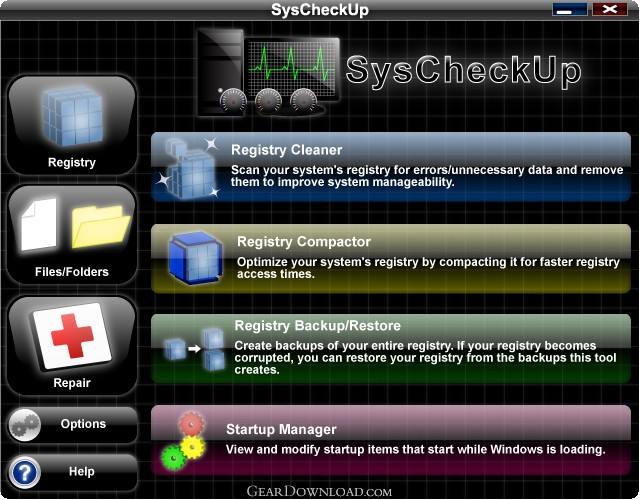 Click to enlarge screenshot
Software Description:
SysCheckUp is designed for Windows to diagnose problems and repair them.
SysCheckUp is software designed for Windows to keep your computer running at maximum performance. The innovative repair tool can repair multiple problems including: missing desktop icons, missing taskbars, missing drives, malfunctioning audio, and denied access to the task manager and control panel. The repair tool also repairs general problems such as invalid service dependencies and file conflicts. SysCheckUp's registry cleaner can remove obsolete items from the system registry for increased manageability. The registry cleaner is significantly more thorough than other registry cleaners and scans and removes obsolete file extensions, context menu items, installer information, and more. The registry compactor can compact your registry for faster registry access times. The registry backup/restore tool will allow you to create a registry backup and restore it in the event of registry corruption. The disk cleaner can remove obsolete files from your hard drive to free up hard drive space. The startup manager can help you to find items that start while Windows is loading to help to decrease boot time and disable problematic startup items. The startup optimizer attempts to find and disable unused functions in Windows to decrease boot time and free up RAM. The shell extension manager can help to resolve problems related to Windows Explorer slowdowns/crashes. The system tweaker finds tweaks to help maximize your computer's performance.
What's New: Improved registry cleaner ignore list method; Bug fixed that prevented customers from registering SysCheckUp in some cases; Several minor changes
Limitations: 30 Days Trial
SysCheckUp is software designed for Windows to keep your computer running at maximum performance. The innovative repair tool can repair multiple problems including: missing desktop icons, missing taskbars, missing drives, malfunctioning audio, and denied access to the task manager and control panel. The repair tool also repairs general problems such as invalid service dependencies and file conflicts. SysCheckUp's registry cleaner can remove obsolete items from the system registry for increased manageability. The registry cleaner is significantly more thorough than other registry cleaners and scans and removes obsolete file extensions, context menu items, installer information, and more. The registry compactor can compact your registry for faster registry access times. The registry backup/restore tool will allow you to create a registry backup and restore it in the event of registry corruption. The disk cleaner can remove obsolete files from your hard drive to free up hard drive space. The startup manager can help you to find items that start while Windows is loading to help to decrease boot time and disable problematic startup items. The startup optimizer attempts to find and disable unused functions in Windows to decrease boot time and free up RAM. The shell extension manager can help to resolve problems related to Windows Explorer slowdowns/crashes. The system tweaker finds tweaks to help maximize your computer's performance.
What's New: Improved registry cleaner ignore list method; Bug fixed that prevented customers from registering SysCheckUp in some cases; Several minor changes
Limitations: 30 Days Trial
Feature List:
- Repairer
- Missing taskbar
- Missing desktop icons
- Missing CD drives
- CDs do not automatically run
- Secure websites do not open
- Video/audio codec problems
- Windows Installer problems
- Printing problems
- Task Manager problems
- System Restore problems
- Disk Defragmenter problem
- ActiveX/COM-related problems
- This entire process generally takes only a few minutes. This tool can be used to cleanup problems after a virus attack, a repair install, unintentional setting changes, etc
- Registry Cleaner
- The registry cleaner will scan your system's registry and fix the errors it finds. This tool will make your computer more stable and manageable
- Registry Compactor
- The registry compactor can reduce the size of your registry to speed up registry access times
- Registry Backup / Restore
- The Windows registry is one of the most crucial components required for Windows to operate. It is a huge database of settings that Windows and most programs use to store settings. If a single critical registry key/value becomes corrupted, it can leave your computer in an extremely unstable state or even leave you with an unbootable system. With this tool, you can create registry backups and restore them at a later date if the registry becomes corrupt
- Disk Cleaner
- Scan your hard drive for unnecessary files and delete them. Over time, your hard drive may fill up with unnecessary files that take up space that could be used for useful files
Awards:
 SysCheckUp 4.1.0 is rated Editor's Choice
SysCheckUp 4.1.0 from Epiphany Software LLC has been reviewed by GearDownload.com editors and rated Editor's Choice.
100% Clean:
 SysCheckUp 4.1.0 is 100% clean
This download (syscheckupsetup.exe) was tested thoroughly and was found 100% clean. Click "Report Spyware" link on the top if you found this software contains any form of malware, including but not limited to: spyware, viruses, trojans and backdoors.
Related Software:
- Casper RAM Cleaner 2.3 - Casper RAM Cleaner increases your system performance.
- StartPro 2.0 - Gain control of your Windows startup
- Serial Splitter 3.0 - Enable all applications to receive same data from a serial port simultaneously.
- PC Tweaker 2.20 - Using PC Tweaker you can improve software and internet connection productivity.
- Actions Monitor 1.02 - Monitor and display system activity.
- ActiveStartup 1.45 - Windows startup manager. Supports backup/restore configurations.
- Key Transformation 8.1701 - Customize keyboard layout; Change key on keyboard; On screen keyboard.
- SystemAI 1.5 - SystemAI™ creates an ideal virtual computer for each of your applications.
- Fast PC 1.0 - Fast PC makes your PC faster, error-free and more efficient!
- Cleanse Uninstaller Pro 10.2 - Cleanse the fast,easy, complete uninstaller
top 10 most downloaded


recommended software
-
- AppleXsoft Photo Recovery for Mac
- AppleXsoft Photo Recovery is the comprehensive digital media data rescue software designed for Mac users, it featuring innovative photo recovery algor...

-
- Cacheman
- Memory is one of the most important pieces of computer hardware as it is in constant use no matter what a PC is used for. There is a tremendous number...
