Index >> System Utilities >> Backup & Restore >> SyncBackPro
Report SpywareSyncBackPro 6.5.4.0

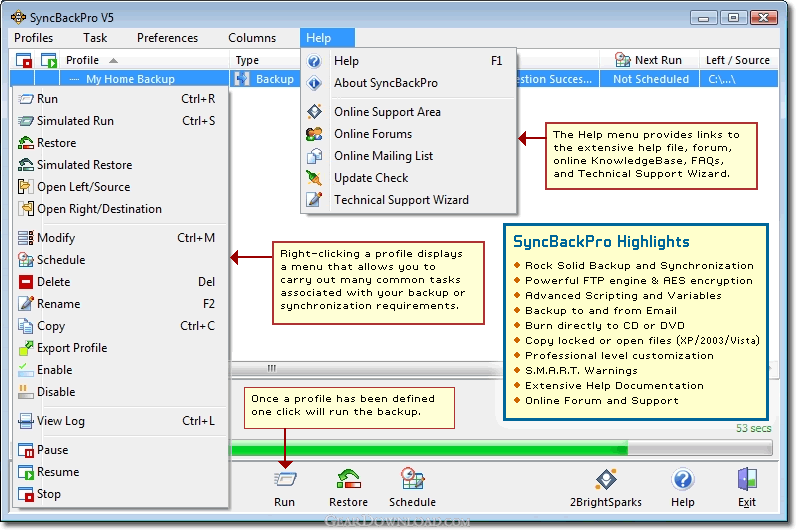 Click to enlarge screenshot
Software Description:
SyncBackPro - Easily backup/sync files to another drive, FTP, network, cloud, or email server
SyncBackPro is an advanced file backup & synchronization program that can be used with hard drives, CD’s & DVD’s, removable media (e.g. Compact Flash), FTP, FTPS, and SFTP servers, Zip64 archives (with 256-bit AES encryption), POP3/IMAP4/SMTP email servers, network shares, and cloud storage services (Amazon S3 and Microsoft Azure). Highly configurable, SyncBackPro includes: open/locked file copying; file versioning; scripting; fast backup; true synchronization; Zip64 support; compression filtering; detailed and easy to read log files; email results; simulated backups and restore; file filters; sub-directory selection; copy verification; background backups; auto-close of programs; profile groups; compare files, and an extensive context sensitive help file.
As well as English, SyncBackPro is also available in Catalan, Simplified Chinese, Traditional Chinese, Czech, Dutch, French, German, Hungarian, Italian, Norwegian, Polish, Russian, Brazilian Portuguese, Spanish, and Swedish.
SyncBackPro, developed by 2BrightSparks, is a multi-award winning solution with tens of thousands of users. SyncBackPro provides a dependable way of ensuring digital files are safe with a simple interface that enables the first time user to backup and save their valuable data within minutes. As well as an Easy Mode for essential backup, restore, and synchronization tasks, SyncBackPro has an Expert Mode that delivers advanced functionality. If you need to backup to an FTP server or network and email the results this is where you'll fine-tune the software. SSL (implicit and explicit), MODE Z compression, and one-time-passwords are supported.
A comprehensive context sensitive help file provides easily accessible instructions and guidance about all aspects of using SyncBackPro. In addition an extensive Frequently Asked Questions section provides all the answers you're likely to ask when carrying out a backup, restore, or synchronization task.
What's New: See web site for details
Limitations: 30 Days Trial
TAGS: backup, backup removable media, backup software
SyncBackPro is an advanced file backup & synchronization program that can be used with hard drives, CD’s & DVD’s, removable media (e.g. Compact Flash), FTP, FTPS, and SFTP servers, Zip64 archives (with 256-bit AES encryption), POP3/IMAP4/SMTP email servers, network shares, and cloud storage services (Amazon S3 and Microsoft Azure). Highly configurable, SyncBackPro includes: open/locked file copying; file versioning; scripting; fast backup; true synchronization; Zip64 support; compression filtering; detailed and easy to read log files; email results; simulated backups and restore; file filters; sub-directory selection; copy verification; background backups; auto-close of programs; profile groups; compare files, and an extensive context sensitive help file.
As well as English, SyncBackPro is also available in Catalan, Simplified Chinese, Traditional Chinese, Czech, Dutch, French, German, Hungarian, Italian, Norwegian, Polish, Russian, Brazilian Portuguese, Spanish, and Swedish.
SyncBackPro, developed by 2BrightSparks, is a multi-award winning solution with tens of thousands of users. SyncBackPro provides a dependable way of ensuring digital files are safe with a simple interface that enables the first time user to backup and save their valuable data within minutes. As well as an Easy Mode for essential backup, restore, and synchronization tasks, SyncBackPro has an Expert Mode that delivers advanced functionality. If you need to backup to an FTP server or network and email the results this is where you'll fine-tune the software. SSL (implicit and explicit), MODE Z compression, and one-time-passwords are supported.
A comprehensive context sensitive help file provides easily accessible instructions and guidance about all aspects of using SyncBackPro. In addition an extensive Frequently Asked Questions section provides all the answers you're likely to ask when carrying out a backup, restore, or synchronization task.
What's New: See web site for details
Limitations: 30 Days Trial
TAGS: backup, backup removable media, backup software
Feature List:
- You can now backup and synchronize your files via an email server (POP3/IMAP4 and SMTP), e.g. Gmail, Yahoo!, etc. For example, you could synchronize your files with a friend or colleague via a dedicated shared email account. You could also sign up to a free email account and backup your files to it. There is no need to worry about spam - SyncBackPro can be configured to automatically delete all emails that are not used by SyncBackPro. There is also no need to worry about security because you can store your files using 256-bit AES encryption
- Now you can backup directly to CD or DVD (including Blu-Ray), with automatic disk spanning. There is no need to pre-format the CD/DVD, and compression does not need to be used for disk spanning
- This powerful new feature allows you to configure how SyncBackPro works and runs profiles. For example, you could create a script that lets SyncBackPro backup to a database (or anything else you can access). Scripting can also be used to change how profiles run
- SyncBackPro uses a database to store details of the files it is copying, instead of storing the information in RAM (memory). This means an unlimited number of files and folders can now be processed. SyncBackPro will use RAM for performance but will automatically and seamlessly switch to a database if memory is running low or the number of files reaches a threshold. Using a database will actually be significantly faster when the number of files is in the hundreds of thousands
- Using S.M.A.R.T. technology, SyncBackPro can detect the impending failure of a hard drive. If a hard drive is going to fail (or has failed) then the log file will have details, and the profile status will indicate it. To use this feature your computers BIOS and hard drive must support S.M.A.R.T. (and it must also be enabled via the BIOS settings)
- As well as supporting the industry standard Zip compression, and BWT compression, you can now also compress using BZip2. It compresses most files more effectively than more traditional gzip or Zip, but it is slower. If space is more of a concern than speed, then BZip2 may be the solution
- As well as supporting traditional FTP and FTPS, SyncBackPro now also supports SFTP
100% Clean:
 SyncBackPro 6.5.4.0 is 100% clean
This download (SyncBackPro_Setup.exe) was tested thoroughly and was found 100% clean. Click "Report Spyware" link on the top if you found this software contains any form of malware, including but not limited to: spyware, viruses, trojans and backdoors.
Related Software:
- SyncBackSE 6.5.4.0 - Easily backup/sync files to another drive, FTP, ZIP, network, or removable media
- SyncBackFree 6.5.4.0 - Easily backup/sync files to another drive, FTP, ZIP, network, or removable media
- ! - Oops 1.02 - ! Oops ! - the independant auto-save.
- ERS 2K/XP, Emergency Recovery System FAT/FAT32 6.01 - Win 2K/XP, Recover gracefully from a system crash with ERS 2K/XP.
- ERS 9x, Emergency Recovery System 9x 11.45 - Win 95/98/ME Recover gracefully from a system crash with ERS.
- Acronis True Image Enterprise Server 8.0 - Real-time disk backup, disk imaging, and bare metal restore for Windows servers
- NH Backup 3.0.74 - Get a fast, reliable and affordable backups solution.
- DataBK SQL Server Backup 11.0.6 - Backup and restore Microsoft SQL Server database to a local or network drive.
- Outlook Express Backup Restore 2.364 - Backup your Outlook Express and restore it when it is necessary.
- Backup4all Professional 6.1.180 - Customizable backup program. Full, incremental, differential and mirror backups
top 10 most downloaded


recommended software
-
- AppleXsoft Photo Recovery for Mac
- AppleXsoft Photo Recovery is the comprehensive digital media data rescue software designed for Mac users, it featuring innovative photo recovery algor...

-
- Cacheman
- Memory is one of the most important pieces of computer hardware as it is in constant use no matter what a PC is used for. There is a tremendous number...
