Index >> System Utilities >> Backup & Restore >> SmartBackup
Report SpywareSmartBackup 3.6.4

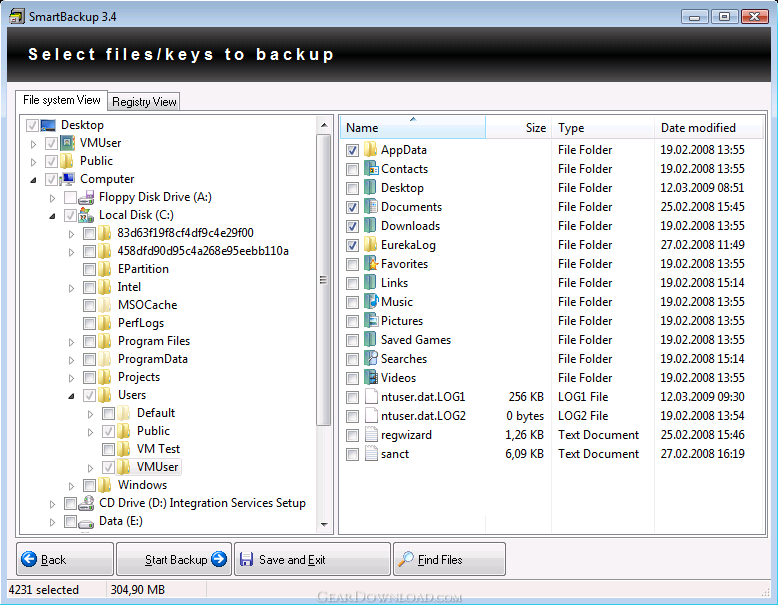 Click to enlarge screenshot
Software Description:
SmartBackup - Inexpensive, fast and easy to use backup software
SmartBackup is inexpensive, fast and easy to use backup software for Windows 2000/XP/Vista. On the one hand it helps you to select your important files for backup, which results in a shorter time needed for a backup. On the other hand it automatically keeps your backups up to date and copies only the files which really have changed since the last backup. Additionally, it allows you to synchronize your backup source and destination, which makes it easier to keep your data files and documents on your PC and your laptop synchronized. SmartBackup offers detailed options to specify which files should be copied. As destination a ZIP file, an FTP server, a portable medium or a CD / DVD may be specified, too.
What's New: * Bugfix: The option "Copy NTFS permissions list for every file" can now be used again. This options was broken in V3.6.3. * The order of the context menu entries of a backup job has been aligned to those of Windows.
Limitations: 21 Days Trial
SmartBackup is inexpensive, fast and easy to use backup software for Windows 2000/XP/Vista. On the one hand it helps you to select your important files for backup, which results in a shorter time needed for a backup. On the other hand it automatically keeps your backups up to date and copies only the files which really have changed since the last backup. Additionally, it allows you to synchronize your backup source and destination, which makes it easier to keep your data files and documents on your PC and your laptop synchronized. SmartBackup offers detailed options to specify which files should be copied. As destination a ZIP file, an FTP server, a portable medium or a CD / DVD may be specified, too.
What's New: * Bugfix: The option "Copy NTFS permissions list for every file" can now be used again. This options was broken in V3.6.3. * The order of the context menu entries of a backup job has been aligned to those of Windows.
Limitations: 21 Days Trial
Feature List:
- The directory structure is preserved on the backup volume
- Files which are already present on the backup volume and did not change will not be copied. This results in extremely short backup times if backups are done regularly. An Explorer like interface makes SmartBackup easy to use
- You can mark any file for backup from the Explorer context menu. This allows you to decide which files should be backup up while you are opening, saving or copying them, without starting SmartBackup
- SmartBackup is able to refresh a backup automatically once a day or once a week, either at a given time or on Windows startup
- You can use SmartBackup to replicate your documents and data files to a Notebook, a second harddisk or another PC in your local network
- SmartBackup can write your backups to a CD or DVD without any additional burning software
- An online help file and a user's manual as PDF file are included
- A German version is available too
- A search function for your harddisks helps you to find your documents and data files
- SmartBackup can save your backup directly to an FTP server, which is in an different geographical location
- Files or folders can be restored using drag & drop in the Windows Explorer
- Install & Uninstall support
100% Clean:
 SmartBackup 3.6.4 is 100% clean
This download (SmartBackup-Demo.exe) was tested thoroughly and was found 100% clean. Click "Report Spyware" link on the top if you found this software contains any form of malware, including but not limited to: spyware, viruses, trojans and backdoors.
Related Software:
- ! - Oops 1.02 - ! Oops ! - the independant auto-save.
- ERS 2K/XP, Emergency Recovery System FAT/FAT32 6.01 - Win 2K/XP, Recover gracefully from a system crash with ERS 2K/XP.
- ERS 9x, Emergency Recovery System 9x 11.45 - Win 95/98/ME Recover gracefully from a system crash with ERS.
- Acronis True Image Enterprise Server 8.0 - Real-time disk backup, disk imaging, and bare metal restore for Windows servers
- NH Backup 3.0.74 - Get a fast, reliable and affordable backups solution.
- DataBK SQL Server Backup 11.0.6 - Backup and restore Microsoft SQL Server database to a local or network drive.
- Outlook Express Backup Restore 2.364 - Backup your Outlook Express and restore it when it is necessary.
- Backup4all Professional 6.1.180 - Customizable backup program. Full, incremental, differential and mirror backups
- MinuteMan Data Backup Suite 8.54 - MinuteMan Data Backup with MinZip and MinSelfEx.
- Adolix Outlook Express Backup 3.0 - The easiest way to backup email data from Top Email Clients
top 10 most downloaded


recommended software
-
- AppleXsoft Photo Recovery for Mac
- AppleXsoft Photo Recovery is the comprehensive digital media data rescue software designed for Mac users, it featuring innovative photo recovery algor...

-
- Cacheman
- Memory is one of the most important pieces of computer hardware as it is in constant use no matter what a PC is used for. There is a tremendous number...
