Index >> System Utilities >> File & Disk Management >> Smart CD Catalog Professional
Report SpywareSmart CD Catalog Professional 3.07

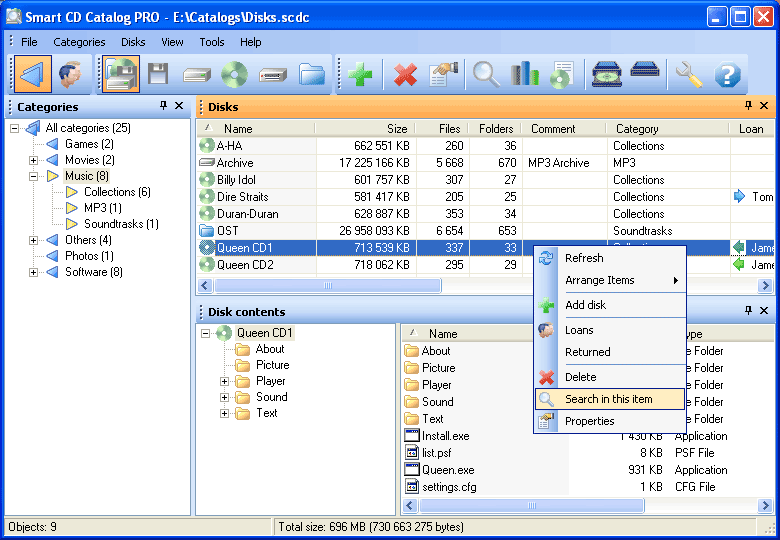 Click to enlarge screenshot
Software Description:
Smart CD Catalog Professional - A way to see the contents of your disks without inserting them into the drive.
Still having troubles organizing your disks? Smart CD Catalog will help you put them in order!
You probably have many CDs, DVDs, external hard drives with document libraries, MP3 music files, photo and video collections, software distribution packages, data backups and other disks?
- What if you need one of your disks, but you cannot remember where it is?
- What if you need an important file on a disk but you cannot remember on which disk it is stored?
- What if you just want to know what files are on your disks?
You might have to check all your disks, insert them into the drive one after another, waste a huge amount of time and wear yourself out and your computer too.
But, not if you use Smart CD Catalog. With Smart CD Catalog, you can quickly and easily find the necessary disk or file and view the contents of your disks without inserting them into the drive.
The program will be also useful for those people who have a lot of friends. You no longer have to remember who you have lent a movie or a music collection to.
Smart CD Catalog will help you organize your personal database with all your disks, saving time and effort and solving the problem of organizing your disks.
Main features:
- Creating disk categories and locations
- Maintaining the list of borrowers
- Storing the history of loans
- Viewing the list of disks separately for each type or all types together
- Adding disks of any type supported by your computer
- Autoscanning of inserted CDs
- CDDB support
- Adding folders to the catalog
- Adding a comment for any disk, folder or file
- Viewing detailed information about each disk, folder or file
- Displaying the size of any folder
- Sorting by any parameter
- Detailed statistics for disks, folders and files
- Powerful search tools
- Flexible reports
- Password-protected access
What's New: Now you can press the F2 key of the keyboard to save information of the disk property window. Fixed rare problem with incorrect file date on some computers which caused error during adding this date value to the catalog. Fixed incorrect layout of "Add a disk manually" dialog box (windows 7 / 8).
Limitations: 30 Days Trial
Still having troubles organizing your disks? Smart CD Catalog will help you put them in order!
You probably have many CDs, DVDs, external hard drives with document libraries, MP3 music files, photo and video collections, software distribution packages, data backups and other disks?
- What if you need one of your disks, but you cannot remember where it is?
- What if you need an important file on a disk but you cannot remember on which disk it is stored?
- What if you just want to know what files are on your disks?
You might have to check all your disks, insert them into the drive one after another, waste a huge amount of time and wear yourself out and your computer too.
But, not if you use Smart CD Catalog. With Smart CD Catalog, you can quickly and easily find the necessary disk or file and view the contents of your disks without inserting them into the drive.
The program will be also useful for those people who have a lot of friends. You no longer have to remember who you have lent a movie or a music collection to.
Smart CD Catalog will help you organize your personal database with all your disks, saving time and effort and solving the problem of organizing your disks.
Main features:
- Creating disk categories and locations
- Maintaining the list of borrowers
- Storing the history of loans
- Viewing the list of disks separately for each type or all types together
- Adding disks of any type supported by your computer
- Autoscanning of inserted CDs
- CDDB support
- Adding folders to the catalog
- Adding a comment for any disk, folder or file
- Viewing detailed information about each disk, folder or file
- Displaying the size of any folder
- Sorting by any parameter
- Detailed statistics for disks, folders and files
- Powerful search tools
- Flexible reports
- Password-protected access
What's New: Now you can press the F2 key of the keyboard to save information of the disk property window. Fixed rare problem with incorrect file date on some computers which caused error during adding this date value to the catalog. Fixed incorrect layout of "Add a disk manually" dialog box (windows 7 / 8).
Limitations: 30 Days Trial
Feature List:
- Intuitive graphic interface
- Adding any types of disks
- Adding separate folders
- Automatically scanning inserted CDs and DVDs
- Numbering disks
- Adding comments to disks, folders or files
- Filtering disks by categories and types of media
- Maintaining a list of borrowers and a history of loans
- Displaying detailed information about disks, folders or files
- Displaying the size of folders in the list of folders and files
- Sorting disks, folders and files by any property
- Detailed statistics about the contents of the catalog
- Flexible report generator
- Minimize the program into the system tray
- Wide search features
100% Clean:
 Smart CD Catalog Professional 3.07 is 100% clean
This download (smart-cd-catalog-pro.exe) was tested thoroughly and was found 100% clean. Click "Report Spyware" link on the top if you found this software contains any form of malware, including but not limited to: spyware, viruses, trojans and backdoors.
Related Software:
- Abaiko Disk Space Monitor 3 - A simple, but still useful, easy to use and configure disk space monitor.
- Smart CD Catalog Lite 2.15 - Smart CD Catalog Lite will help you create an ordered CD/DVD database.
- Rapid File Renamer 2.01 - Simple and fast file renamer for all your renaming needs!
- Smart CD Catalog Standard 1.10 - View the contents of your discs without inserting them into the drive!
- Advanced Disk Space Monitor 4.0 - Disk monitoring tool with email alerts and reports that can be run as a service.
- Folder Cache 2.6 - Access to the recently used & favorite folders from the Save and Open dialogs.
- O&O Defrag Professional Edition 16.0 - Faster system starts, accelerated programs, and professional settings
- Visual Comparer 1.40 - Visual file compare and merge of the text files with syntax hightlight
- Advanced CATaloguer Pro 2.6 - Professional software for cataloguing on all kinds of media
- EF Duplicate Files Manager 7.10 - Find out duplicate files with same name, same size, same content
top 10 most downloaded


recommended software
-
- AppleXsoft Photo Recovery for Mac
- AppleXsoft Photo Recovery is the comprehensive digital media data rescue software designed for Mac users, it featuring innovative photo recovery algor...

-
- Cacheman
- Memory is one of the most important pieces of computer hardware as it is in constant use no matter what a PC is used for. There is a tremendous number...
