Index >> System Utilities >> File & Disk Management >> SIGuardian
Report SpywareSIGuardian 1.7.335

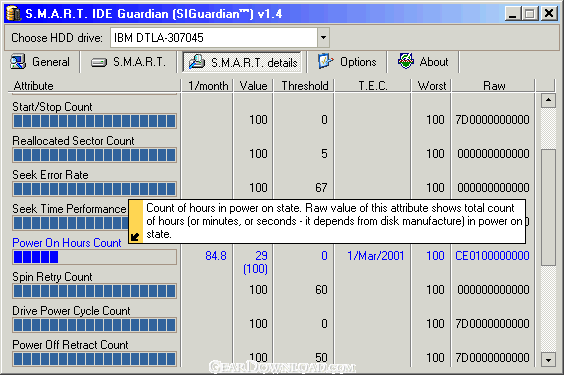 Click to enlarge screenshot
Software Description:
SIGuardian - Monitor for possible HDD failures BRFORE they happen with this S.M.A.R.T tool.
Learn about HDD failure BEFORE it happens and save your valuable data. SIGuardian uses S.M.A.R.T technology built in every modern hard-drive to accurately predict the date when using a particular hard-drive is no longer safe.
S.M.A.R.T. stands for Self-Monitoring, Analysis and Reporting Technology. Every time the hard-drive is started, it performs a self-checkup and records a certain value for each of its attributes (properties). The values range between 0 (non-functioning) to 250 (excellent condition). The average value for most attributes is 100. When the safety threshold is crossed (20 for most attributes), it means that a hard-drive is unstable and you should back up your data.
SIGuardian displays all HDD attribute values, whether they are safe and not, real-time. This tool is also capable of monitoring HDD temperature and alerting you over the network or via e-mail when overheating or failure possibility is diagnosed. You don’t have to monitor HDD condition – the program can do it itself.
The program works in two modes. The first one is attribute check upon startup. In this mode, the program compares previous attribute values to the new ones and, if the are unchanged, automatically closes itself. Likewise, if SIGuardian discovers that some attribute value is lower, you will be alerted.
In the second mode, this software application is continuously running and checks for the attribute values periodically according to the user specified intervals.
While the program is simple and straightforward enough to be used by any computer user at home or office, SIGuardian comes with special features that make it an ideal tool for monitoring multiple hard-drives. The program is very easy to deploy over networks of any size. In addition, SIGuardian is capable of supplying other HDD information, such as standards supported, speed modes, current working mode, to name a few.
Download your FREE trial version and never worry about HDD failures again.
What's New: + New localization engine! + New setup engine - now based on Windows Installer (msi) technology,so network deployment are more easy and can be made using many other tools! + Dicsount on purchase during first or second day after install added. + Changes in version numbering - now build number used as third number in version. * bug in UI – language combobox, mouse cursor changed to hand. Fixed. * web update – error not found information. Fixed.* Trial reminder – removed. * Beta versions expire date – removed. * Fixed bug in localization – East-European languages (for example Japan) doesn’t show correctly. Fixed. * bug in UI – checkbox in Internet autoupdate check don’t save it status. Fixed. * Internet check for update – now calling after show SIGuardian main window. * Internet check for update – now no any error boxes if newer version not found. * Personal settings for each HDD – don’t work. No any HDDs displayed in the left pane. Fixed. * Web update check – asks user before.
Limitations: 30 Days Trial
Learn about HDD failure BEFORE it happens and save your valuable data. SIGuardian uses S.M.A.R.T technology built in every modern hard-drive to accurately predict the date when using a particular hard-drive is no longer safe.
S.M.A.R.T. stands for Self-Monitoring, Analysis and Reporting Technology. Every time the hard-drive is started, it performs a self-checkup and records a certain value for each of its attributes (properties). The values range between 0 (non-functioning) to 250 (excellent condition). The average value for most attributes is 100. When the safety threshold is crossed (20 for most attributes), it means that a hard-drive is unstable and you should back up your data.
SIGuardian displays all HDD attribute values, whether they are safe and not, real-time. This tool is also capable of monitoring HDD temperature and alerting you over the network or via e-mail when overheating or failure possibility is diagnosed. You don’t have to monitor HDD condition – the program can do it itself.
The program works in two modes. The first one is attribute check upon startup. In this mode, the program compares previous attribute values to the new ones and, if the are unchanged, automatically closes itself. Likewise, if SIGuardian discovers that some attribute value is lower, you will be alerted.
In the second mode, this software application is continuously running and checks for the attribute values periodically according to the user specified intervals.
While the program is simple and straightforward enough to be used by any computer user at home or office, SIGuardian comes with special features that make it an ideal tool for monitoring multiple hard-drives. The program is very easy to deploy over networks of any size. In addition, SIGuardian is capable of supplying other HDD information, such as standards supported, speed modes, current working mode, to name a few.
Download your FREE trial version and never worry about HDD failures again.
What's New: + New localization engine! + New setup engine - now based on Windows Installer (msi) technology,so network deployment are more easy and can be made using many other tools! + Dicsount on purchase during first or second day after install added. + Changes in version numbering - now build number used as third number in version. * bug in UI – language combobox, mouse cursor changed to hand. Fixed. * web update – error not found information. Fixed.* Trial reminder – removed. * Beta versions expire date – removed. * Fixed bug in localization – East-European languages (for example Japan) doesn’t show correctly. Fixed. * bug in UI – checkbox in Internet autoupdate check don’t save it status. Fixed. * Internet check for update – now calling after show SIGuardian main window. * Internet check for update – now no any error boxes if newer version not found. * Personal settings for each HDD – don’t work. No any HDDs displayed in the left pane. Fixed. * Web update check – asks user before.
Limitations: 30 Days Trial
Feature List:
- Can estimate hard disk life
- Suitable for beginners and advanced users
- Don't use computer's memory while you work
- Constantly hard disk health monitoring
- Shows values of S.M.A.R.T. attributes
- Individual control of S.M.A.R.T. attributes
- Full info about hard disk supported features
100% Clean:
 SIGuardian 1.7.335 is 100% clean
This download (siguard1.exe) was tested thoroughly and was found 100% clean. Click "Report Spyware" link on the top if you found this software contains any form of malware, including but not limited to: spyware, viruses, trojans and backdoors.
Related Software:
- Folder Cache 2.6 - Access to the recently used & favorite folders from the Save and Open dialogs.
- O&O Defrag Professional Edition 16.0 - Faster system starts, accelerated programs, and professional settings
- Visual Comparer 1.40 - Visual file compare and merge of the text files with syntax hightlight
- Advanced CATaloguer Pro 2.6 - Professional software for cataloguing on all kinds of media
- EF Duplicate Files Manager 7.10 - Find out duplicate files with same name, same size, same content
- EF Find 8.00 - EF Find is a powerful search program also inside archive files.
- Visual Multitool 4.4 - It is a file viewer, finder and editor with text tools.
- Advanced File Organizer 3.01 - Powerful cataloguer for all kinds of removable media, network drives, hard disk.
- Owl Commander 4.0 - Owl Commander is a complete solution for managing files for Windows Computer.
- MyBFL:The Body for LIFE Companion 6.4c - Complete body for life S/W for palm includes Meal Planner,Graphs,Photo Album.
top 10 most downloaded


recommended software
-
- AppleXsoft Photo Recovery for Mac
- AppleXsoft Photo Recovery is the comprehensive digital media data rescue software designed for Mac users, it featuring innovative photo recovery algor...

-
- Cacheman
- Memory is one of the most important pieces of computer hardware as it is in constant use no matter what a PC is used for. There is a tremendous number...
